












.thumb.png.6cba57c5e88519e419516e3ed1152e01.png)
By Troy
How to trick GM's SPS into giving files when the module is already updated to the latest calibration version.
It's beneficial to read up on this other tutorial to familiarise yourself with GM's calibration files concept if you're new.
I will demonstrate how to trick GM's online SPS into giving you the needed calibration files when the module is already updated to the latest calibration version, or has a different part number version for the car/VIN it was originally coded for.
Before you approach this method, you need to already have a set of calibration files for the editing process, maybe from a different car's Vin number, which is using the same specs module.
This method works best with GM's European marketed cars. With the marketed European cars, only one file needs to be edited to carry out the trick. More than likely, all the files in the calibration package will need to be edited with the American marketed cars( I could be wrong on this).
This trick can be useful for various reasons.
Examples are:
- Say you install a used IPC into your car and update that IPC to the latest calibration version, later you change your mind and you need to revert the IPC back to stock, you can use this trick to get the original files for your IPC if you don't already have them.
- Say you bought a used BCM module that came out of a Insignia/Buick Regal car and you want to install that used BCM module into a Mokka/Buick Encore, you can use this trick to get the needed calibration files from GM's online SPS service for the Mokka/Buick Encore car.
- You can use this trick to mix and match calibration files for experiments, activating features.
There could be many other reasons why you would need to get calibration files.
You can use this trick as a mind sparker for sparking ideas and possibilities to overcome some hurdles for gaining what you need to achieve your goals.
A good tip
Label and keep an archive of all the calibration files and other files when you come across them.
- They may come in handy down the line.
- Nothing last forever, GM may choose to alter their system and stop handing out files to their cache folder.🙂
Only use calibration files coded for that line of module.
Meaning: do not try to install files coded for an HMI module onto a BCM module.
In most cases, the method consists of two stages.
- Editing the calibration file.
- Correcting the checksum after editing the file.
I'll explain a bit about the checksum in simple terms for those who don't know what it is.
The checksum is a security method GM uses for a calibration file to identify if the file has been edited/hacked before the core system gives it access to run on its system's platform.
Imagine the binary codes in each calibration file are marbles.
Some of the marbles are very important, while some are not.
GM places all the marbles in the middle of a circle to form a circle with a nice round circular edge line, and they then take a photo snapshot of the circle and various measurements as a reference.
When we edit the calibration file/marbles, we end up altering that nice rounded circular line. Remember GM took a photo snapshot of the file, and they know the precise measurements for how the circle should look before they give that file access to operated in the system.
Correcting the checksum is basically rearranging some of the other unimportant marbles to form back that perfect circle, which then tricks the modules core system into believing the file was not edited/hacked.
Other mathematical calculations are going on, but the concept is basically the same.
I won't include a tutorial on how to correct the checksum, as I need to figure out a simple none confusing method to demonstrate the process.
However, you can do a google search on correcting first-4 byte Big-Endian checksums to understand the process.
With that said, let's get down to explaining the trick.
Other than the checksum part, the trick is pretty simple.
Input the modules VIN number into the website
 TIS
TIS
Copy the System Calibration part number.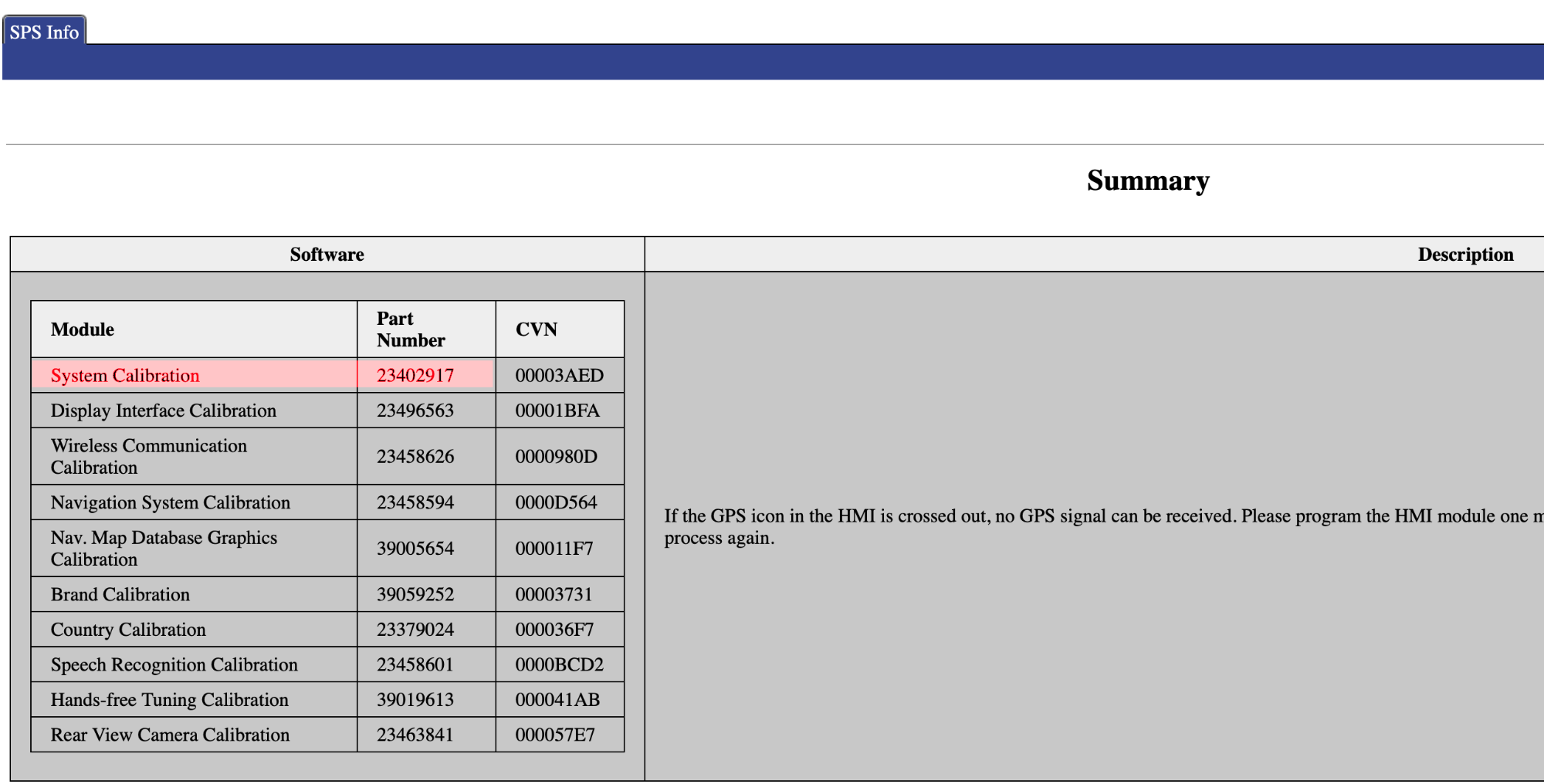
Use an online converter to convert the part number decimal value into hexadecimal value.
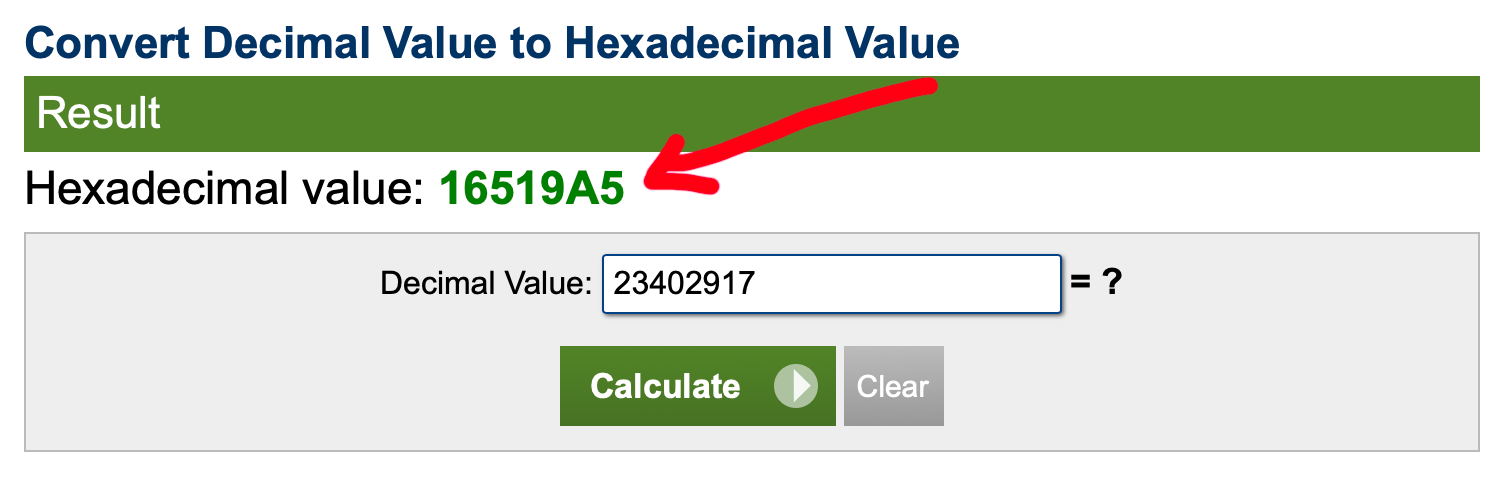
Open the System Calibration file in a hex editor.
Use the hex editor to search for the hexadecimal part number.

You now need to change the part number's last digit to one digit down.
Example: The System Calibration part number is 23402917. You need to change it to 23402916.
Convert 23402916 into hexadecimal and use it to replace the original part number that's in the calibration file.
You may or may not need to correct the checksum.
Save the file.
Program the calibration package to the module using DPS.
When you connect the module to GM online SPS service,
GM's SPS will now see your module as not having the latest calibrations and gives the needed files.
In some cases, you can get away by only changing the System Calibration part number with no need to correct the checksum.
So, do that and if it doesn't work, then correct the checksum.
Tutorial on correcting the checksum.
-
 3
3
-
 1
1
-
 1
1
-
 1
1























































.jpg.434408b0b61b4552ae25cde5c0b5a388.jpg)






.jpeg.503ad3cbf167f180662b9e06a35f1911.jpg.4256ffb79777f00833ddbf666186ef55.jpg)



-min.jpeg.e57f393a5b1034dc5ead0fdf0e5be0a7.jpg.8b0eac9dbd8dd2120749a61afa119519.jpg)




.jpeg.7788c0ed0981e43684ee21be2e0cfd0c.jpg.5fe699189bcf0d18517707ce4222e81a.jpg)


.thumb.jpg.0f819d95317e386a92453772edb75c6b.jpeg.61f2c44081948bc780313ab6fcfdc53b.jpeg)













.jpeg.c58f6a017dba02d1386e26ad62d32fe5.jpeg)




.jpg.9dd8d45a3fad0a651bb2bc39ddead936.jpg.7a19f233d3331becb9d93ee7cfc63379.jpg)




.jpg.3dfde5099751bef5f6e2d27f3d463275.jpg.edf3062b4fb37e14c71ab2caa86c1053.jpg)






















Recommended Comments
Join the conversation
You can post now and register later. If you have an account, sign in now to post with your account.