












.thumb.png.6cba57c5e88519e419516e3ed1152e01.png)
By Troy
CameraLoops Now Has Its Own UK Vehicle Registration Number to VIN Lookup Tool
In September 2023, I published an article outlining a clever little trick to generate the Vehicle Identification Number (VIN) for a UK Vehicle Registration Number (VRN) using a third-party website, for free. Unfortunately, the third-party website owner discovered the trick and resolved the issue. As a result, I have now implemented a UK VRN-to-VIN lookup tool directly on this website.
Knowing the VINs of different GM vehicles is essential for gathering calibration files for GM vehicles with varying specifications and activating module features. It's also useful for checking RPO codes and vehicle options through the GM Techline Connect Service when purchasing a used vehicle. You can find various VINs by using websites like ebay.co.uk and autotrader.co.uk to collect vehicle registration numbers, convert those VRNs into VINs, and then utilise those VINs with the GM Techline Connect SPS service to download calibration files or check RPO code specifications.
The UK VRN-to-VIN lookup tool is available for FREE to all CameraLoops +Contributor Members at no additional cost. You can access the UK VRN-to-VIN lookup tool link in the top header menu bar under the "Tools & Games" menu, as well as in the website's footer under "Quick Links."
.
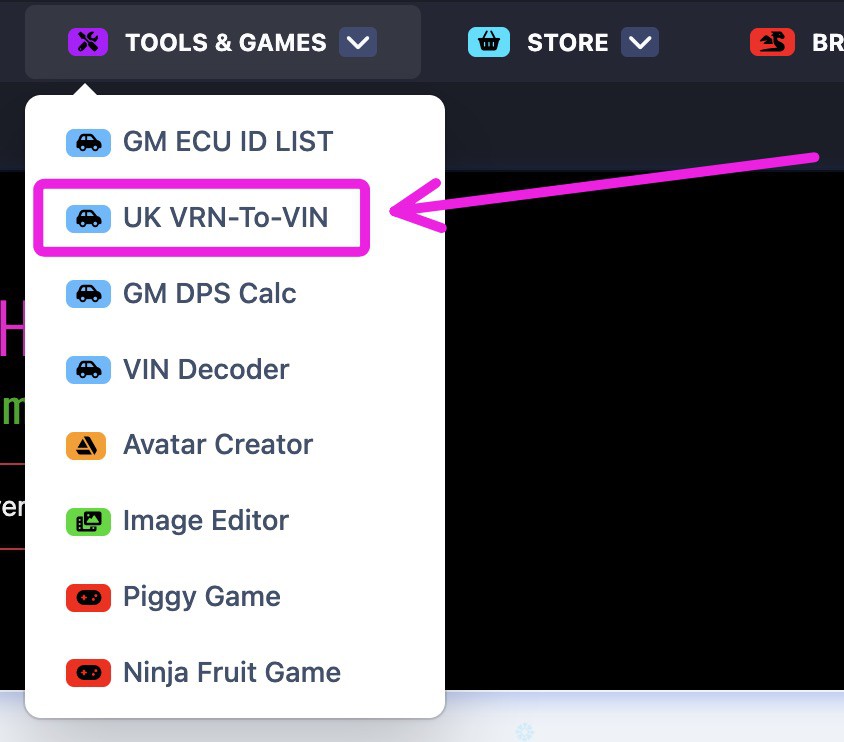

-
 2
2





















































.jpg.434408b0b61b4552ae25cde5c0b5a388.jpg)






.jpeg.503ad3cbf167f180662b9e06a35f1911.jpg.4256ffb79777f00833ddbf666186ef55.jpg)




-min.jpeg.e57f393a5b1034dc5ead0fdf0e5be0a7.jpg.8b0eac9dbd8dd2120749a61afa119519.jpg)




.jpeg.7788c0ed0981e43684ee21be2e0cfd0c.jpg.5fe699189bcf0d18517707ce4222e81a.jpg)


.thumb.jpg.0f819d95317e386a92453772edb75c6b.jpeg.61f2c44081948bc780313ab6fcfdc53b.jpeg)













.jpeg.c58f6a017dba02d1386e26ad62d32fe5.jpeg)




.jpg.9dd8d45a3fad0a651bb2bc39ddead936.jpg.7a19f233d3331becb9d93ee7cfc63379.jpg)




.jpg.3dfde5099751bef5f6e2d27f3d463275.jpg.edf3062b4fb37e14c71ab2caa86c1053.jpg)






















Recommended Comments
Join the conversation
You can post now and register later. If you have an account, sign in now to post with your account.