Skip to content
View in the app

A better way to browse. Learn more.

www.CameraLoops.ru

A full-screen app on your home screen with push notifications, badges and more.

To install this app on iOS and iPadOS
  1. Tap the Share icon in Safari
  2. Scroll the menu and tap Add to Home Screen.
  3. Tap Add in the top-right corner.
To install this app on Android
  1. Tap the 3-dot menu (⋮) in the top-right corner of the browser.
  2. Tap Add to Home screen or Install app.
  3. Confirm by tapping Install.

GM HMI 2.5 Activate Video In Motion, SAT-NAV In Motion, Track-Pad, Rear Camera And Climate Control using GM DPS

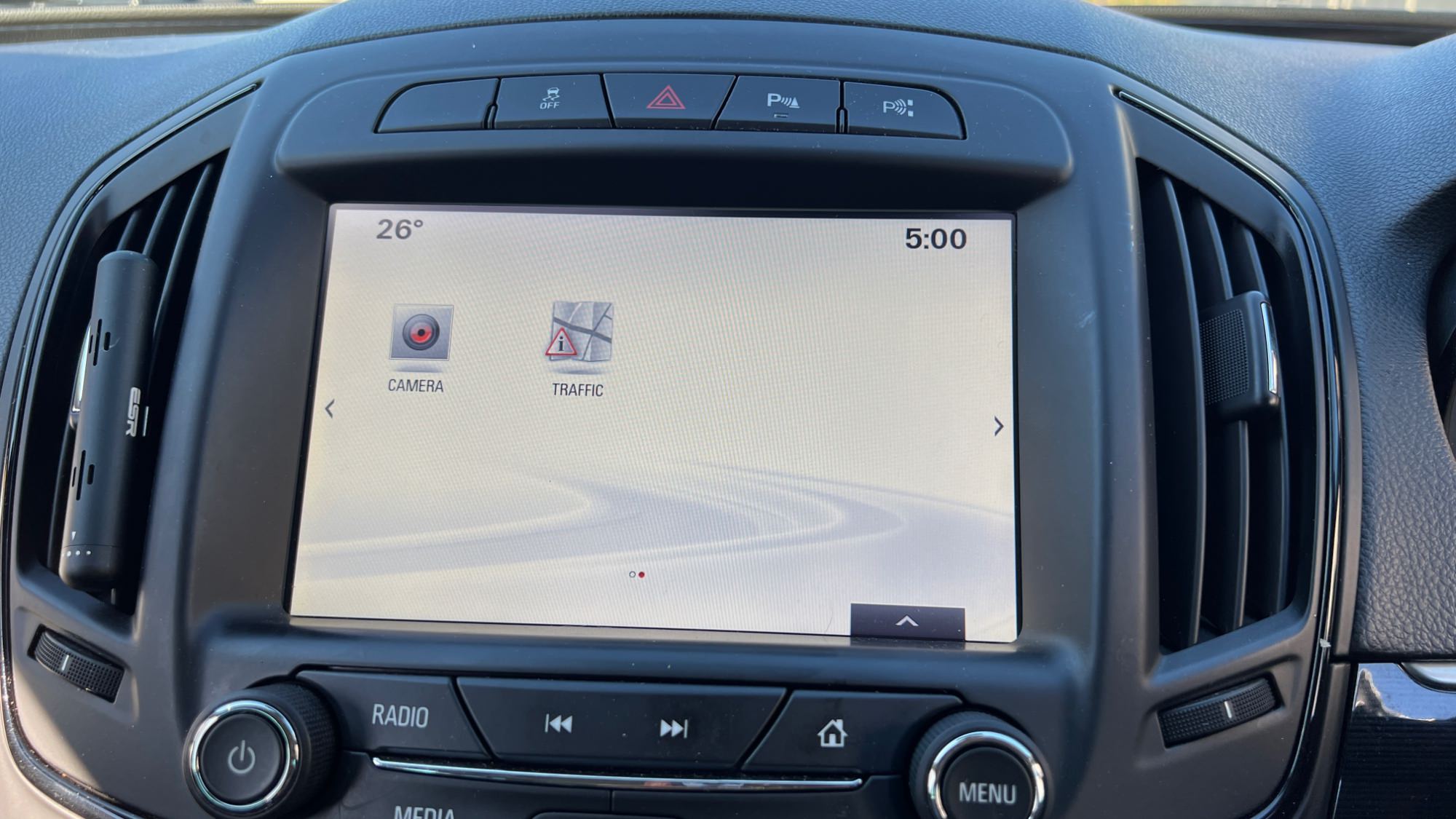
You can use this HMI 2.5 DPS calibration archive file to activate video in motion, SAT-NAV in motion, Track-Pad, rear camera, rear camera always on and climate control. 


Option features 

 Video in motion: Watch videos while the car is driving 

 SAT-NAV in motion: Type address in the SAT-NAV while the car is driving.

 Track-Pad: Track-pad activated.

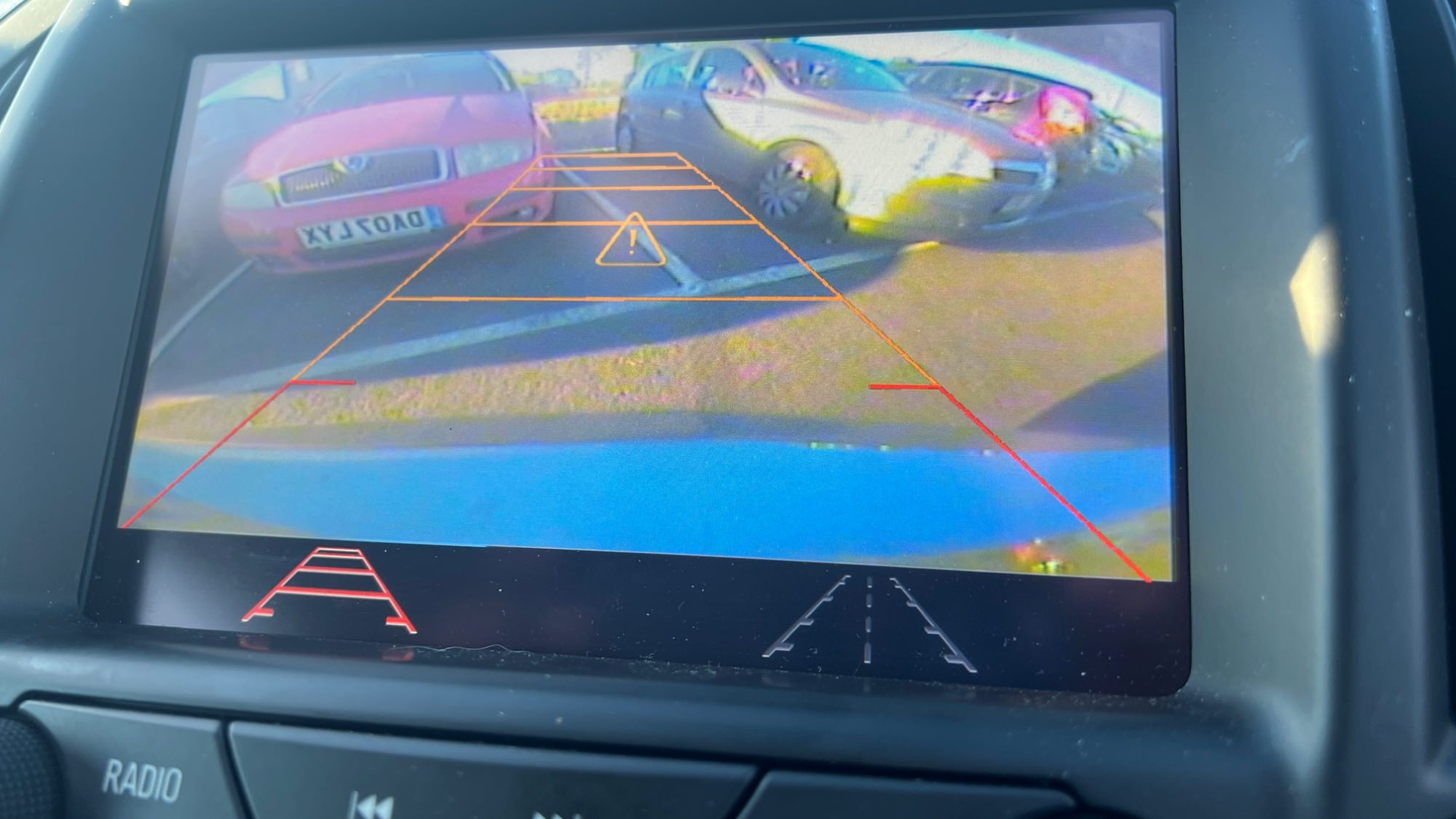
 Rear camera: Reverse camera with guidance lines and park assist symbols.

 Rear camera always on: Touchscreen icon to activate rear camera always on. (A special modification will need to be carried out for this option to work, which I need to figure out soon)

 Climate control: Control climate from the touch screen.

 Vauxhall and Opel screen boot up logo.

 Bonus file: This package also includes a DPS archive with the rear camera turned off.


For Vauxhall Brand


For Opel Brand


For Opel Brand Middle East Arabic


image.jpeg

image.jpeg

image.jpeg

image.jpeg

image.jpeg

image.jpeg

image.jpeg

image.jpeg


User Feedback

Recommended Comments

Opel_driver Apprentice

+Opel_driver

+Contributor
  • Contributor

I bought the file. VIM and trackpad in my 2014 Insignia now works with the upgraded HMI 2.5 using your file. 👏

Car-Hacker Rising Star

+Car-Hacker

+Purchaser

Impressive.

Arbe_gtc Rookie

+Arbe_gtc

+Contributor

GM Car Hacking Expert

  • Contributor

Hi!


Think possible to add this RPO Option? (C70) from Camaro?

https://www.youtube.com/watch?v=kjF8rbQqwbo

Need an Control module conected to the BCM (3 wires, X1 Pin 17, X6 pin 26 and X1 pin 23) and calibrations for the HMI to enable the menú.

24 colours of ambient light managed form the HMI...


Example VIN: 1G1FJ1R65J0126255

Arbe_gtc Rookie

+Arbe_gtc

+Contributor

GM Car Hacking Expert

  • Contributor
20 minutes ago, Arbe_gtc said:

Hi!


Think possible to add this RPO Option? (C70) from Camaro?

https://www.youtube.com/watch?v=kjF8rbQqwbo

Need an Control module conected to the BCM (3 wires, X1 Pin 17, X6 pin 26 and X1 pin 23) and calibrations for the HMI to enable the menú.

24 colours of ambient light managed form the HMI...


Example VIN: 1G1FJ1R65J0126255

The control module can be this: 23389979
2 vins more:

1G1FG1R76J0129642
1G1FH1R74J0162183

Troy Grand Master

Troy

Administrator

GM Car Hacking Expert

7 hours ago, Arbe_gtc said:

Hi!


Think possible to add this RPO Option? (C70) from Camaro?

https://www.youtube.com/watch?v=kjF8rbQqwbo

Need an Control module conected to the BCM (3 wires, X1 Pin 17, X6 pin 26 and X1 pin 23) and calibrations for the HMI to enable the menú.

24 colours of ambient light managed form the HMI...


Example VIN: 1G1FJ1R65J0126255


I don't think that car with the LED option is using the HMI 2.5 module. I don't see any LED options in the HMI 2.5 module.

WWEILER Explorer

+WWEILER

+Contributor
  • Contributor

Is there any way to get a cal flash to turn the hyper flash off on a Silverado truck?

Troy Grand Master

Troy

Administrator

GM Car Hacking Expert

5 minutes ago, WWEILER said:

Is there any way to get a cal flash to turn the hyper flash off on a Silverado truck?

What is the hyper flash? Can you post a photo for the hyper flash icon showing on the hmi 2.5 screen. 

Arbe_gtc Rookie

+Arbe_gtc

+Contributor

GM Car Hacking Expert

  • Contributor

Appears to be there are a aditional module between Display and HMI (84307902) Called Module Asm-Hmi Control Module Bypass. The HMI 2.5 of the corvette (and others), havn't navi integrated... Maybe this asm module enable the ambient light options in the screen.

Troy Grand Master

Troy

Administrator

GM Car Hacking Expert

28 minutes ago, Arbe_gtc said:

Appears to be there are a aditional module between Display and HMI (84307902) Called Module Asm-Hmi Control Module Bypass. The HMI 2.5 of the corvette (and others), havn't navi integrated... Maybe this asm module enable the ambient light options in the screen.


I wouldn’t now as we don’t have those cars in the UK. 

WWEILER Explorer

+WWEILER

+Contributor
  • Contributor
2 hours ago, Troy said:

What is the hyper flash? Can you post a photo for the hyper flash icon showing on the hmi 2.5 screen. 

Sorry This is not the right place for My question.  Hyper Flash is when the turn signals blink fast do to installing led taillights (has to do with bulb outage).  And GM has a calibration update to fix it. Which is in the BCM. 

Troy Grand Master

Troy

Administrator

GM Car Hacking Expert

Yep, lights are usually controlled by the BCM. 

WWEILER Explorer

+WWEILER

+Contributor
  • Contributor
1 hour ago, Troy said:

Yep, lights are usually controlled by the BCM. 

Is there a way to get that cal. flash & install it in my BCM or are they different for each vehicle?

Troy Grand Master

Troy

Administrator

GM Car Hacking Expert

I don’t have any knowledge about that option so I can’t help. Just speculating. You probably would need to find a vin that has that option, get the sps files for that vin then program the files to your BCM and see if it works. 

Smash Top Member

Smash

Member

Troy, what gives the choice of parking lines in the photo? are both options active? I heard it's for a trailer..

Troy Grand Master

Troy

Administrator

GM Car Hacking Expert

5 minutes ago, Smash said:

Troy, what gives the choice of parking lines in the photo? are both options active? I heard it's for a trailer..


Yes both options are there. 
Yes you can use the lines to hook up a tow trailer. 
 

14A9A771-9EE2-4682-BC25-5487E5AD483C.jpeg

pupu14 Community Regular

+pupu14

+Contributor

GM Car Hacking Expert

  • Contributor

Is there a way to improve backup cameras video quality (replace with some better cam)?
Reverse camera in my Insignia is pretty low-res and too blurry.. Also, at night it is pretty useless, because it gets overexposed from glare from lights being reflected from various chrome parts around the boot..

I see yours is the same as mine, Troy..

Troy Grand Master

Troy

Administrator

GM Car Hacking Expert

1 hour ago, pupu14 said:

Is there a way to improve backup cameras video quality (replace with some better cam)?
Reverse camera in my Insignia is pretty low-res and too blurry.. Also, at night it is pretty useless, because it gets overexposed from glare from lights being reflected from various chrome parts around the boot..

I see yours is the same as mine, Troy..


Yes better camera is out there, I see those who retro fit RVC to the Insignia are using better quality camera. The issue is to find the source to purchase one of those RVC.

Loading60 Apprentice

Troll-Loading60

Troll-Troll

I want active the rear camera for IOR receiver 

My vin: KL1ZA5CS2KB114773


image.jpg

image.jpg

image.jpg

Troy Grand Master

Troy

Administrator

GM Car Hacking Expert

3 hours ago, Loading60 said:

I want active the rear camera for IOR receiver 

My vin: KL1ZA5CS2KB114773


image.jpg

image.jpg

image.jpg


Does the car uses HMI 2.5?

If so, I can add rear camera if you send me the HMI 2.5 calibration files in PM.

Loading60 Apprentice

Troll-Loading60

Troll-Troll
2 hours ago, Troy said:


Does the car uses HMI 2.5?

If so, I can add rear camera if you send me the HMI 2.5 calibration files in PM.

I don’t know 🤷‍♂️

pupu14 Community Regular

+pupu14

+Contributor

GM Car Hacking Expert

  • Contributor

No, this is HMI 3.0

Loading60 Apprentice

Troll-Loading60

Troll-Troll
3 hours ago, Troy said:


Does the car uses HMI 2.5?

If so, I can add rear camera if you send me the HMI 2.5 calibration files in PM.


‪GMPROG - Tools - Google Chrome‬ 9_22_2022 8_23_17 AM.png

Troy Grand Master

Troy

Administrator

GM Car Hacking Expert

3 hours ago, Loading60 said:


‪GMPROG - Tools - Google Chrome‬ 9_22_2022 8_23_17 AM.png

I don’t have a solution for hmi 3. 

Troy Grand Master

Troy

Administrator

GM Car Hacking Expert

Does anyone has a working hmi 3 on a bench setup?


Loading60 Apprentice

Troll-Loading60

Troll-Troll
31 minutes ago, Troy said:

Does anyone has a working hmi 3 on a bench setup?


Can I access the Liunx by obd, and active the rvc?

Join the conversation

You can post now and register later. If you have an account, sign in now to post with your account.

Guest
Add a comment...

All Articles

Popular Members

  1. hassan77h
    +hassan77h
    27
  2. Troy
    Troy
    22
  3. uglyoldbastard
    +uglyoldbastard
    13
  4. regloops
    +regloops
    8
  5. GM-Enthusiast
    +GM-Enthusiast
    7

New Members

  1. David Fontenot
    David Fontenot
      Member
    Joined
  2. SSAUTOZ
    SSAUTOZ
      Member
    Joined
  3. valdemarford
    valdemarford
      Member
    Joined
  4. Course faycal khalil
    Troll-Course faycal khalil
      Troll-Troll
    Joined
  5. Troll stevie nick
    Troll-Troll stevie nick
      Troll-Troll
    Joined
  6. Troll Parkerchevy
    Troll-Troll Parkerchevy
      Troll-Troll
    Joined
  7. Hayk Vardanyan
    Hayk Vardanyan
      Member
    Joined
  8. tunedbycasco
    tunedbycasco
      Member
    Joined
  9. freehugs
    freehugs
      Member
    Joined
  10. ceberon
    ceberon
      Member
    Joined

CameraLoops™
Powered by Art
All Trademarks appearing on this website are the property of their respective owners.

Account

Navigation

Configure browser push notifications

Chrome (Android)
  1. Tap the lock icon next to the address bar.
  2. Tap Permissions → Notifications.
  3. Adjust your preference.
Chrome (Desktop)
  1. Click the padlock icon in the address bar.
  2. Select Site settings.
  3. Find Notifications and adjust your preference.