









Skip to content
View in the app

A better way to browse. Learn more.

www.CameraLoops.ru

A full-screen app on your home screen with push notifications, badges and more.

To install this app on iOS and iPadOS
  1. Tap the Share icon in Safari
  2. Scroll the menu and tap Add to Home Screen.
  3. Tap Add in the top-right corner.
To install this app on Android
  1. Tap the 3-dot menu (⋮) in the top-right corner of the browser.
  2. Tap Add to Home screen or Install app.
  3. Confirm by tapping Install.

How to get cheap GM GDS2 for eternity.

GM has fixed the vulnerability. This file no longer works with the new GM GDS2.

More info here.

Global Diagnostic System 2 aka GDS2
GDS2 is GM's motor vehicle diagnostic software used by auto mechanics to perform diagnostics, including reading fault codes, resetting the vehicle's electronic module and various other configurations.
In order to have access to GDS2,  you have to pay a subscription fee to GM.
In this tutorial, I demonstrate how to pay once and have GDS2 access for eternity.
GDS2 uses two security measures. 

1. A hardware ID file name "swkV3"

2. A system licence file.

This tutorial circumvents the system licence file. That's why one needs to purchase a GM subscription in order to obtain the hardware ID file.


Step 1
Purchase a GDS2 subscription for the shortest/cheapest length.

Screenshot 2021-09-29 at 7.54.48 pm.jpg


For USA cars, use ACDelco
For European use ServiceBox


Step 2
Install and run GDS2 on all the PCs on which you intend to use the GDS diagnostic software.


Step 3

Windows OS automatically hides the "programData" folder. To unhide hidden folders, use the Windows Explorer settings. 
Navigate to C:\ProgramData\GM\TIS2WebProxy\.dls\.lreg 
From that folder, delete the licence file that's there and replace it with the attached infiniteLease.dat file.

The infiniteLease.dat file also works with the new Techline GDS2.


Step 4 
Restart the GDS2 application. The Days remaining until the lease expires should change to infinite.
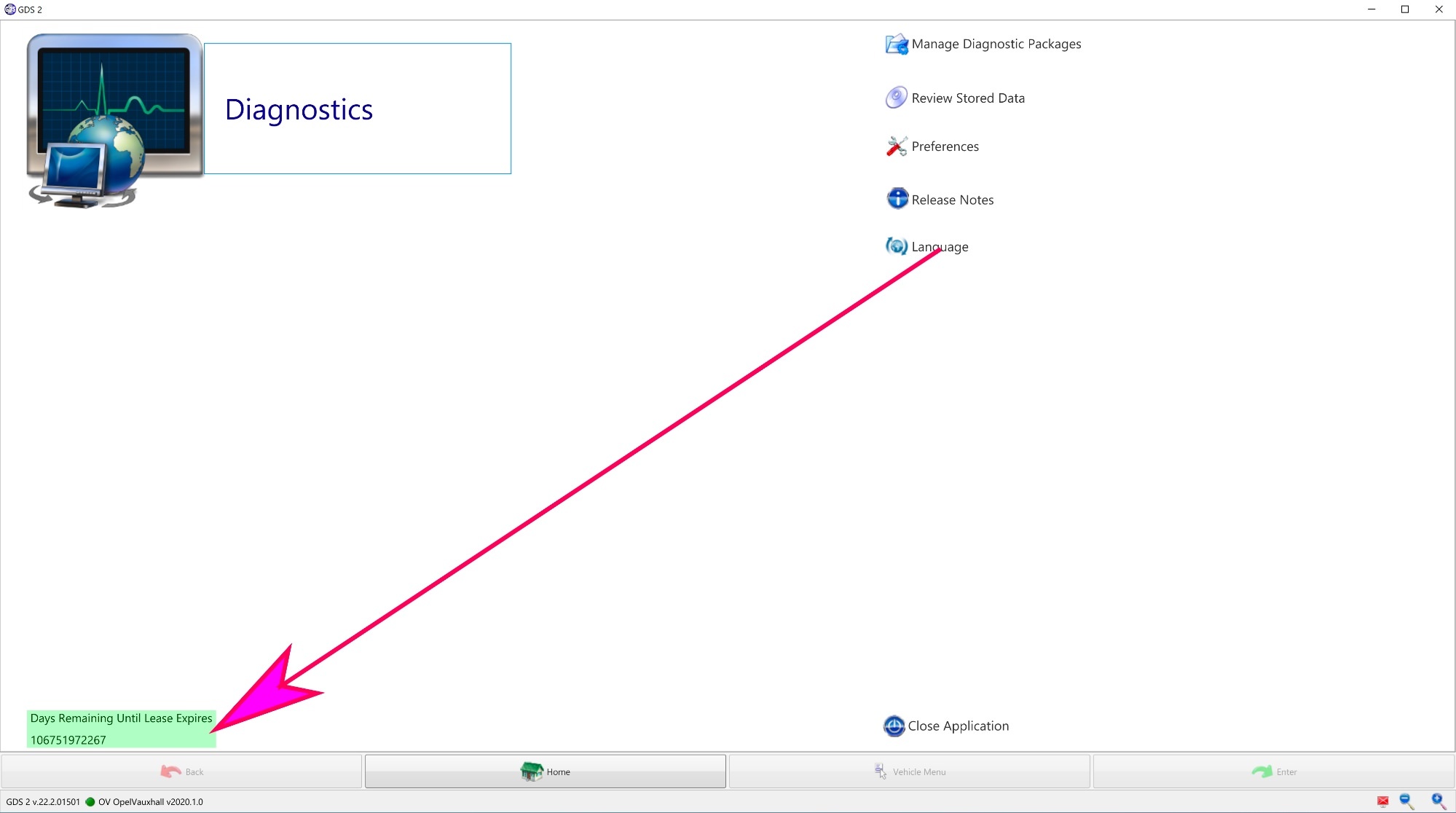
Screenshot 2021-09-29 at 6.24.29 pmt.jpg


For Techline, connect GDS2 standalone mode.

Windows OS automatically hides the "programData" folder. To unhide hidden folders, use the Windows Explorer settings. 

  1. Go to C:\ProgramData\GM\TLC\TIS2WebProxy\.dls\.lreg

  2. Delete the file that's already in the ".lreg" folder.

  3. Place the infiniteLease.dat file you downloaded into the ".lreg" folder.

  4. Close and reopen the Techline Connect application. The days remaining until the lease expires should change to infinite.
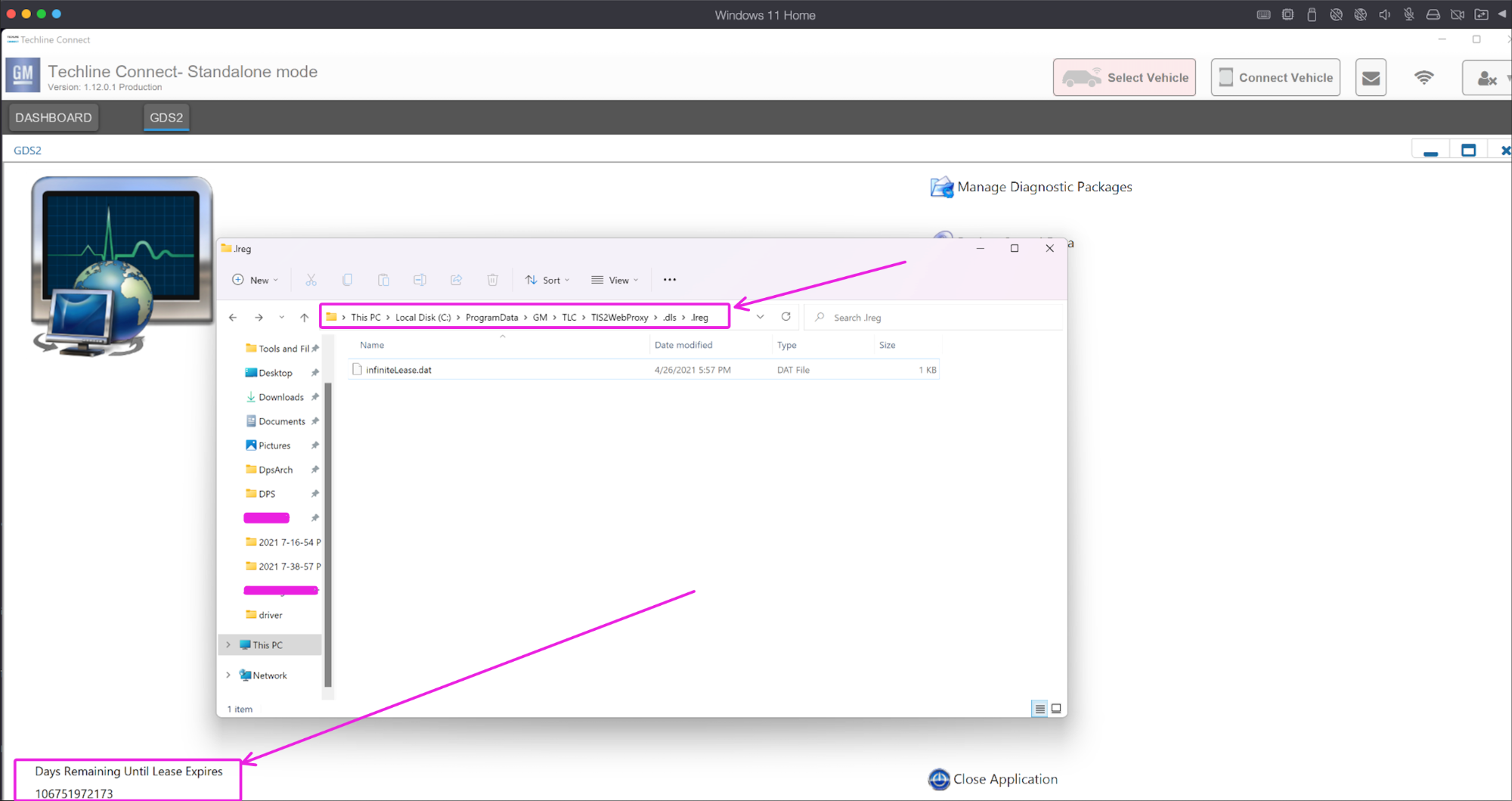
image.png


GDS2 Infinite lease file 


Troy
Message added by Troy,

GM has fixed the vulnerability. This file no longer works with the new GM GDS2.

More info here.


User Feedback

Recommended Comments

04colyZQ8 Enthusiast

04colyZQ8

Member

You can also search around for a VM version of techline and use GDs2 offline, and use the same patched lease to extend the trial period to millions of days!! Like I did, for 100% free. However it needs to be a 64x machine, that can support virtual mode 64x. If only we could find offline sps programming. 

04colyZQ8 Enthusiast

04colyZQ8

Member

1706877233_Windows7x64-VMwareWorkstation16Player(Non-commercialuseonly)2021-09-293_19_59PM.thumb.png.774974a7ba9ad480f63c13e211b26473.png

med458 Enthusiast

+med458

+Contributor
  • Contributor

You never fail to amaze Troy

garageshopdude Rising Star

garageshopdude

Member

Will the lease patch get overwritten if you login to techline connect (not standalone mode)? Just confirming how the process works.

Troy Grand Master

Troy

Administrator

GM Car Hacking Expert

3 hours ago, garageshopdude said:

Will the lease patch get overwritten if you login to techline connect (not standalone mode)? Just confirming how the process works.


Yes Techline overwrites some files. Just keep a copy of the lease file in a folder on your PC and when Techline overwrites it, copy and past the lease file back to the location.


Techline uses the same lease file, but Techline store the lease file in a different location.

check these Techline location as I don't fully remember the Techline lease file location.

" C:\ProgramData\GM\TLC\TIS2WebProxy\.dls\.lreg"

"C:\ProgramData\GM\TLC\TIS2WebProxy\.dls\.TUM\.lreg"


Petey Pablo Apprentice

+Petey Pablo

+Contributor
  • Contributor
On 10/2/2021 at 3:10 AM, Troy said:


Yes Techline overwrites some files. Just keep a copy of the lease file in a folder on your PC and when Techline overwrites it, copy and past the lease file back to the location.


Techline uses the same lease file, but Techline store the lease file in a different location.

check these Techline location as I don't fully remember the Techline lease file location.

" C:\ProgramData\GM\TLC\TIS2WebProxy\.dls\.lreg"

"C:\ProgramData\GM\TLC\TIS2WebProxy\.dls\.TUM\.lreg"


Tried figuring this out today but mine looks different.  Not sure what file I'm supposed to replace with the infinitelease.dat file as there is no *.dat file in any of the folders suggested.


Any ideas?

GDS2 license thing for Troy.png

Automotive Programming Rising Star

+Automotive Programming

+Contributor
  • Contributor

Need help what file do I delete thanks

Screenshot 2021-11-01 085449.png

Troy Grand Master

Troy

Administrator

GM Car Hacking Expert

The lease file works with the new techline gds2. 

I’ll look into it soon and update the tutorial with info on how to apply the trick to the new Techline GDS2. 
 

pies Rising Star

+pies

+Contributor
  • Contributor

another problem, after installing infinitelease i opened gds2 and it showed the large number of days until expired, this is with tech line standalone mode. i then when on line to my ac delco account and logged in to check if sps still worked and it does, however when i went back to gds2 standalone mode the lease was back to 179 days and all the dignostic packages were erased. i can no longer do any diagnostics in stand alone mode

nostra Top Member

+nostra

+Purchaser

Hello Troy at the first time i use techline connect after many update from Ac Delco  i receive an error message and even i pay for a vin i can use the program .The program accept my mdi but give me that error after i write the vin .Do you have an idea? thank you

Troy Grand Master

Troy

Administrator

GM Car Hacking Expert

9 minutes ago, nostra said:

Hello Troy at the first time i use techline connect after many update from Ac Delco  i receive an error message and even i pay for a vin i can use the program .The program accept my vci but give me that error after i write the vin .Do you have an idea? thank you

I receive that error before.

To fix mine, I uninstall TLC and all general motors application from my pc control panel. Delete the GM folders, then re-install TLC. It worked fine after doing that.

nostra Top Member

+nostra

+Purchaser

thank you i will try that. 🙂

nostra Top Member

+nostra

+Purchaser

If we want to use the gsd2 only do we have to pass by the techline or it will start indepedently?

rusty2009 Enthusiast

+rusty2009

+Contributor
  • Contributor
On 10/20/2021 at 8:45 PM, Petey Pablo said:

Tried figuring this out today but mine looks different.  Not sure what file I'm supposed to replace with the infinitelease.dat file as there is no *.dat file in any of the folders suggested.


Any ideas?

GDS2 license thing for Troy.png

Did you get it working I have the same as you do?

duraid M .Saleh Rising Star

duraid M .Saleh

Member

hi dear 

I need file for radio gmc 2015 

I need change used radio plaz

Troy Grand Master

Troy

Administrator

GM Car Hacking Expert

4 hours ago, duraid M .Saleh said:

hi dear 

I need file for radio gmc 2015 

I need change used radio plaz


For used satellite radio and HMI 2.5 module, it will remove the theft lock.


autorepair Top Member

+autorepair

+Contributor
  • Contributor

Hi troy could you assist me in getting unlimited lease file location i cant find no file to replace it with thanks

Troy Grand Master

Troy

Administrator

GM Car Hacking Expert

18 minutes ago, autorepair said:

Hi troy could you assist me in getting unlimited lease file location i cant find no file to replace it with thanks


Hi, if you’re using techline connect, the location is C:\ProgramData\GM\TLC\TIS2WebProxy\.dls\.lreg


Troy Grand Master

Troy

Administrator

GM Car Hacking Expert

The programData folder is automatically hidden in windows. Use windows explorer settings to unhide hidden folders. 

autorepair Top Member

+autorepair

+Contributor
  • Contributor

Thanks got it 

kdautomotive Rising Star

+kdautomotive

+Contributor
  • Contributor

i placed file in C:\ProgramData\GM\TLC\TIS2WebProxy\.dls\.lreg and delete the old file and i now get lease has expired message. 

Does this no longer work or am i doing something wrong?

Lister Llanes Enthusiast

+Lister Llanes

+Contributor
  • Contributor
On 9/8/2023 at 10:12 AM, kdautomotive said:

i placed file in C:\ProgramData\GM\TLC\TIS2WebProxy\.dls\.lreg and delete the old file and i now get lease has expired message. 

Does this no longer work or am i doing something wrong?

Hey bro, did you figure this out?

redtech Rising Star

+redtech

+Contributor
  • Contributor

Got it to work.  Tried a few times.  Make sure you change settings for windows to show hidden files.  Be careful to navigate to the correct spot there will be a license file already in there.  Delete it and replace with Troys.  I navigated past the screen that said I didn't have a valid lease, put a vin in and it worked.  Went back out and it shows the gazillion days till expiration. 

BullMech Enthusiast

+BullMech

+Contributor
  • Contributor

does this contain only the US models or can be added also other diagnostic package e.g. for EU cars?

pupu14 Community Regular

+pupu14

+Contributor

GM Car Hacking Expert

  • Contributor
11 hours ago, BraynV said:

does this contain only the US models or can be added also other diagnostic package e.g. for EU cars?

Works for both Global GDS2 (v22.x) and Opel GDS2 (v100.x) versions.
Diagnostic packages are not license dependent - you can install and use whatever you want (some newer Deliverables do require some certain version of GDS2, though)

Join the conversation

You can post now and register later. If you have an account, sign in now to post with your account.

Guest
Add a comment...

All Articles

Popular Members

  1. hassan77h
    +hassan77h
    27
  2. Troy
    Troy
    22
  3. uglyoldbastard
    +uglyoldbastard
    13
  4. regloops
    +regloops
    8
  5. GM-Enthusiast
    +GM-Enthusiast
    7

New Members

  1. David Fontenot
    David Fontenot
      Member
    Joined
  2. SSAUTOZ
    SSAUTOZ
      Member
    Joined
  3. valdemarford
    valdemarford
      Member
    Joined
  4. Course faycal khalil
    Troll-Course faycal khalil
      Troll-Troll
    Joined
  5. Troll stevie nick
    Troll-Troll stevie nick
      Troll-Troll
    Joined
  6. Troll Parkerchevy
    Troll-Troll Parkerchevy
      Troll-Troll
    Joined
  7. Hayk Vardanyan
    Hayk Vardanyan
      Member
    Joined
  8. tunedbycasco
    tunedbycasco
      Member
    Joined
  9. freehugs
    freehugs
      Member
    Joined
  10. ceberon
    ceberon
      Member
    Joined

CameraLoops™
Powered by Art
All Trademarks appearing on this website are the property of their respective owners.

Account

Navigation

Configure browser push notifications

Chrome (Android)
  1. Tap the lock icon next to the address bar.
  2. Tap Permissions → Notifications.
  3. Adjust your preference.
Chrome (Desktop)
  1. Click the padlock icon in the address bar.
  2. Select Site settings.
  3. Find Notifications and adjust your preference.

















































































