Skip to content
View in the app

A better way to browse. Learn more.

www.CameraLoops.ru

A full-screen app on your home screen with push notifications, badges and more.

To install this app on iOS and iPadOS
  1. Tap the Share icon in Safari
  2. Scroll the menu and tap Add to Home Screen.
  3. Tap Add in the top-right corner.
To install this app on Android
  1. Tap the 3-dot menu (⋮) in the top-right corner of the browser.
  2. Tap Add to Home screen or Install app.
  3. Confirm by tapping Install.

How to correct checksum after editing GM's calibration files

Update 2/October/2025

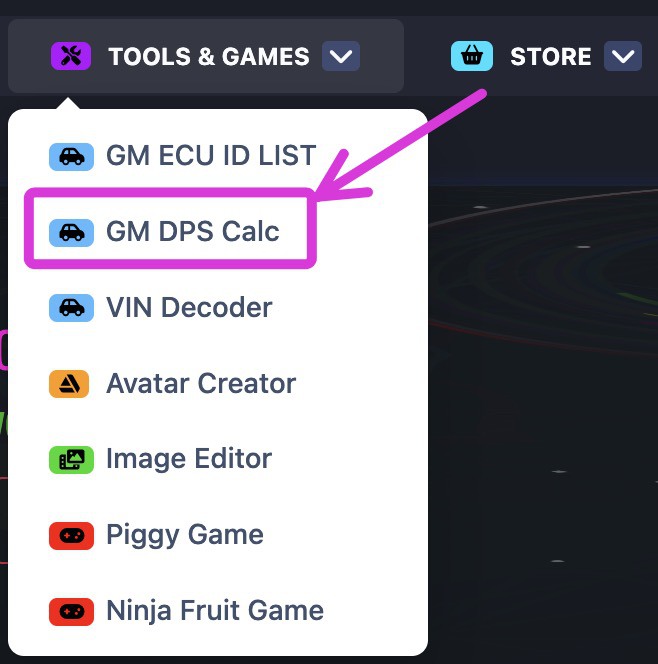
You no longer need to manually correct the checksum of the GM calibration files. You can automatically correct the checksum of modified GM calibration files online using this checksum tool, which was created by a CameraLoops member.

The online checksum tool can be accessed from the website's top menu, under the "Tools & Games" button, or via the following web link. GM Online Checksum Calculator

Massive thanks to ECU-Online.com
Screenshot 2025-10-02 at 7.33.39 am.jpg

In this tutorial, I will explain in steps how to correct the checksum after editing a GM module calibration file.

This process illustrates correcting the checksum for the first four bytes.


It's beneficial to read up on these other tutorials to familiarise yourself with GM's calibration files concept if you're new. 


Tools you will need.

 Hex Editor Neo


Step 1.

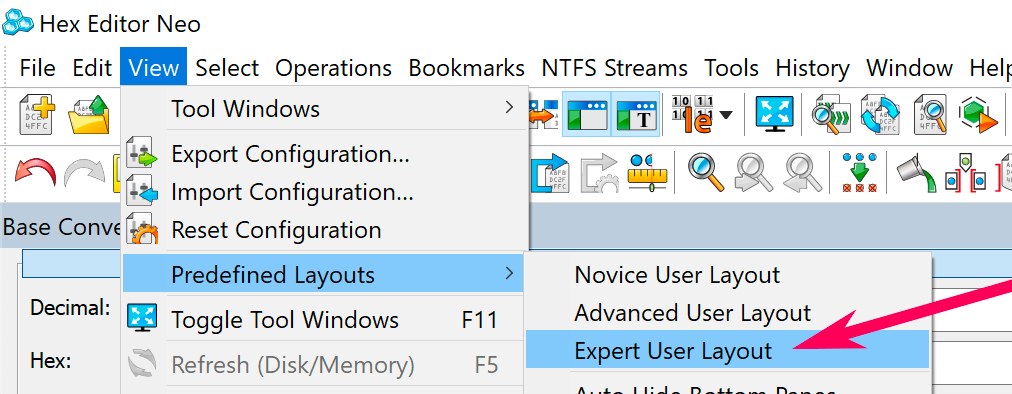
Open the calibration file in Neo and edit your file.

Set Predefined Layouts as Expert User Layout.
Screenshot 2021-08-01 at 11.43.56 am copy.png


Step 2.

Select all the codes in the calibration file except the first four bytes/code.

How to correct checksum after editing GM's calibration files


Step 3.

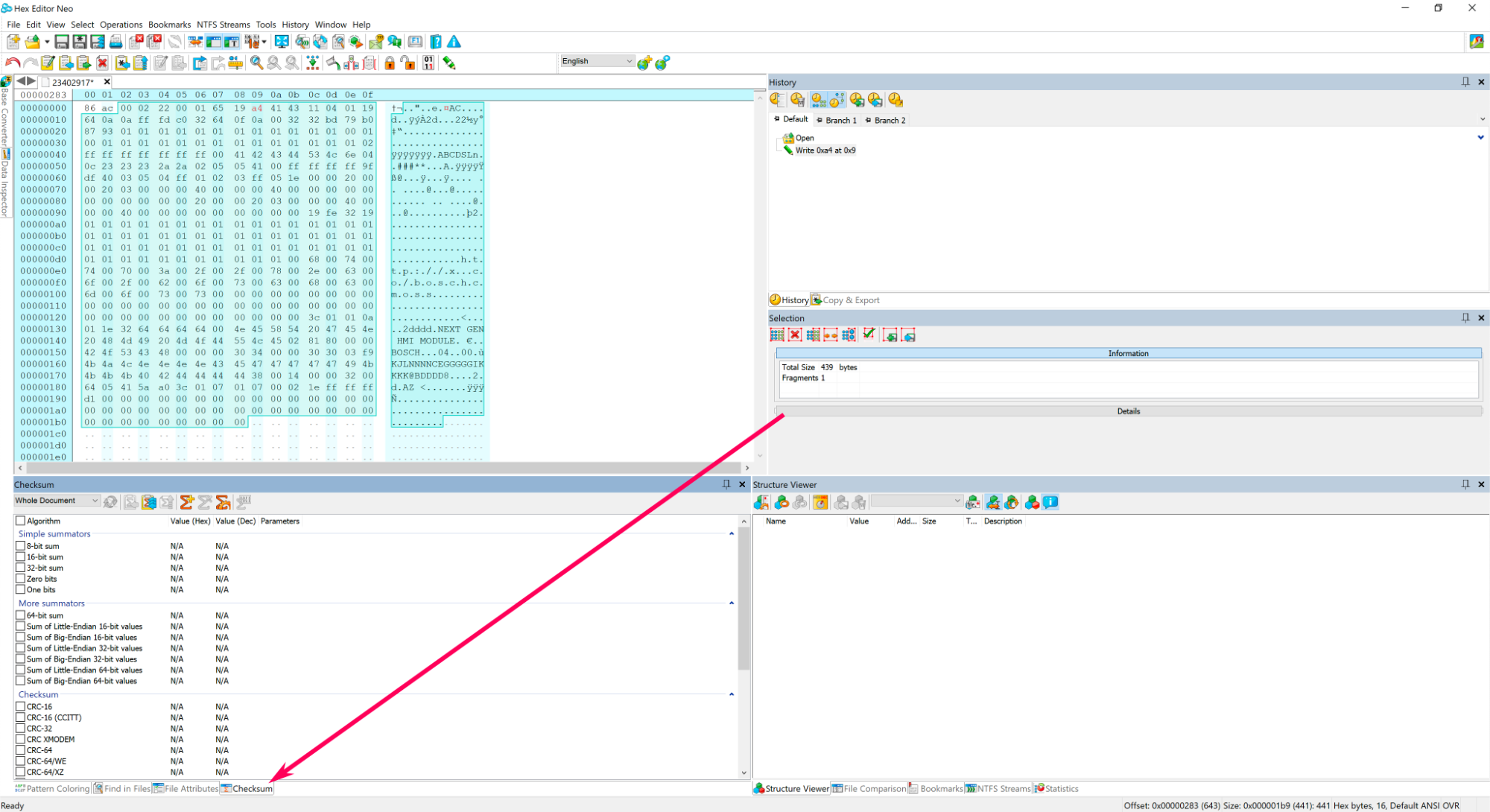
At the bottom of Neo click Checksum.
Screenshot 2021-08-01 at 3.33.41 pm copy.png


Step 4.

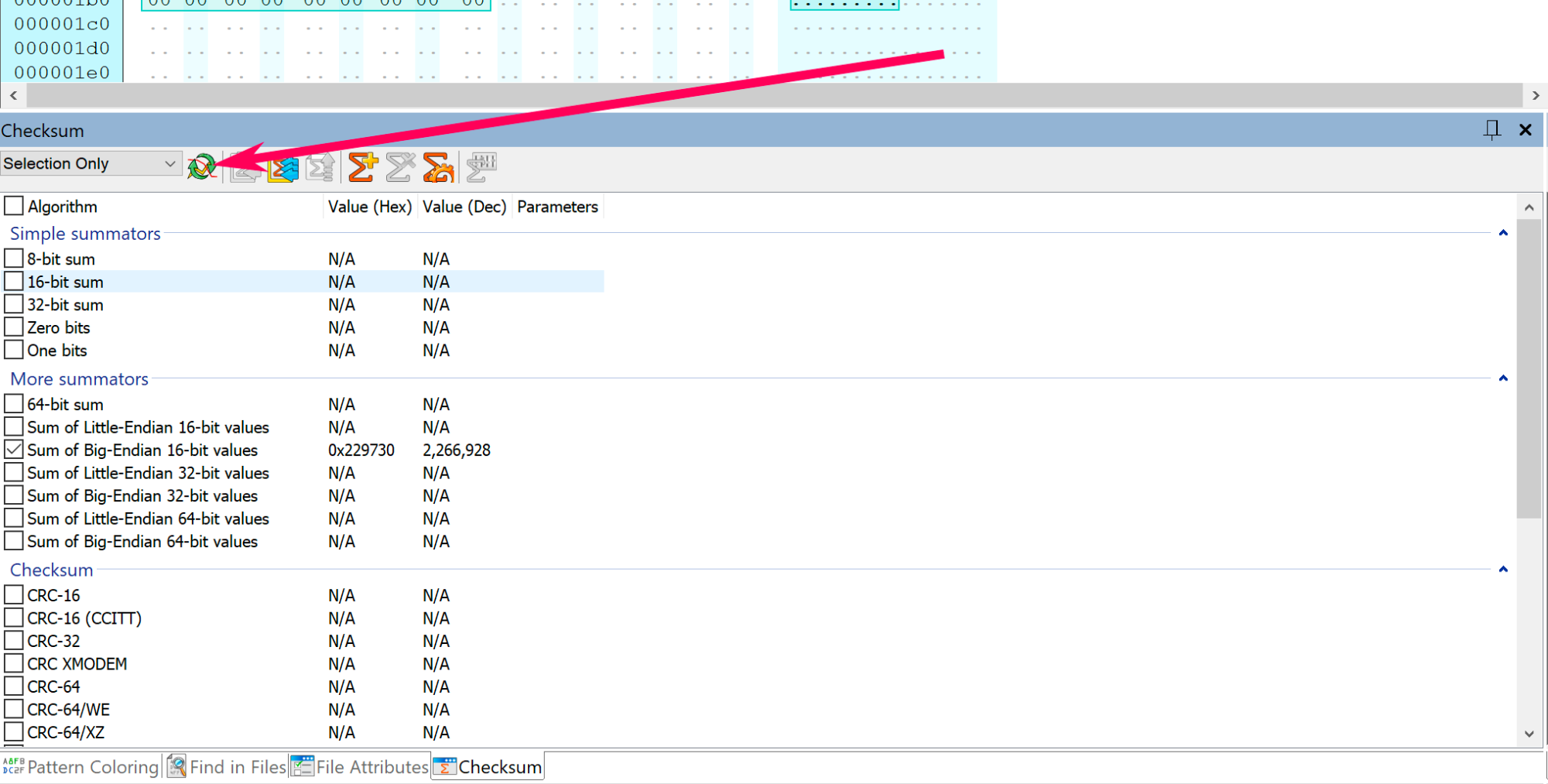
In Neo's checksum window, change the option: Whole document to Selection only.

Screenshot 2021-08-01 at 3.40.24 pm copy.png


Step 5.

Select Sum of Big-Endian 16-bit value 

Screenshot 2021-08-01 at 6.56.16 pm copy.png


Step 6.

Click the  Refresh button.

Screenshot 2021-08-01 at 7.01.14 pm copy.png


Step 7.

Copy the last 4 digits, which is: 9730 
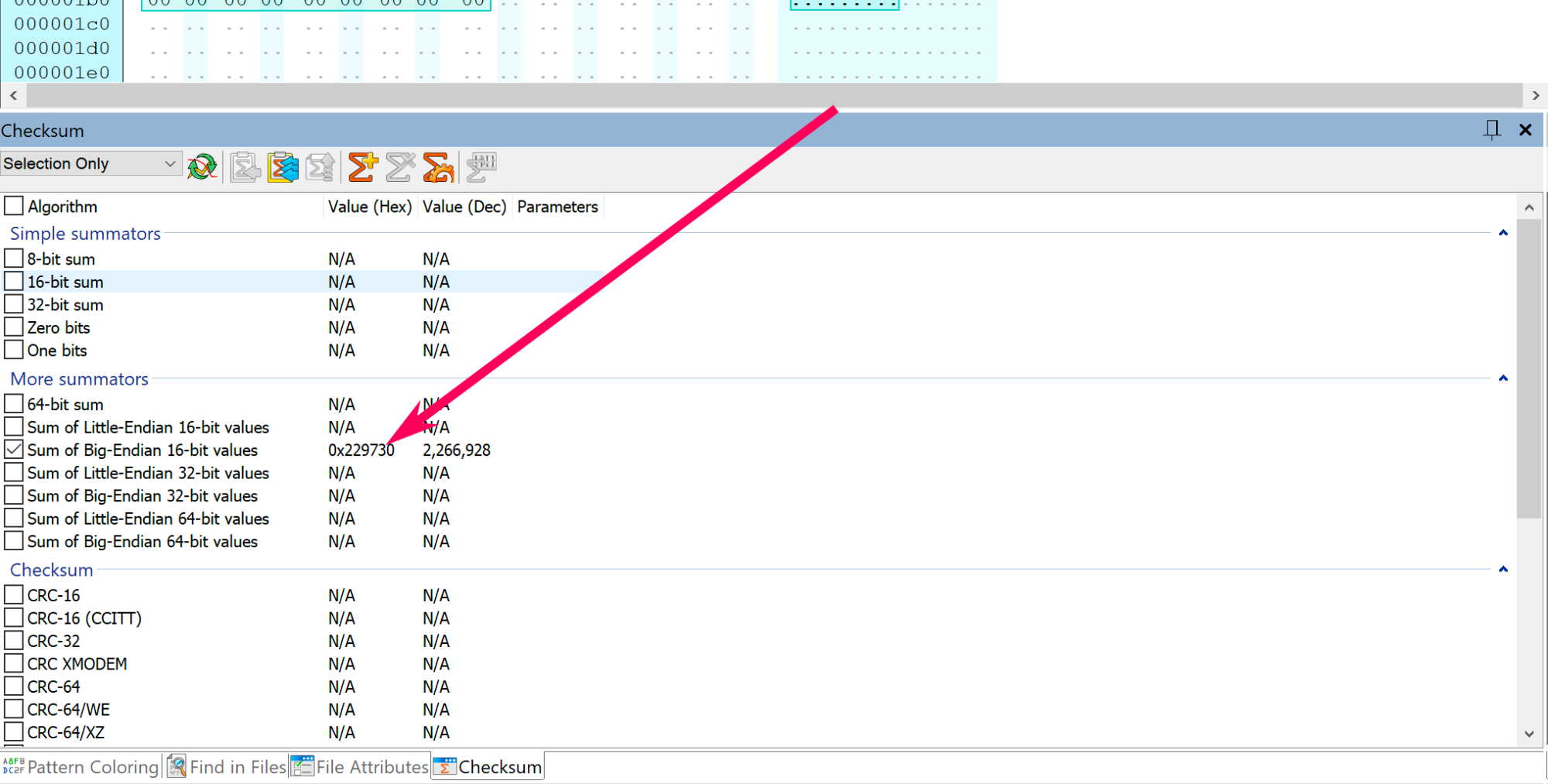
Screenshot 2021-08-01 at 7.01.14 pm copy.png


Step 8.

Convert 9730 into Binary code, then copy paste the binary code in a text editor.
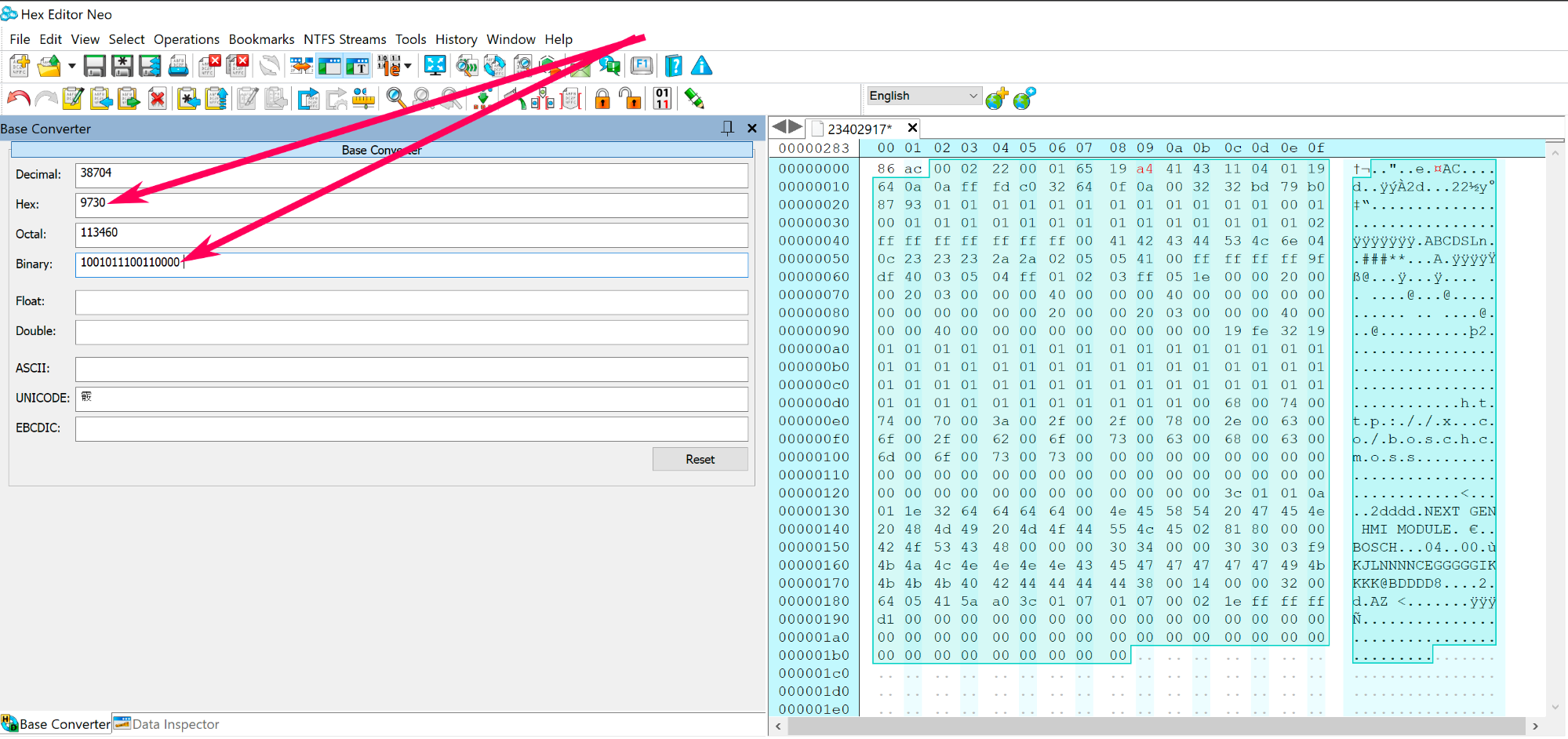
Screenshot 2021-08-01 at 7.14.03 pm copy.png


Step 9.

Now you need to create a reverse copy of the binary code: 1001011100110000, see the example below.
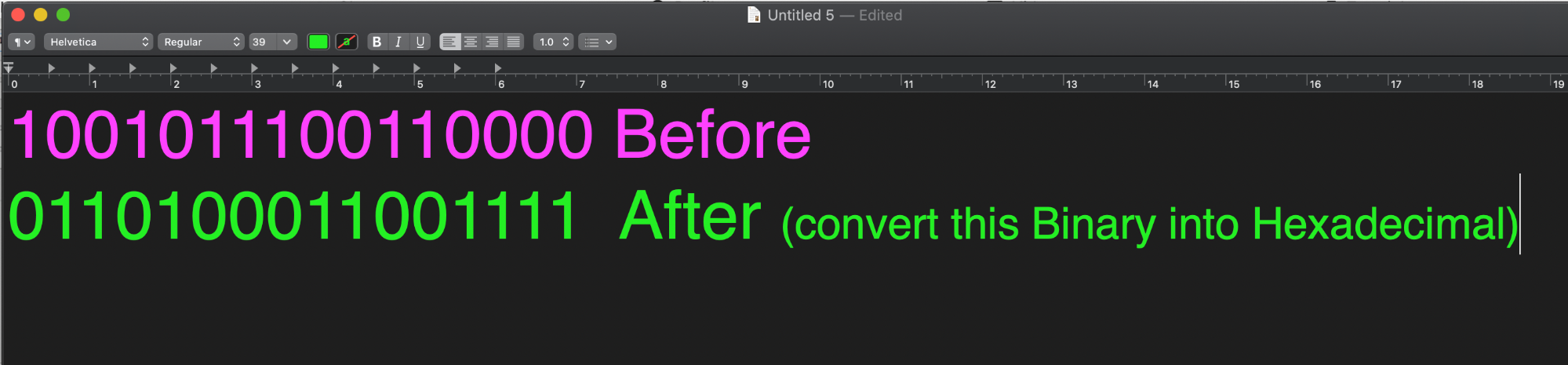
Screenshot 2021-08-01 at 7.23.31 pm.png


Step 10.

Convert the reverse binary code 0110100011001111 into hexadecimal code, which equals to 68cf 
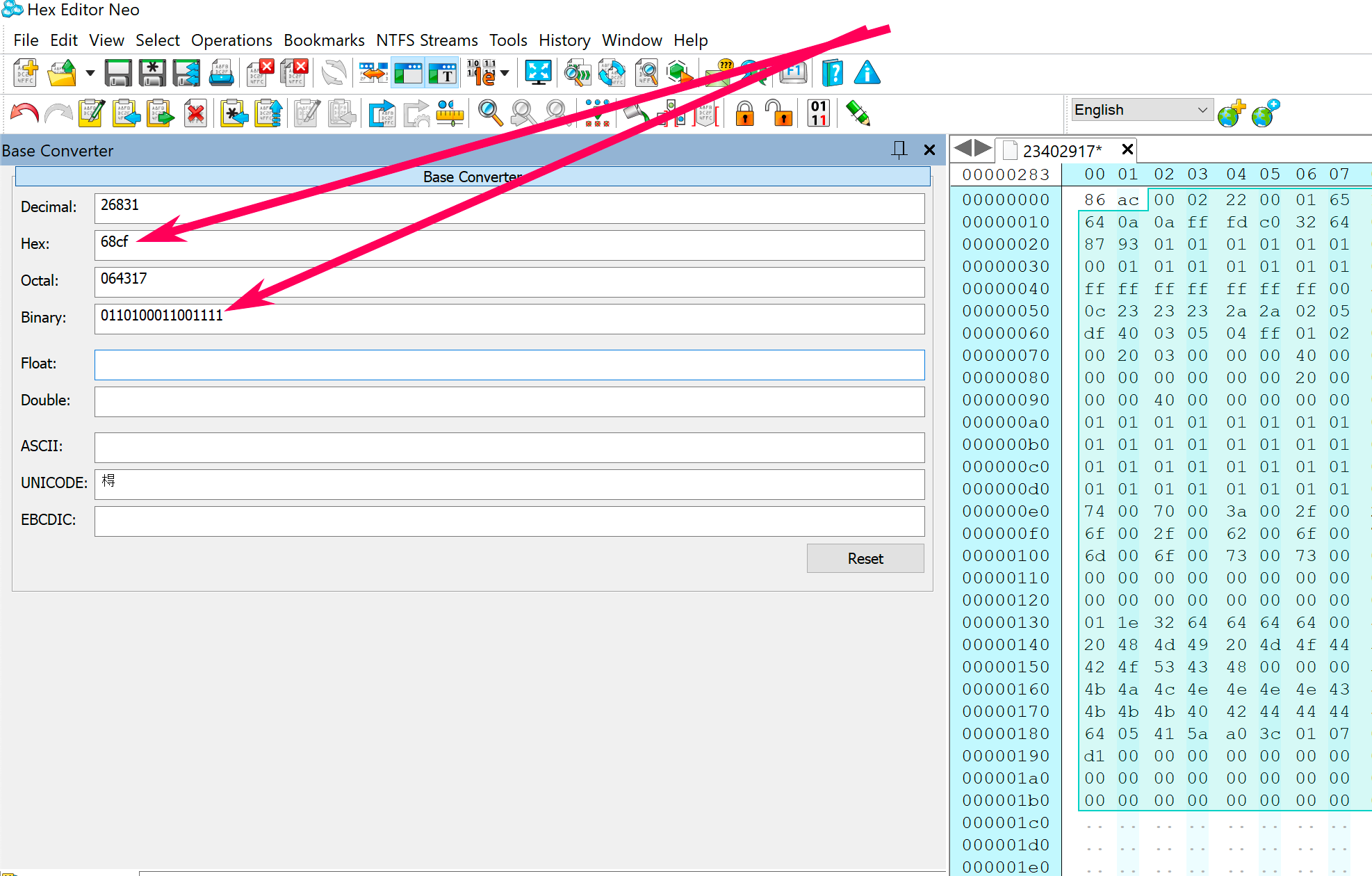
Screenshot 2021-08-02 at 12.03.51 am copy.png


Step 11.

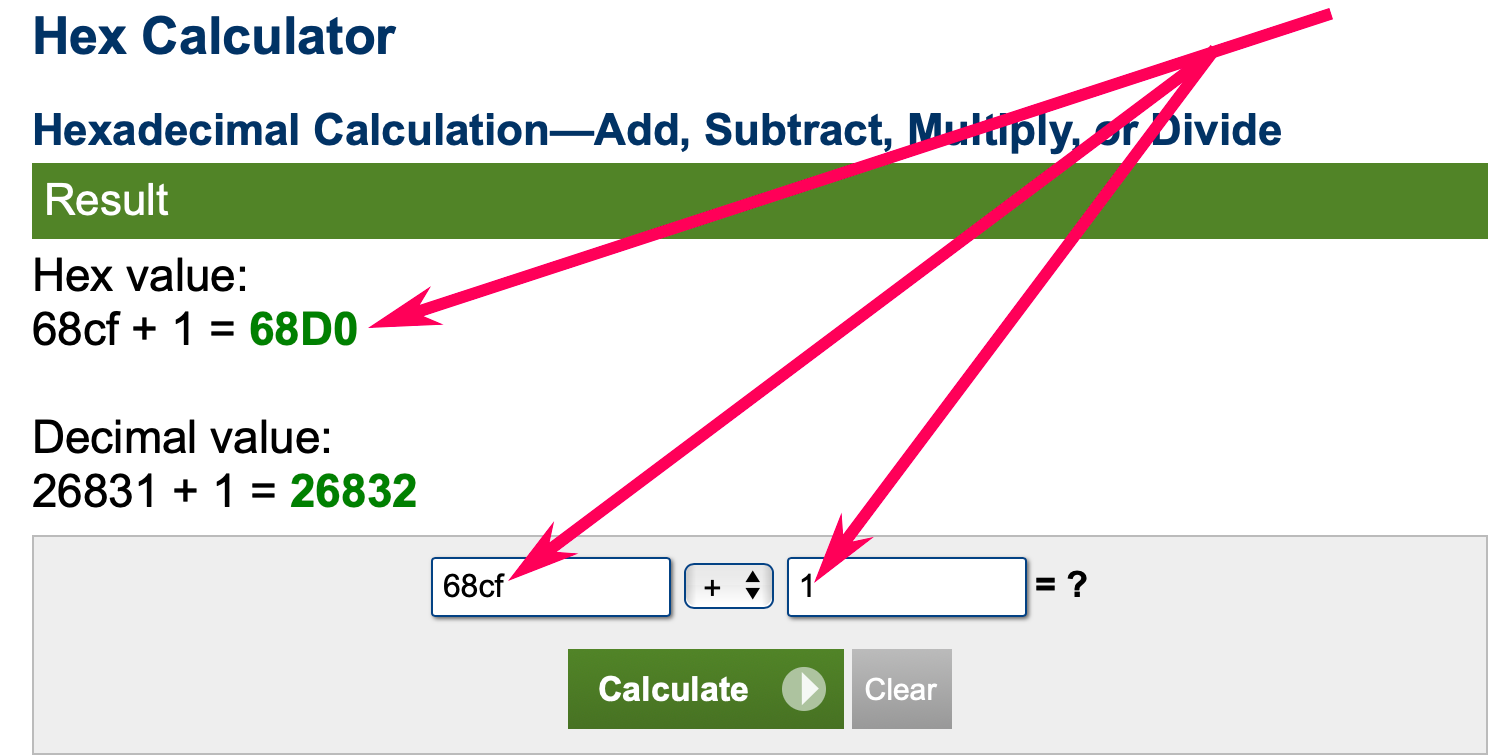
Now you need to add 1 to the hexadecimal code, which looks like this 68cf+1=

Use this online calculator to do the calculation.

68cf+1=68d0
Screenshot 2021-08-02 at 12.25.20 am copy.png


Step 12.

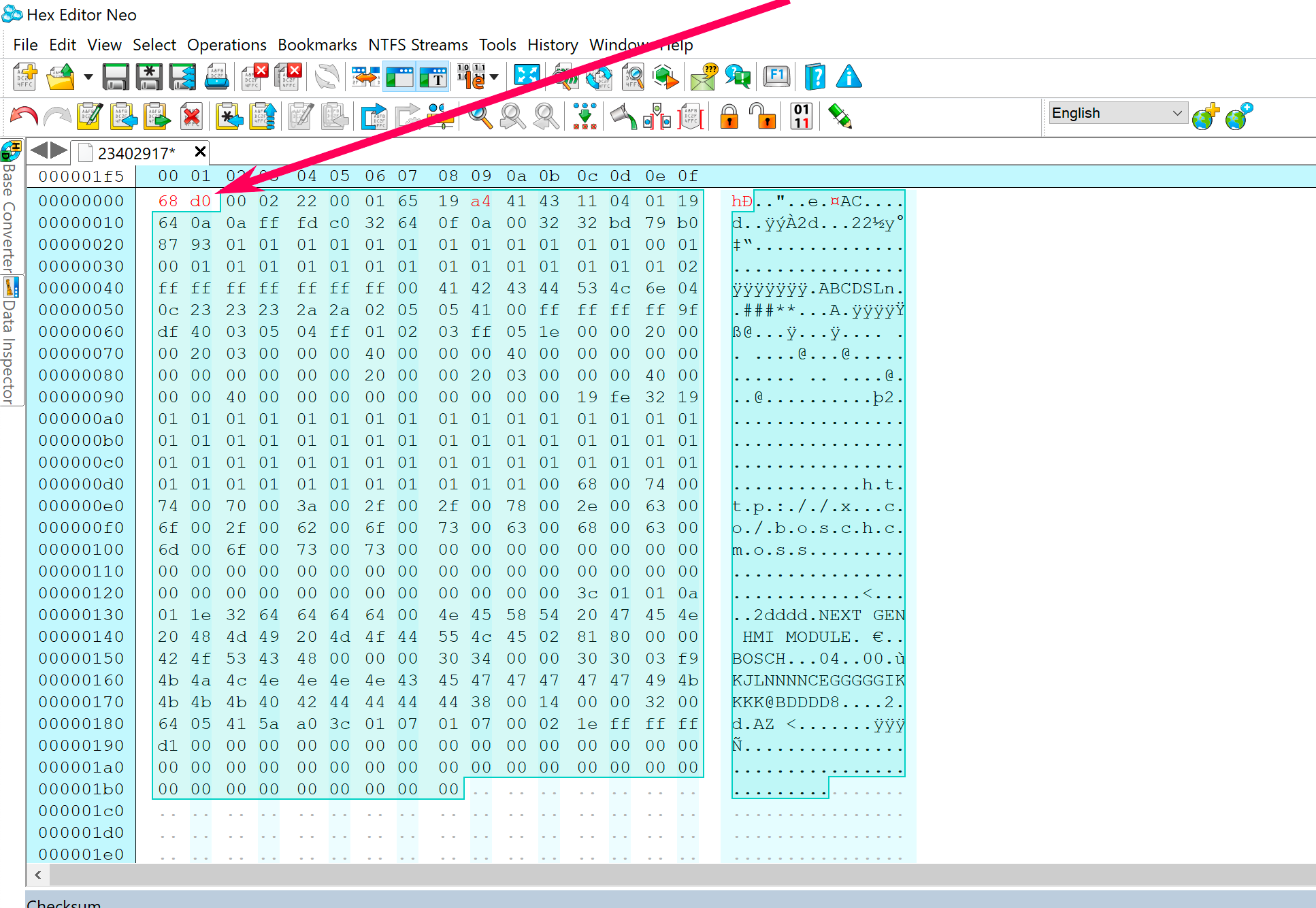
Now you have 68d0

Replace the first four unselected bytes/code in the calibration file with 68d0.
Screenshot 2021-08-02 at 12.34.20 am copy.png


Step 13.

The checksum has been corrected.

Save the calibration file and program your calibration package to the module using GM DPS.


User Feedback

Recommended Comments

Arbe_gtc Rookie

+Arbe_gtc

+Contributor

GM Car Hacking Expert

  • Contributor
On 10/11/2024 at 4:42 PM, Dan79 said:

Whhat option in SPAT do i need to use? its a .bin file and cant find any option to zip that back so its like a original sps cache file

spat, create a new archive. follow the text in the window and make your own files.

Dan79 Top Member

+Dan79

+Contributor
  • Contributor

have a HMI file and what i can see its uses big endian, i get 1288 as checksum on this  file, can anyone confirm that?

I get error when i run the archive in dps 

84229478USA2.5.bin

Arbe_gtc Rookie

+Arbe_gtc

+Contributor

GM Car Hacking Expert

  • Contributor
7 minutes ago, Dan79 said:

have a HMI file and what i can see its uses big endian, i get 1288 as checksum on this  file, can anyone confirm that?

I get error when i run the archive in dps 

84229478USA2.5.bin 565 B · 0 downloads

check this


Dan79 Top Member

+Dan79

+Contributor
  • Contributor
3 minutes ago, Arbe_gtc said:

i have read that several times and followed the directions how to create the checksum  but i dont think im getting it right, can you check if the cheksum i got 1288 is correct for the file ?


On 10/11/2024 at 4:05 PM, Arbe_gtc said:

use SPAT option in DPS to create the package


Arbe_gtc Rookie

+Arbe_gtc

+Contributor

GM Car Hacking Expert

  • Contributor

the checksum of this  file es A4 5E, read again my message, HMI uses little

Dan79 Top Member

+Dan79

+Contributor
  • Contributor
5 minutes ago, Arbe_gtc said:

the checksum of this  file es A4 5E, read again my message, HMI uses little

When i try little endian i get 5ea3 then +1    5EA4

Hex value:
5ea3 + 1 = 5EA4

Dan79 Top Member

+Dan79

+Contributor
  • Contributor
1 minute ago, Dan79 said:

When i try little endian i get 5ea3 then +1    5EA4

Hex value:
5ea3 + 1 = 5EA4

Sorry now i can see that it most swap so A4 first then 5E, right?

Arbe_gtc Rookie

+Arbe_gtc

+Contributor

GM Car Hacking Expert

  • Contributor
2 minutes ago, Dan79 said:

Sorry now i can see that it most swap so A4 first then 5E, right?

you need swap it, yes


Dan79 Top Member

+Dan79

+Contributor
  • Contributor
11 minutes ago, Arbe_gtc said:

you need swap it, yes


Thx will test that tomorrow


Dan79 Top Member

+Dan79

+Contributor
  • Contributor

Is it possible to get 068B as hex and then with +1 its only 68C  so missing one nummber? or do i use C068?

Arbe_gtc Rookie

+Arbe_gtc

+Contributor

GM Car Hacking Expert

  • Contributor
On 8/30/2024 at 10:23 PM, Mindaugas Cernius said:

Hello colleagues. After calculating the CheckSum I got the result f2, how do I write the first four bytes?


On 8/31/2024 at 12:26 AM, Robi_X said:

00

@Dan79 same with 3 bytes.

Dan79 Top Member

+Dan79

+Contributor
  • Contributor

so 68C becomes  8C 00  for the hmi file?

Mindaugas Cernius Collaborator

+Mindaugas Cernius

+Contributor
  • Contributor
11 minutes ago, Dan79 said:

so 68C becomes  8C 00  for the hmi file?

123=0123

12=0012

2=0002


Dan79 Top Member

+Dan79

+Contributor
  • Contributor

Hi tested this on 2.0 hmi to see if its the same and its very simular  but the 3rd bit is almost always wrong , like on the attached file if i ran the checksum i get 5914  but checksum is 5994   , tried on several files and always the 3rd is off like if oem is 4BE6 I GET 4B06   , do you know why this is , it uses little also

23154070.bin

Arbe_gtc Rookie

+Arbe_gtc

+Contributor

GM Car Hacking Expert

  • Contributor

i dont know what is your problem...


image.png.5bd053332d35b7996651b9900e267915.png

Dan79 Top Member

+Dan79

+Contributor
  • Contributor

if you try to calculate thechecksum on this original file you will get 5914  and not 5994 like it should be , try your self and you will see you will get 1458+1=1459  so 5914  and thats wrong , thats why i wonder why 

Arbe_gtc Rookie

+Arbe_gtc

+Contributor

GM Car Hacking Expert

  • Contributor
8 minutes ago, Dan79 said:

if you try to calculate thechecksum on this original file you will get 5914  and not 5994 like it should be , try your self and you will see you will get 1458+1=1459  so 5914  and thats wrong , thats why i wonder why 

i got the correct checksum, you can see it in the previous image

Dan79 Top Member

+Dan79

+Contributor
  • Contributor

please show me the steps as i cant get the correct one at all , im stuiped i know:)

Dan79 Top Member

+Dan79

+Contributor
  • Contributor

the NOT of 6BA7 i get 1458 then +1 =1459      and thats 5914

Arbe_gtc Rookie

+Arbe_gtc

+Contributor

GM Car Hacking Expert

  • Contributor
1 hour ago, Dan79 said:

the NOT of 6BA7 i get 1458 then +1 =1459      and thats 5914

I dont know how you get 1458


image.png.59e080b8572405a5ccfef76a5954dba9.png

Dan79 Top Member

+Dan79

+Contributor
  • Contributor

That i understand ,please try this file and tell me what the cheksum is , i have edited  so the first bits are not correct know, i want to check if we get to same conclusion , if i go trough all the steps to check cheksum (little) i get BB2B for this file.

23648990.bin

Arbe_gtc Rookie

+Arbe_gtc

+Contributor

GM Car Hacking Expert

  • Contributor
17 minutes ago, Dan79 said:

That i understand ,please try this file and tell me what the cheksum is , i have edited  so the first bits are not correct know, i want to check if we get to same conclusion , if i go trough all the steps to check cheksum (little) i get BB2B for this file.

23648990.bin 915 B · 0 downloads

this file its the same

Dan79 Top Member

+Dan79

+Contributor
  • Contributor

sorry here is it , i get BBAB on this one

23154070.bin

Robi_X Collaborator

+Robi_X

+Contributor

GM Car Hacking Expert

  • Contributor

yes i get also BBAB

Arbe_gtc Rookie

+Arbe_gtc

+Contributor

GM Car Hacking Expert

  • Contributor

Its BB AB, but if the unedited file ful checksum, is 0x80000 the edited file must be 0x80000.  if you correct checksum and the original file have 0x80000 and the edited file have 0x90000, if i remmember, it fails in programming

Join the conversation

You can post now and register later. If you have an account, sign in now to post with your account.

Guest
Add a comment...

All Articles

Popular Members

  1. hassan77h
    +hassan77h
    27
  2. Troy
    Troy
    22
  3. uglyoldbastard
    +uglyoldbastard
    13
  4. regloops
    +regloops
    8
  5. GM-Enthusiast
    +GM-Enthusiast
    7

New Members

  1. David Fontenot
    David Fontenot
      Member
    Joined
  2. SSAUTOZ
    SSAUTOZ
      Member
    Joined
  3. valdemarford
    valdemarford
      Member
    Joined
  4. Course faycal khalil
    Troll-Course faycal khalil
      Troll-Troll
    Joined
  5. Troll stevie nick
    Troll-Troll stevie nick
      Troll-Troll
    Joined
  6. Troll Parkerchevy
    Troll-Troll Parkerchevy
      Troll-Troll
    Joined
  7. Hayk Vardanyan
    Hayk Vardanyan
      Member
    Joined
  8. tunedbycasco
    tunedbycasco
      Member
    Joined
  9. freehugs
    freehugs
      Member
    Joined
  10. ceberon
    ceberon
      Member
    Joined

CameraLoops™
Powered by Art
All Trademarks appearing on this website are the property of their respective owners.

Account

Navigation

Configure browser push notifications

Chrome (Android)
  1. Tap the lock icon next to the address bar.
  2. Tap Permissions → Notifications.
  3. Adjust your preference.
Chrome (Desktop)
  1. Click the padlock icon in the address bar.
  2. Select Site settings.
  3. Find Notifications and adjust your preference.