Skip to content
View in the app

A better way to browse. Learn more.

www.CameraLoops.ru

A full-screen app on your home screen with push notifications, badges and more.

To install this app on iOS and iPadOS
  1. Tap the Share icon in Safari
  2. Scroll the menu and tap Add to Home Screen.
  3. Tap Add in the top-right corner.
To install this app on Android
  1. Tap the 3-dot menu (⋮) in the top-right corner of the browser.
  2. Tap Add to Home screen or Install app.
  3. Confirm by tapping Install.

How to correct checksum after editing GM's calibration files

Update 2/October/2025

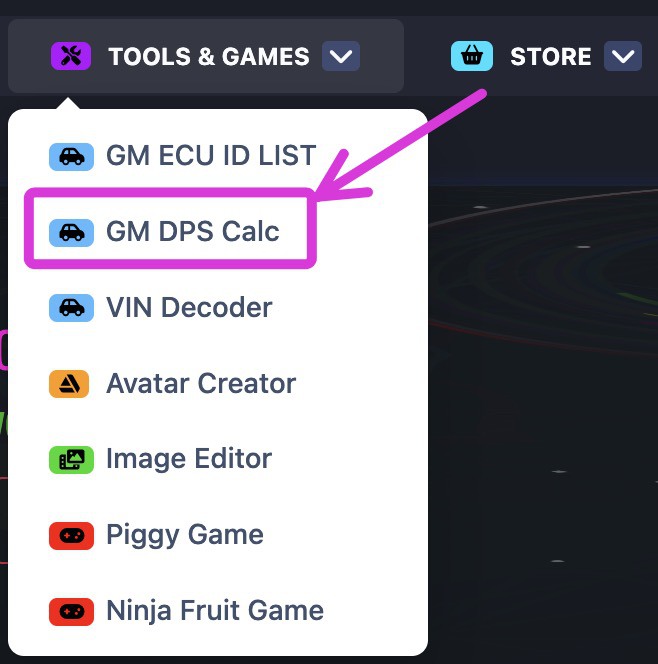
You no longer need to manually correct the checksum of the GM calibration files. You can automatically correct the checksum of modified GM calibration files online using this checksum tool, which was created by a CameraLoops member.

The online checksum tool can be accessed from the website's top menu, under the "Tools & Games" button, or via the following web link. GM Online Checksum Calculator

Massive thanks to ECU-Online.com
Screenshot 2025-10-02 at 7.33.39 am.jpg

In this tutorial, I will explain in steps how to correct the checksum after editing a GM module calibration file.

This process illustrates correcting the checksum for the first four bytes.


It's beneficial to read up on these other tutorials to familiarise yourself with GM's calibration files concept if you're new. 


Tools you will need.

 Hex Editor Neo


Step 1.

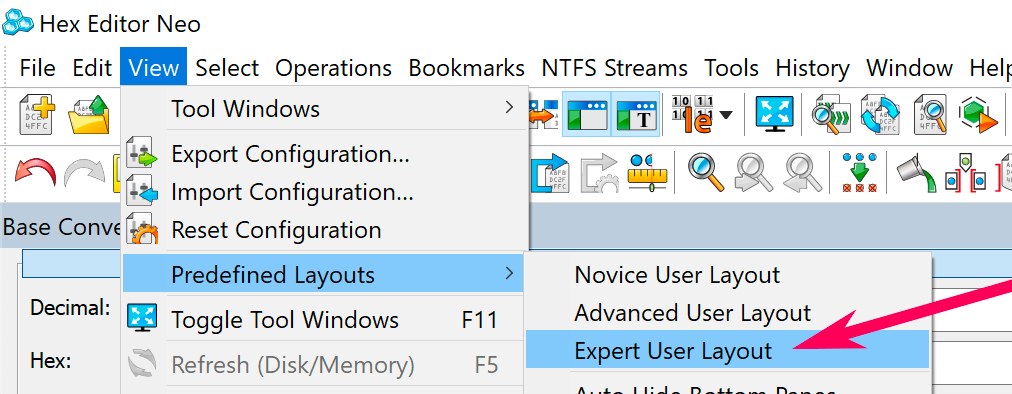
Open the calibration file in Neo and edit your file.

Set Predefined Layouts as Expert User Layout.
Screenshot 2021-08-01 at 11.43.56 am copy.png


Step 2.

Select all the codes in the calibration file except the first four bytes/code.

How to correct checksum after editing GM's calibration files


Step 3.

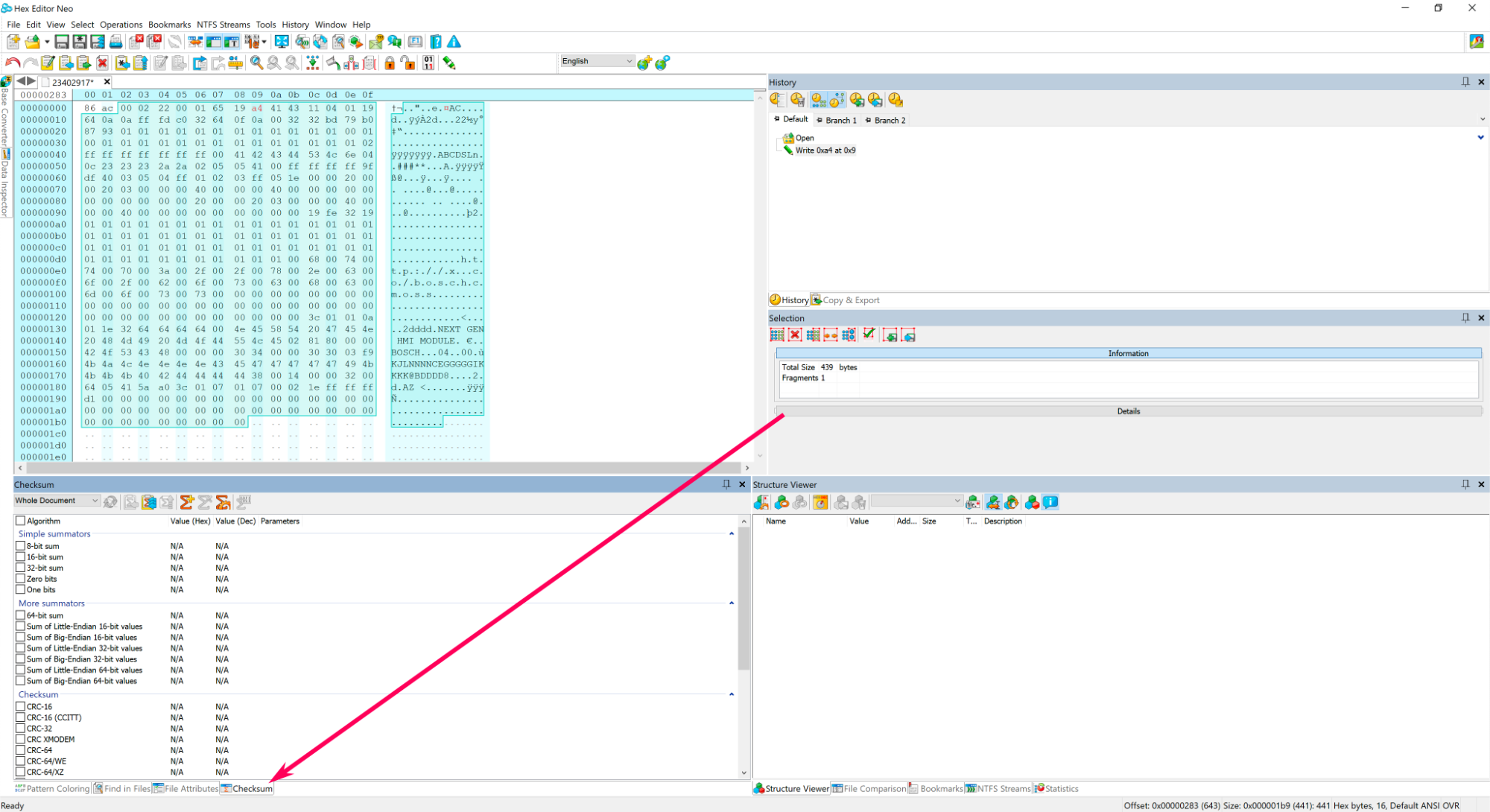
At the bottom of Neo click Checksum.
Screenshot 2021-08-01 at 3.33.41 pm copy.png


Step 4.

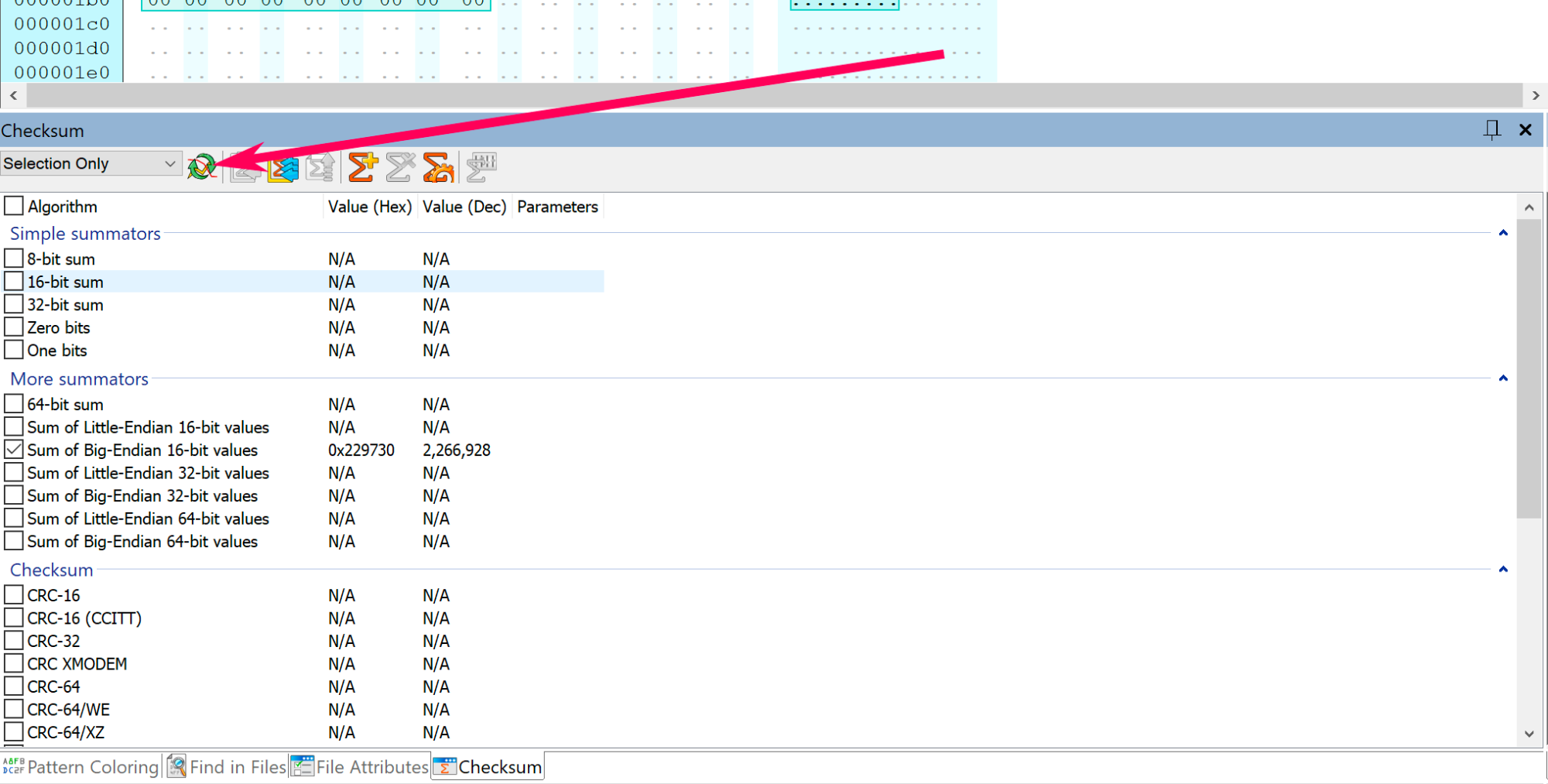
In Neo's checksum window, change the option: Whole document to Selection only.

Screenshot 2021-08-01 at 3.40.24 pm copy.png


Step 5.

Select Sum of Big-Endian 16-bit value 

Screenshot 2021-08-01 at 6.56.16 pm copy.png


Step 6.

Click the  Refresh button.

Screenshot 2021-08-01 at 7.01.14 pm copy.png


Step 7.

Copy the last 4 digits, which is: 9730 
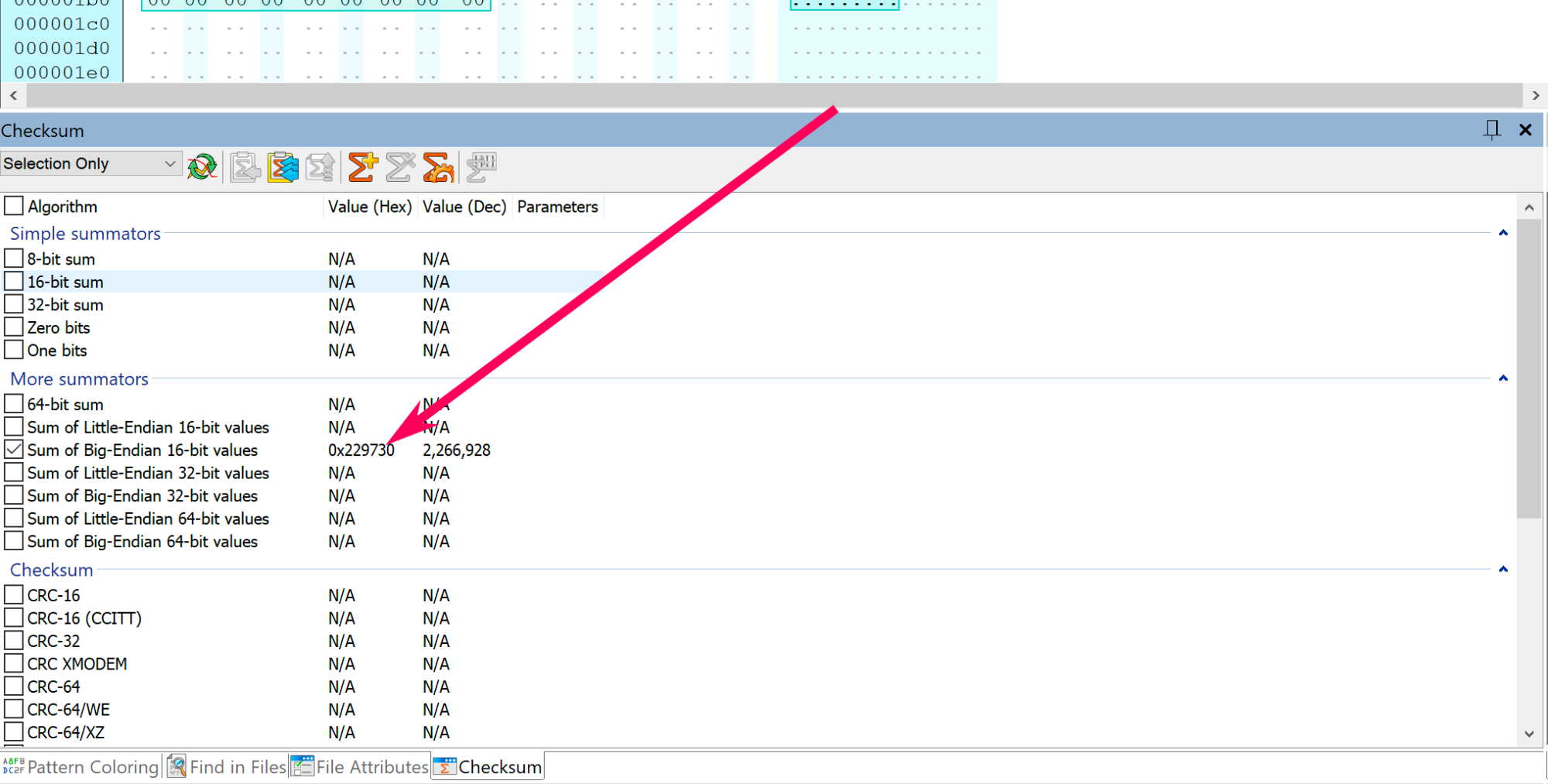
Screenshot 2021-08-01 at 7.01.14 pm copy.png


Step 8.

Convert 9730 into Binary code, then copy paste the binary code in a text editor.
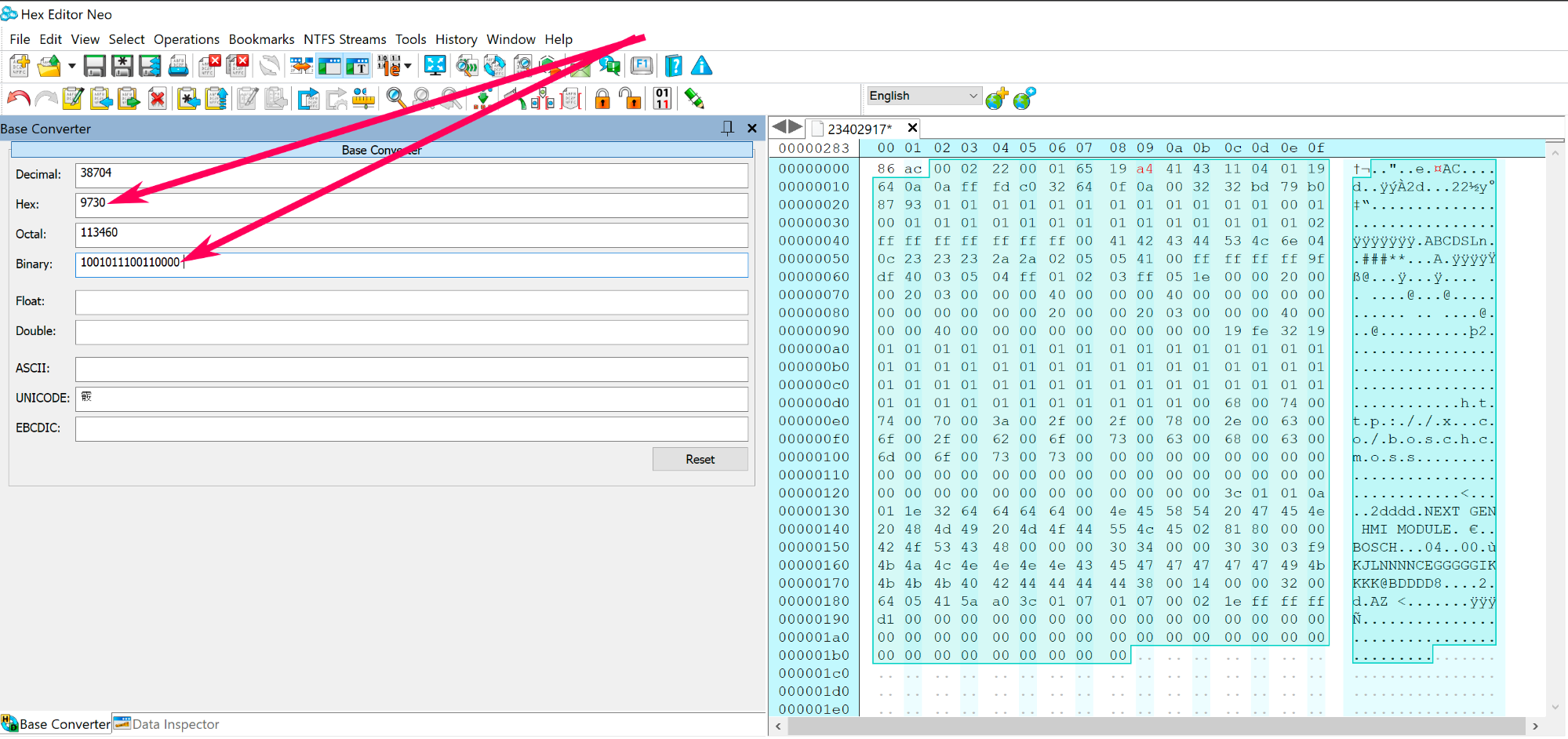
Screenshot 2021-08-01 at 7.14.03 pm copy.png


Step 9.

Now you need to create a reverse copy of the binary code: 1001011100110000, see the example below.
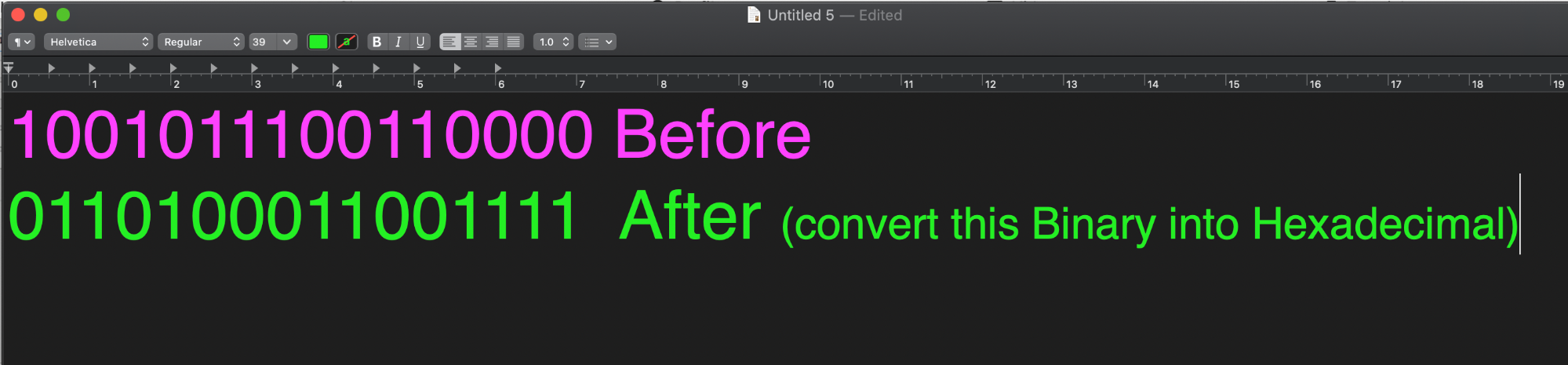
Screenshot 2021-08-01 at 7.23.31 pm.png


Step 10.

Convert the reverse binary code 0110100011001111 into hexadecimal code, which equals to 68cf 
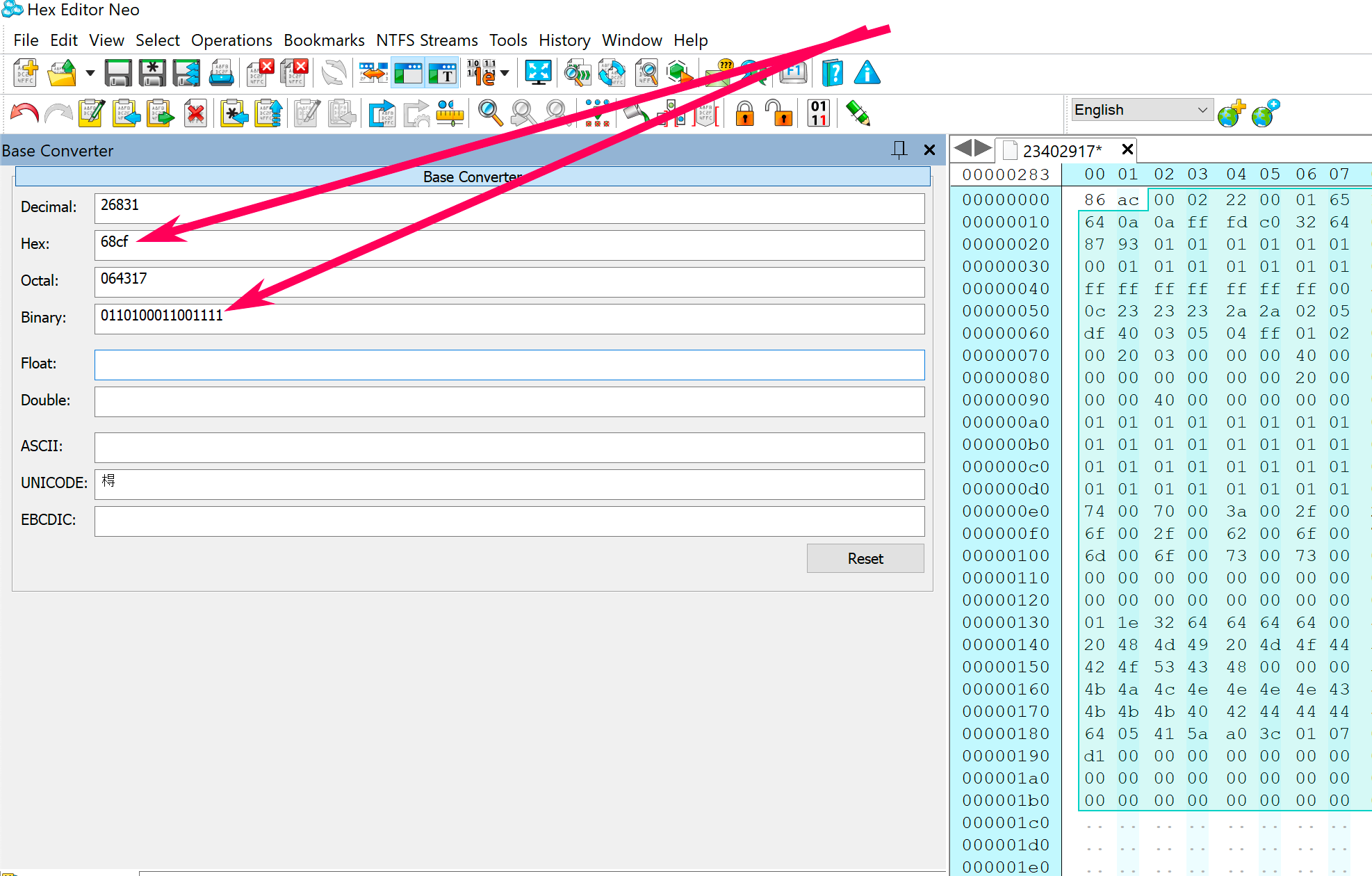
Screenshot 2021-08-02 at 12.03.51 am copy.png


Step 11.

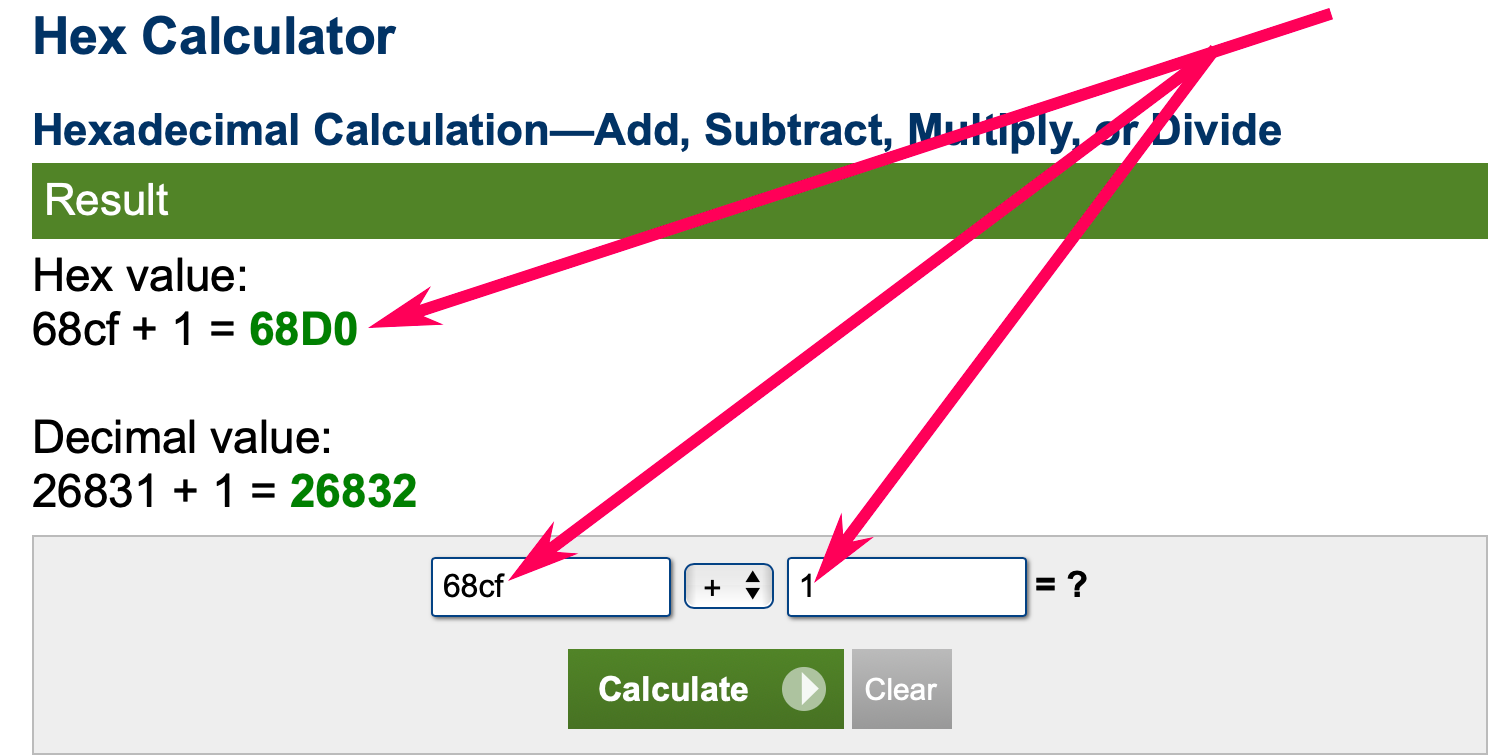
Now you need to add 1 to the hexadecimal code, which looks like this 68cf+1=

Use this online calculator to do the calculation.

68cf+1=68d0
Screenshot 2021-08-02 at 12.25.20 am copy.png


Step 12.

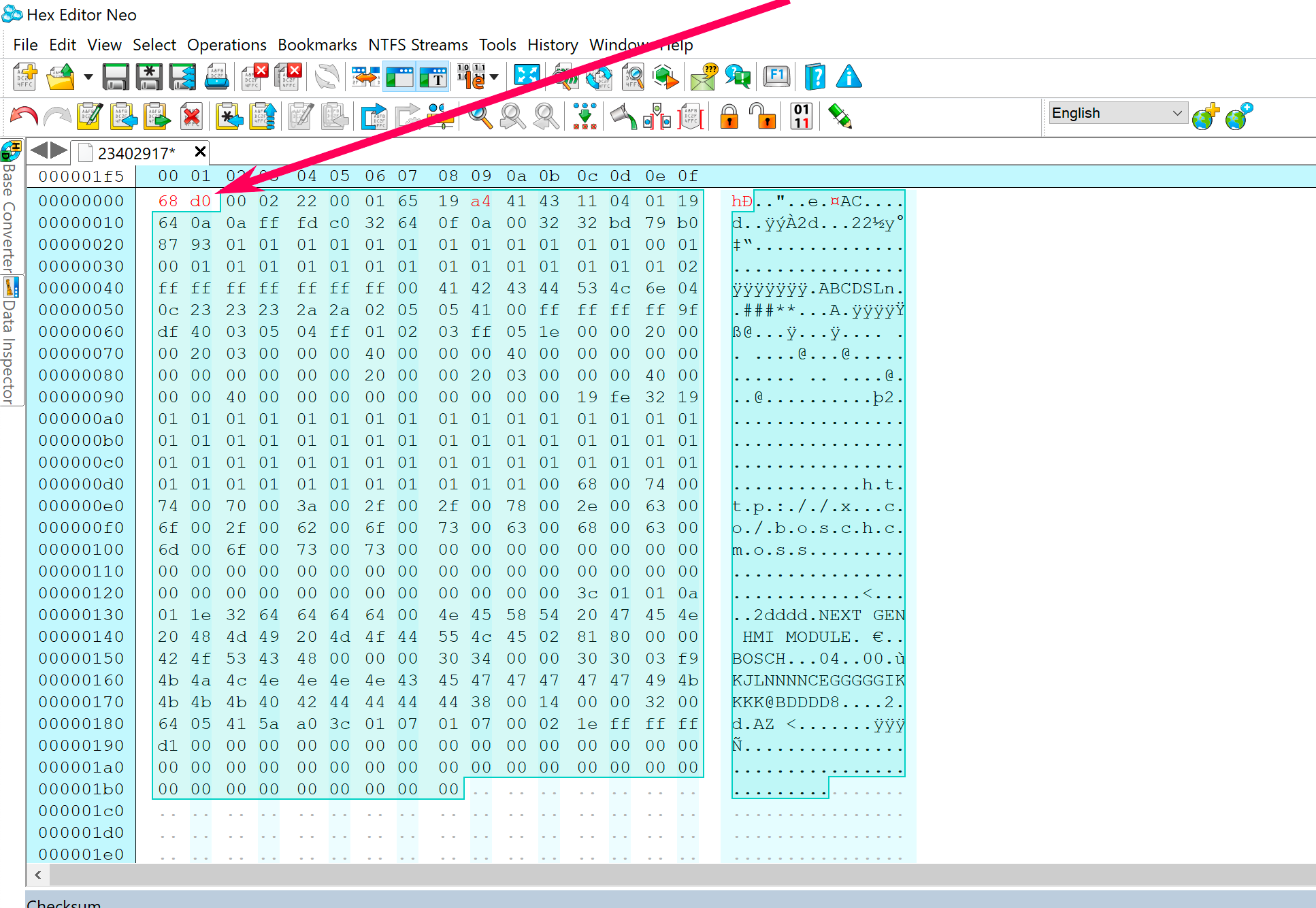
Now you have 68d0

Replace the first four unselected bytes/code in the calibration file with 68d0.
Screenshot 2021-08-02 at 12.34.20 am copy.png


Step 13.

The checksum has been corrected.

Save the calibration file and program your calibration package to the module using GM DPS.


User Feedback

Recommended Comments

Robi_X Collaborator

+Robi_X

+Contributor

GM Car Hacking Expert

  • Contributor

Maybe there is a Checksum but is a different kind than Cal files.

Or you edit something wrong, post Org and Mod eeprom.(What do you wanted to Change?)


Robi_X Collaborator

+Robi_X

+Contributor

GM Car Hacking Expert

  • Contributor

Maybe i'm wrong shoud the eeprom look like that (so many 0x00/0xFF/0x20?)

There is no Vin or PIN?

image.png.222bfade410f7f9b8a966edfdf423b3c.png


Arbe_gtc Rookie

+Arbe_gtc

+Contributor

GM Car Hacking Expert

  • Contributor
45 minutes ago, Rustam Abdullayev said:

@Arbe_gtcThank you for the fast answer. Does it mean eprom no need for a checksum?

But when I tried to edit EPROM the check it in DPS to get info I got the result that EPROM fault. 

EPROM FAULT.png

In the bin file that you shared, there is no VIN or PIN... is that BCM new? used? It seems to be corrupted, but there is some information in the BIN.


image.png.8b8f5b663b4b01c82e316a7444ccf719.png

Rustam Abdullayev Apprentice

Rustam Abdullayev

Member

@Robi_XHello, thank you for asking I am going to return the BCM to the virgin. Yes, there is no VIN due to this is New BCM.

There is the EPROM which I am going to return to virgin 

BCM EPROM QWE.bin

Rustam Abdullayev Apprentice

Rustam Abdullayev

Member

@Arbe_gtcThis is EPROM from the new BCM. I wanted to discover how to return the used BCM to virgin. You can say that I can clone the EPAOM and FLASH from new to used, but I wanted to discover how to return virgin with the original serial number which is in the used BCM. Here is EPROM which I going to return to the virgin.

BCM EPROM QWE.bin

GM-Enthusiast Mentor

+GM-Enthusiast

+Contributor

GM Car Hacking Expert

  • Contributor
5 hours ago, Rustam Abdullayev said:

@Arbe_gtcThis is EPROM from the new BCM. I wanted to discover how to return the used BCM to virgin. You can say that I can clone the EPAOM and FLASH from new to used, but I wanted to discover how to return virgin with the original serial number which is in the used BCM. Here is EPROM which I going to return to the virgin.

BCM EPROM QWE.bin 4 kB · 1 download

Just write virgin file to eeprom,, program bcm ,, program immobiliser with existing transponder key,,done


Car Hacking Services I Provide For General Motors Vehicles.

  • GM Remote Diagnosing and Troubleshooting
  • All GM Modules Programming
  • GM ECM/TCM Tuning
  • Auto Mechanic Workshop
Mindaugas Cernius Collaborator

+Mindaugas Cernius

+Contributor
  • Contributor

The checksum calculation can be different for everyone. For example, in BCM Opel using 16-bit Big-Endian, you need to add 8000 to the resulting result to get the correct checksum. We get Buick's checksum right away without adding anything. Before changing, calculate the checksum and check it to know the correct method.

Rustam Abdullayev Apprentice

Rustam Abdullayev

Member

@Mindaugas CerniusThank you for your advice. But how to calculate the checksum before changing. I'm a novice in this matter

Arbe_gtc Rookie

+Arbe_gtc

+Contributor

GM Car Hacking Expert

  • Contributor
29 minutes ago, Rustam Abdullayev said:

@Mindaugas CerniusThank you for your advice. But how to calculate the checksum before changing. I'm a novice in this matter

Read this thread from the first message and you cand find the answer.

BLKATSG Collaborator

+BLKATSG

+Contributor

GM Car Hacking Expert

  • Contributor

Anyone have any tips on how to find the checksum for a file that doesn't follow the norm?

Here is the cal file I'm working with.

1-Check-Sum.bin

codebuilder Community Regular

+codebuilder

+Contributor

GM Car Hacking Expert

  • Contributor
12 hours ago, BLKATSG said:

Anyone have any tips on how to find the checksum for a file that doesn't follow the norm?

Here is the cal file I'm working with.

1-Check-Sum.bin 511.97 kB · 2 downloads

Is that an OS file?  What module is it for as that would help too.  Some of these checksums can get pretty complex!


I'll take a guess, is it a cluster 🙂 haha


image.png.b799906041feecd50bd7c952c7488d24.png

BLKATSG Collaborator

+BLKATSG

+Contributor

GM Car Hacking Expert

  • Contributor

Yes it is a cluster OS file haha, but an older one.  


6G2EC57Y99L199784 (this is a 2009 vin, but it was a split year so this is the older cluster)

This is one for a 2008 Pontiac G8, the 2009 G8 follows the standard checksum system.


BLKATSG Collaborator

+BLKATSG

+Contributor

GM Car Hacking Expert

  • Contributor

I still haven't figured this out, and I've tried a bunch of combos.  Admittedly I'm not very fluent in checksums.

karolputowski Top Member

+karolputowski

+Contributor
  • Contributor
On 9/20/2021 at 9:52 PM, d533902 said:

Hi Troy, you have some unnecessary steps there. Why are you switching from Hex to Binary?


68cf  XOR FFFF = 9730 


XOR function is probably built into your calc and its also built into windows calculator when in programmer mode


Not the best contribution but sharing what I have


I can confirm that this trick is working for BCM calibrations.

Just use Windows Calculator, type last 4 hex symbols from Hex Editor calculated checksum, select bitwise -> XOR and type FFFF.

The result is the checksum for file.

tjshadyluver Apprentice

+tjshadyluver

+Contributor
  • Contributor

Which bytes in a BCM Calibration, is the Checksum? Is it in the beginning? There are many, many bytes in every Calibration.

Arbe_gtc Rookie

+Arbe_gtc

+Contributor

GM Car Hacking Expert

  • Contributor
1 hour ago, tjshadyluver said:

Which bytes in a BCM Calibration, is the Checksum? Is it in the beginning? There are many, many bytes in every Calibration.

in the first message of this thread, in Step 12.

You have the position of the checksum

tjshadyluver Apprentice

+tjshadyluver

+Contributor
  • Contributor

Lol yeah I went to page 1 and read from the beginning! So cool to have learned that. I'm gonna play soon.

Mindaugas Cernius Collaborator

+Mindaugas Cernius

+Contributor
  • Contributor

Hello colleagues. After calculating the CheckSum I got the result f2, how do I write the first four bytes?

Robi_X Collaborator

+Robi_X

+Contributor

GM Car Hacking Expert

  • Contributor

00

Dan79 Top Member

+Dan79

+Contributor
  • Contributor

Hi the calibration file that being edit is that the direct file we get from ex sps cache  or is it after we have done DPS archive zip file  and then we edit the calibration file?

Dan79 Top Member

+Dan79

+Contributor
  • Contributor

Hi the calibration file that being edit is that the direct file we get from ex sps cache  or is it after we have done DPS archive zip file  and then we edit the calibration file?

Arbe_gtc Rookie

+Arbe_gtc

+Contributor

GM Car Hacking Expert

  • Contributor
27 minutes ago, Dan79 said:

Hi the calibration file that being edit is that the direct file we get from ex sps cache  or is it after we have done DPS archive zip file  and then we edit the calibration file?

the cache files are zipped. you need unzip it with 7zip and you can edit it, after edit, create the zip package for DPS

Dan79 Top Member

+Dan79

+Contributor
  • Contributor

thx so i unpacked the file with 7zip and got the bin file, edit that now but what now? most a zip the file again or can i use it directly to create zip package dor DPS?

Arbe_gtc Rookie

+Arbe_gtc

+Contributor

GM Car Hacking Expert

  • Contributor
46 minutes ago, Dan79 said:

thx so i unpacked the file with 7zip and got the bin file, edit that now but what now? most a zip the file again or can i use it directly to create zip package dor DPS?

use SPAT option in DPS to create the package

Dan79 Top Member

+Dan79

+Contributor
  • Contributor

Whhat option in SPAT do i need to use? its a .bin file and cant find any option to zip that back so its like a original sps cache file

Join the conversation

You can post now and register later. If you have an account, sign in now to post with your account.

Guest
Add a comment...

All Articles

Popular Members

  1. hassan77h
    +hassan77h
    27
  2. Troy
    Troy
    22
  3. uglyoldbastard
    +uglyoldbastard
    13
  4. regloops
    +regloops
    8
  5. GM-Enthusiast
    +GM-Enthusiast
    7

New Members

  1. David Fontenot
    David Fontenot
      Member
    Joined
  2. SSAUTOZ
    SSAUTOZ
      Member
    Joined
  3. valdemarford
    valdemarford
      Member
    Joined
  4. Course faycal khalil
    Troll-Course faycal khalil
      Troll-Troll
    Joined
  5. Troll stevie nick
    Troll-Troll stevie nick
      Troll-Troll
    Joined
  6. Troll Parkerchevy
    Troll-Troll Parkerchevy
      Troll-Troll
    Joined
  7. Hayk Vardanyan
    Hayk Vardanyan
      Member
    Joined
  8. tunedbycasco
    tunedbycasco
      Member
    Joined
  9. freehugs
    freehugs
      Member
    Joined
  10. ceberon
    ceberon
      Member
    Joined

CameraLoops™
Powered by Art
All Trademarks appearing on this website are the property of their respective owners.

Account

Navigation

Configure browser push notifications

Chrome (Android)
  1. Tap the lock icon next to the address bar.
  2. Tap Permissions → Notifications.
  3. Adjust your preference.
Chrome (Desktop)
  1. Click the padlock icon in the address bar.
  2. Select Site settings.
  3. Find Notifications and adjust your preference.