Skip to content
Install the CameraLoops App

Browse CameraLoops via the app. Learn more.

www.CameraLoops.ru

Use the CameraLoops full-screen app on your home screen with push notifications, badges and more.

To install the CameraLoops app on iOS and iPadOS
  1. Tap the Share icon in Safari
  2. Scroll the menu and tap Add to Home Screen.
  3. Tap Add in the top-right corner.
To install the CameraLoops app on Android
  1. Tap the 3-dot menu (⋮) in the top-right corner of the browser.
  2. Tap Add to Home screen or Install app.
  3. Confirm by tapping Install.

How to correct checksum after editing GM's calibration files

Update 2/October/2025

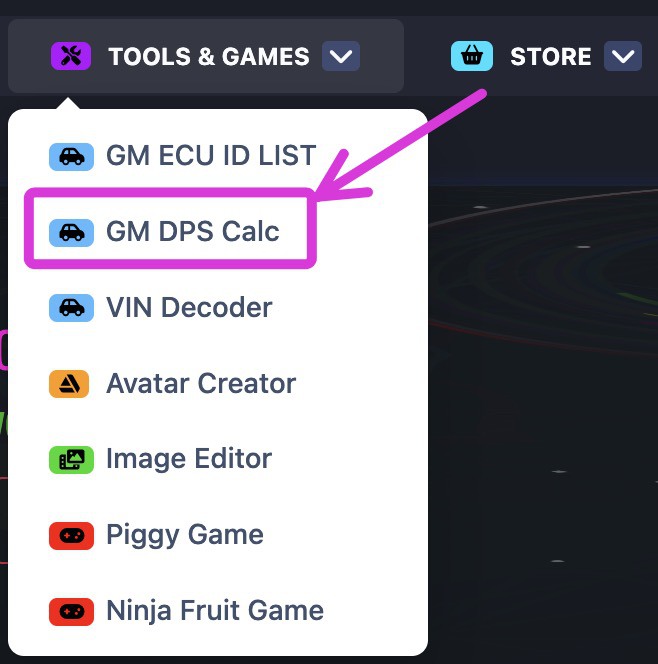
You no longer need to manually correct the checksum of the GM calibration files. You can automatically correct the checksum of modified GM calibration files online using this checksum tool, which was created by a CameraLoops member.

The online checksum tool can be accessed from the website's top menu, under the "Tools & Games" button, or via the following web link. GM Online Checksum Calculator

Massive thanks to ECU-Online.com
Screenshot 2025-10-02 at 7.33.39 am.jpg

In this tutorial, I will explain in steps how to correct the checksum after editing a GM module calibration file.

This process illustrates correcting the checksum for the first four bytes.


It's beneficial to read up on these other tutorials to familiarise yourself with GM's calibration files concept if you're new. 


Tools you will need.

 Hex Editor Neo


Step 1.

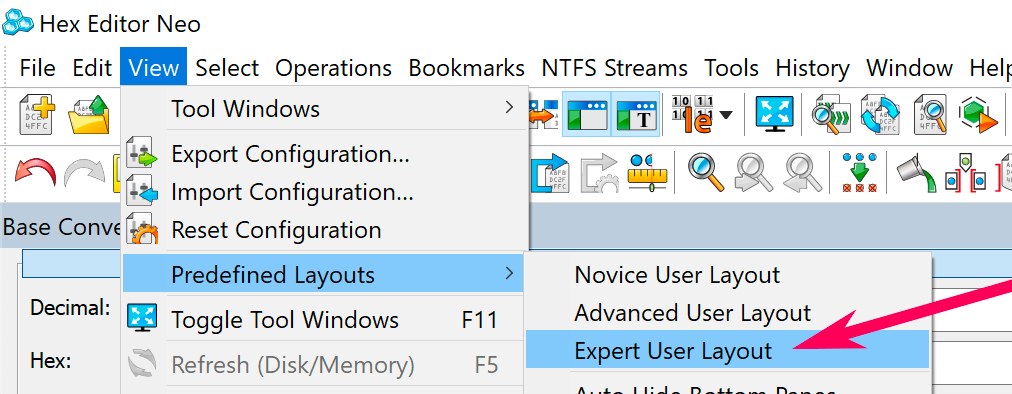
Open the calibration file in Neo and edit your file.

Set Predefined Layouts as Expert User Layout.
Screenshot 2021-08-01 at 11.43.56 am copy.png


Step 2.

Select all the codes in the calibration file except the first four bytes/code.

How to correct checksum after editing GM's calibration files


Step 3.

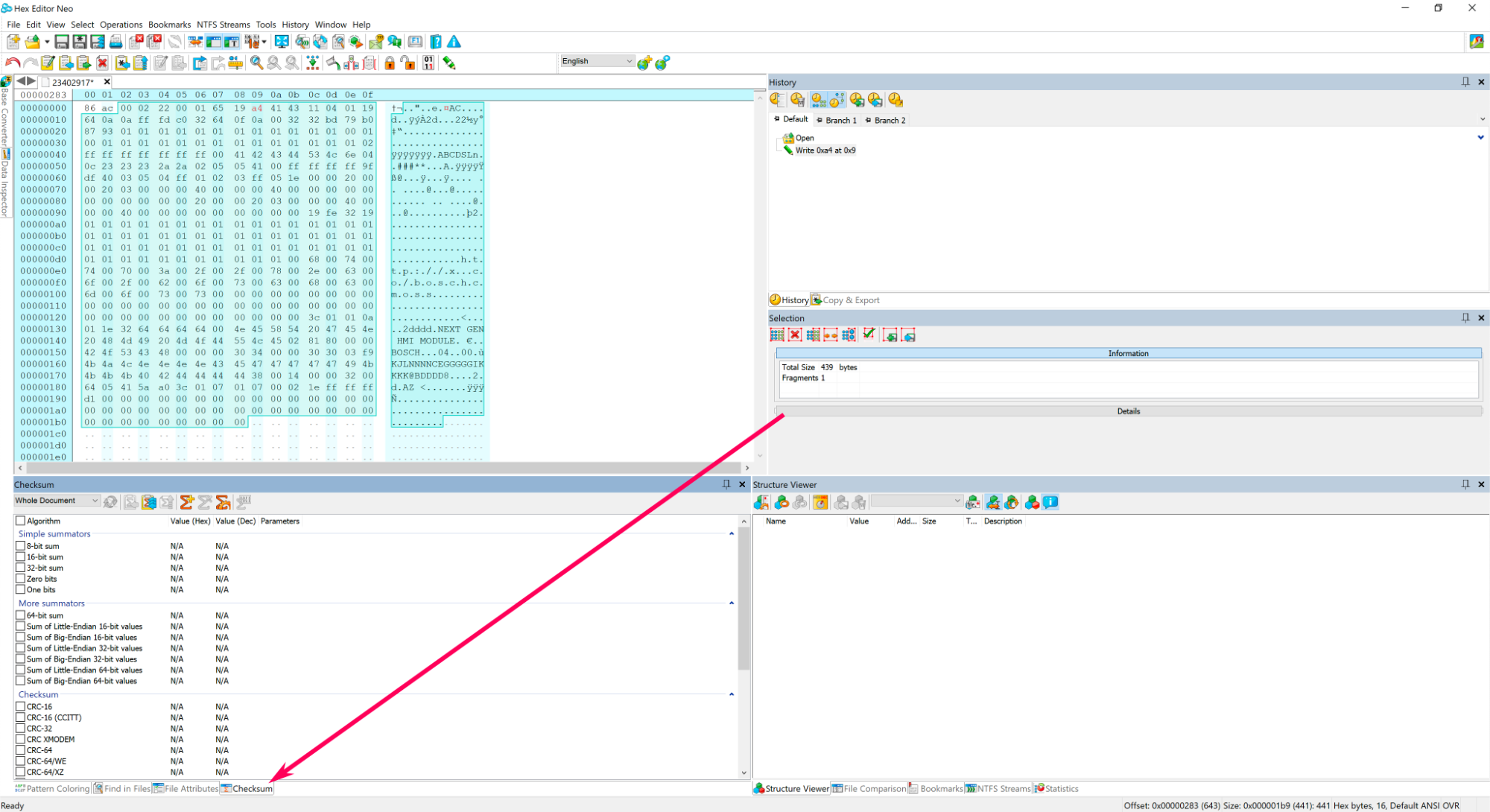
At the bottom of Neo click Checksum.
Screenshot 2021-08-01 at 3.33.41 pm copy.png


Step 4.

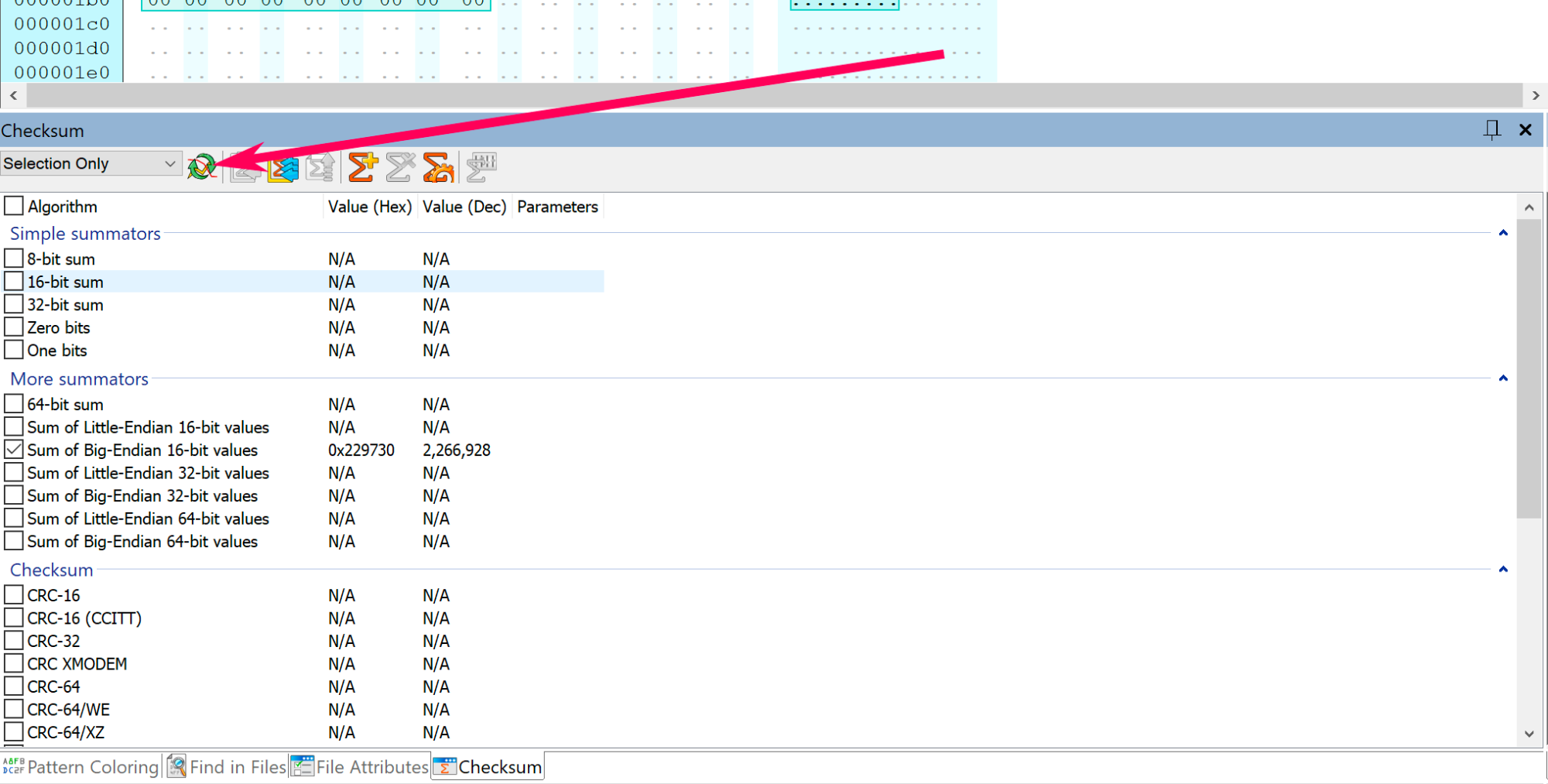
In Neo's checksum window, change the option: Whole document to Selection only.

Screenshot 2021-08-01 at 3.40.24 pm copy.png


Step 5.

Select Sum of Big-Endian 16-bit value 

Screenshot 2021-08-01 at 6.56.16 pm copy.png


Step 6.

Click the  Refresh button.

Screenshot 2021-08-01 at 7.01.14 pm copy.png


Step 7.

Copy the last 4 digits, which is: 9730 
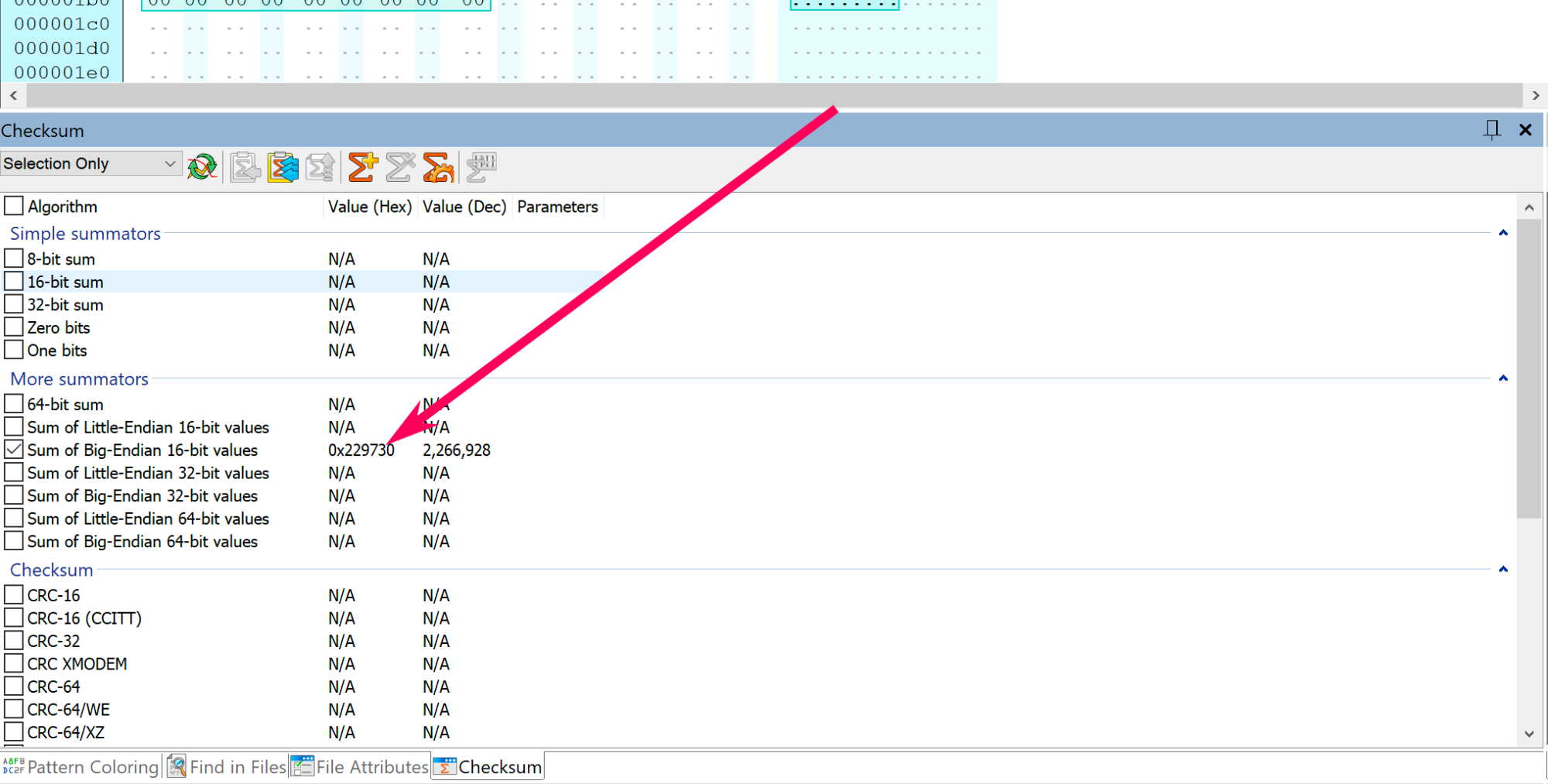
Screenshot 2021-08-01 at 7.01.14 pm copy.png


Step 8.

Convert 9730 into Binary code, then copy paste the binary code in a text editor.
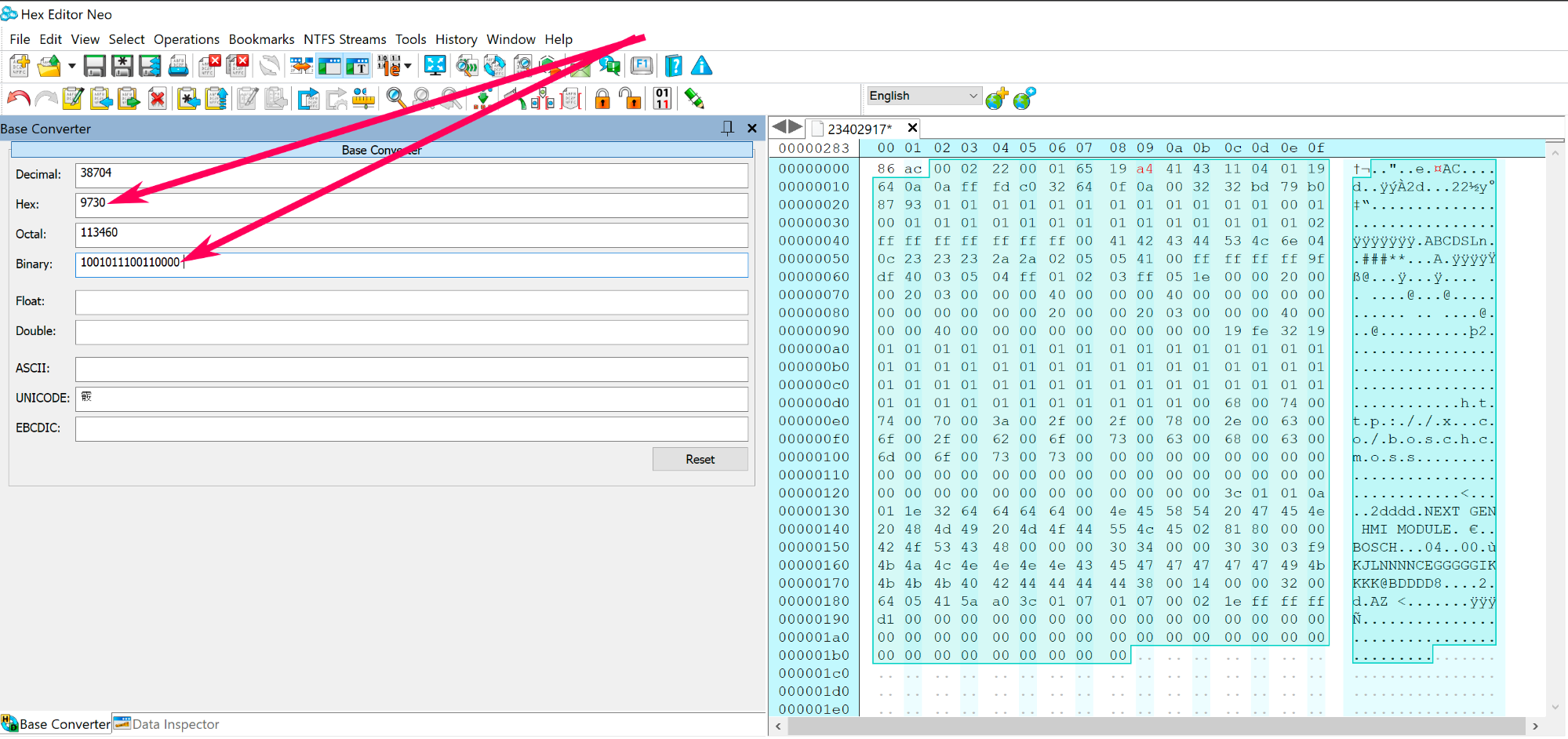
Screenshot 2021-08-01 at 7.14.03 pm copy.png


Step 9.

Now you need to create a reverse copy of the binary code: 1001011100110000, see the example below.
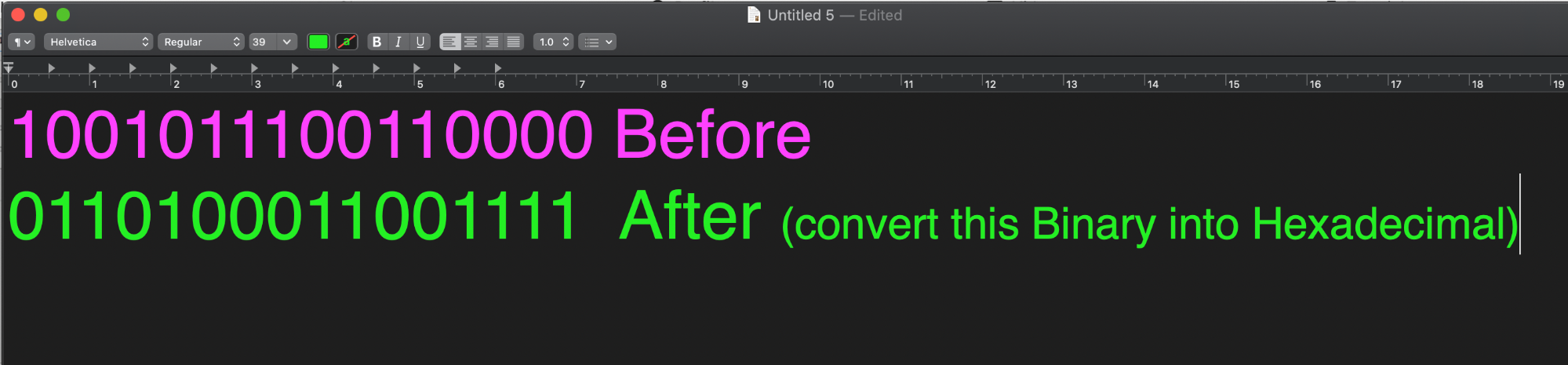
Screenshot 2021-08-01 at 7.23.31 pm.png


Step 10.

Convert the reverse binary code 0110100011001111 into hexadecimal code, which equals to 68cf 
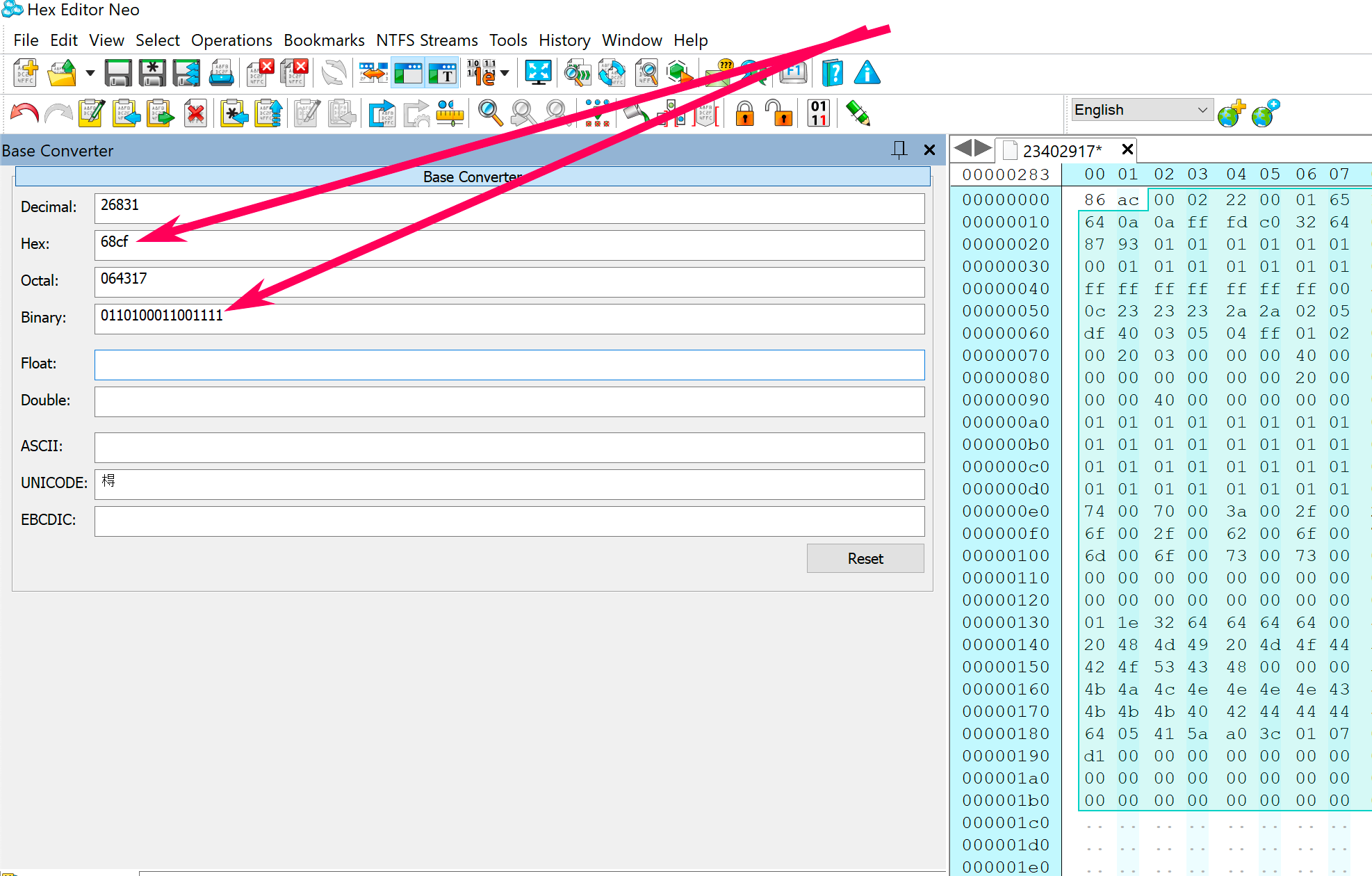
Screenshot 2021-08-02 at 12.03.51 am copy.png


Step 11.

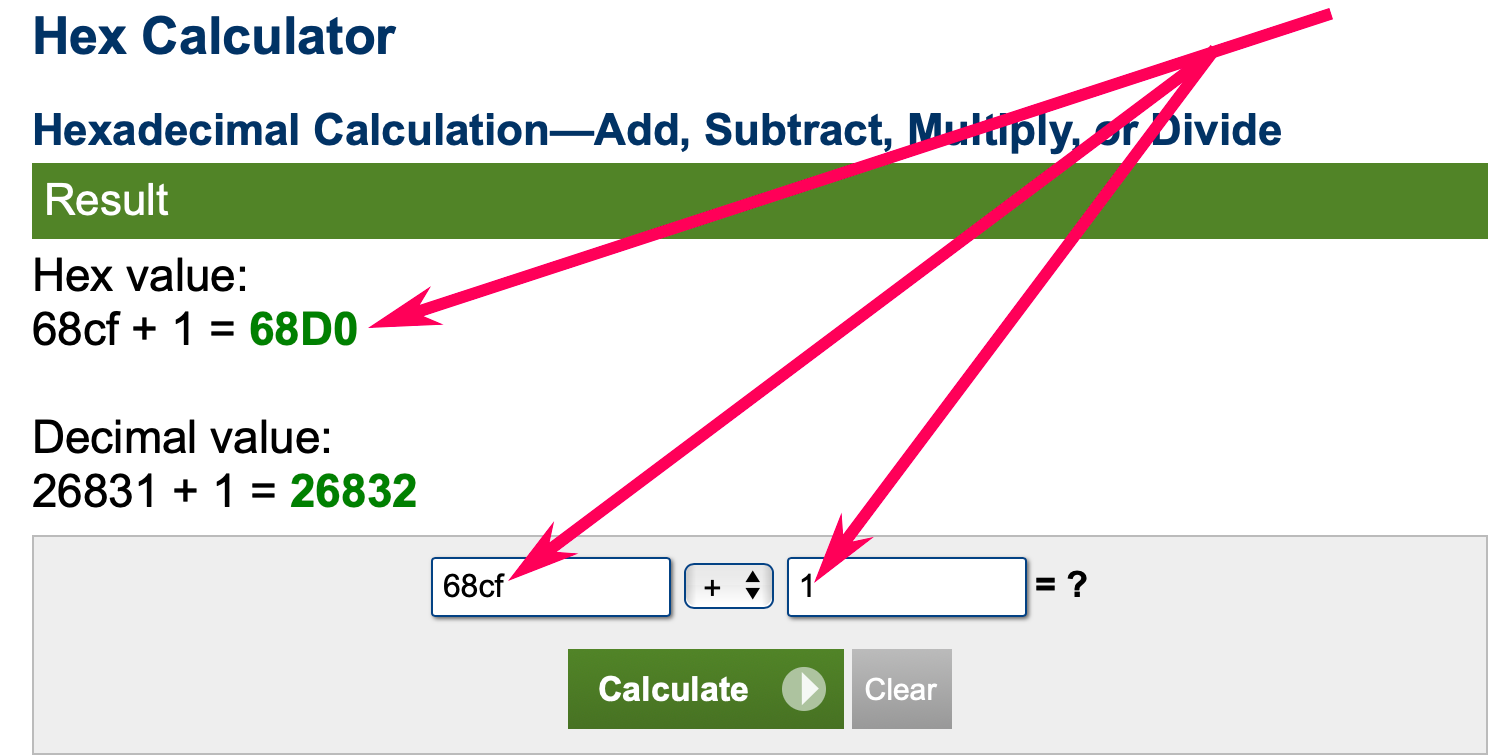
Now you need to add 1 to the hexadecimal code, which looks like this 68cf+1=

Use this online calculator to do the calculation.

68cf+1=68d0
Screenshot 2021-08-02 at 12.25.20 am copy.png


Step 12.

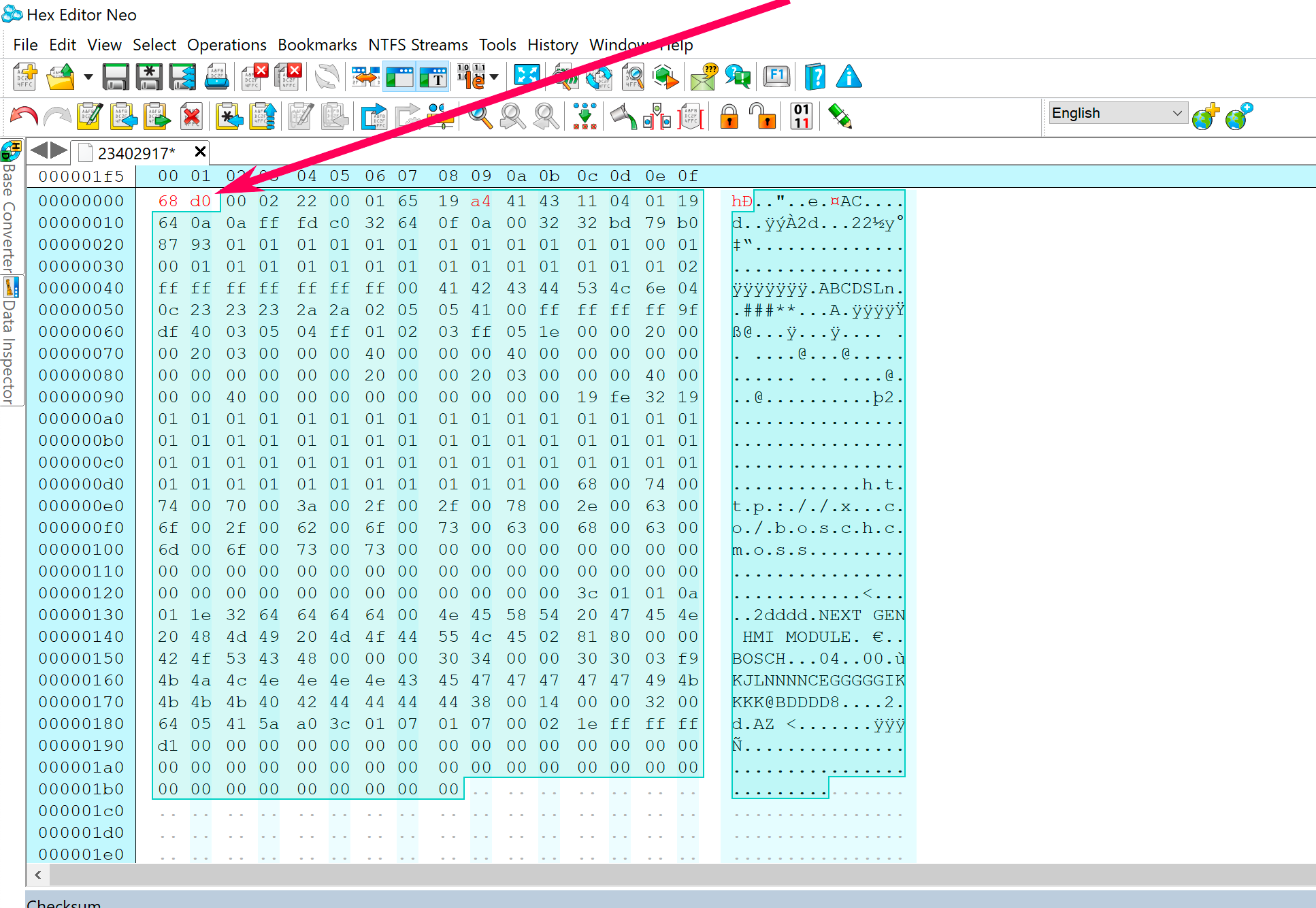
Now you have 68d0

Replace the first four unselected bytes/code in the calibration file with 68d0.
Screenshot 2021-08-02 at 12.34.20 am copy.png


Step 13.

The checksum has been corrected.

Save the calibration file and program your calibration package to the module using GM DPS.


User Feedback

Recommended Comments

stachu22 Explorer

+stachu22

+Purchaser

I tested it and not working for me. I have the same calib file like you, change the same byte  (09 from a5 to a4) and write the same checksum to file - dps stop at 0% with error 😞

MNP Apprentice

MNP

Member

The way I find the easiest is to set the first two bytes in the file to FF FF, calculate the big-endian 16-bit, take the last 4, i.e. 2F B5, use the Hex Calculator to do FFFF - 2FB5, giving us a result of D0 4A. Fill the first two byte with that checksum and bam, it's correct.

WWW.CALCULATOR.NET

This free hex calculator can add, subtract, multiply, and divide hexadecimal values, as well as convert between hexadecimal and decimal values.


nev3r Enthusiast

+nev3r

+Contributor
  • Contributor
On 6/2/2022 at 12:26 AM, MNP said:

The way I find the easiest is to set the first two bytes in the file to FF FF, calculate the big-endian 16-bit, take the last 4, i.e. 2F B5, use the Hex Calculator to do FFFF - 2FB5, giving us a result of D0 4A. Fill the first two byte with that checksum and bam, it's correct.

WWW.CALCULATOR.NET

This free hex calculator can add, subtract, multiply, and divide hexadecimal values, as well as convert between hexadecimal and decimal values.


After trying guide by Troy i just stubbled upon this comment - as yes its way easier doing the way you wrote ! Thanks

Selfish mr fixing Top Member

Banned-Selfish mr fixing

Banned-Banned

good day to you troy.

what type of software you are using to modify the calibration files?

Troy Grand Master

Troy

Administrator

GM Car Hacking Expert

3 hours ago, mr fixing said:

good day to you troy.

what type of software you are using to modify the calibration files?


A hex editor 


Arbe_gtc Rookie

+Arbe_gtc

+Contributor

GM Car Hacking Expert

  • Contributor

im getting error using the same file as @Troy 23402917 changin the same byte... in DPS any idea? 23402917CORR

ProgramLog_hmi.Txt

Abdulazizxoja Rising Star

Abdulazizxoja

Member

Спасибо Трой 

Arbe_gtc Rookie

+Arbe_gtc

+Contributor

GM Car Hacking Expert

  • Contributor
22 hours ago, _mrv_ said:

If it is not too late, try this one

23402917CORR_CS.bin 441 B · 3 downloads

I already resolved it. some calibrations are calculated in little-endian, and others in bigg-endian (the HMI uses little)


thanks!!

PLSA Top Member

+PLSA

+Contributor
  • Contributor

How to apply this to Global Can B?

Vauxhall_Mark Collaborator

Vauxhall_Mark

Member
On 3/16/2023 at 12:22 PM, Arbe_gtc said:

I already resolved it. some calibrations are calculated in little-endian, and others in bigg-endian (the HMI uses little)


thanks!!

Care to share exactly what you did? I'm going to try and write an app to automate it.

Arbe_gtc Rookie

+Arbe_gtc

+Contributor

GM Car Hacking Expert

  • Contributor
1 hour ago, Vauxhall_Mark said:

Care to share exactly what you did? I'm going to try and write an app to automate it.

Open somes calibrations file of different units (BCM, IPC, HMI...) with hex editor neo. And use the checksum option, select "all document" to check the checksum of all the file and calculate Little-endian 16 and Big-endian 16. then you have results. (i dont know if there are more ecus with oter type of checksum. probably no)

If you look the result of the checksum, you can see 0000 or FFFF in 16 big, or 16 little. Only in one of them. then with this you can know if is little 16 or big 16.

You careful with this: If the result of checksum is FFFF you  dont need add nothing to correct checksum. if the result is 0000, you need add +1 to the result and in some cases, the result of the checksum must swap (i see this in K74 HMI and K26 AFL module K26 in astra K uses both types of checksum big-end 16 in some files, and little-end 16 in other.)

I cant tried all units, but check the type of checksum uses is easy.

the method for calculate the correction, we know it 😛

Vauxhall_Mark Collaborator

Vauxhall_Mark

Member
1 hour ago, Arbe_gtc said:

Open somes calibrations file of different units (BCM, IPC, HMI...) with hex editor neo. And use the checksum option, select "all document" to check the checksum of all the file and calculate Little-endian 16 and Big-endian 16. then you have results. (i dont know if there are more ecus with oter type of checksum. probably no)

If you look the result of the checksum, you can see 0000 or FFFF in 16 big, or 16 little. Only in one of them. then with this you can know if is little 16 or big 16.

You careful with this: If the result of checksum is FFFF you  dont need add nothing to correct checksum. if the result is 0000, you need add +1 to the result and in some cases, the result of the checksum must swap (i see this in K74 HMI and K26 AFL module K26 in astra K uses both types of checksum big-end 16 in some files, and little-end 16 in other.)

I cant tried all units, but check the type of checksum uses is easy.

the method for calculate the correction, we know it 😛

My basic excel macro calculates checksum from the endian result, that's first stage but saves a little time. 

Vauxhall_Mark Collaborator

Vauxhall_Mark

Member
On 10/20/2023 at 6:05 PM, Arbe_gtc said:

Open somes calibrations file of different units (BCM, IPC, HMI...) with hex editor neo. And use the checksum option, select "all document" to check the checksum of all the file and calculate Little-endian 16 and Big-endian 16. then you have results. (i dont know if there are more ecus with oter type of checksum. probably no)

If you look the result of the checksum, you can see 0000 or FFFF in 16 big, or 16 little. Only in one of them. then with this you can know if is little 16 or big 16.

You careful with this: If the result of checksum is FFFF you  dont need add nothing to correct checksum. if the result is 0000, you need add +1 to the result and in some cases, the result of the checksum must swap (i see this in K74 HMI and K26 AFL module K26 in astra K uses both types of checksum big-end 16 in some files, and little-end 16 in other.)

I cant tried all units, but check the type of checksum uses is easy.

the method for calculate the correction, we know it 😛

Got it basically working can edit any value and re-checksum.  Been testing with my HMI, enabled a few options to test Climate App, Touchpad, front camera etc. @codebuilder not as polished as yours but only a proof of concept, I'll code it up properly in visual studio when I get a chance. 

20231021_165807.jpg

codebuilder Community Regular

+codebuilder

+Contributor

GM Car Hacking Expert

  • Contributor
3 minutes ago, Vauxhall_Mark said:

Got it basically working can edit any value and re-checksum.  Been testing with my HMI, enabled a few options to test Climate App, Touchpad, front camera etc. @codebuilder not as polished as yours but only a proof of concept, I'll code it up properly in visual studio when I get a chance. 

20231021_165807.jpg

Hey, it does the job!!! haha, nice work :).  At least you've made a quick way to do it.

KiT71 Enthusiast

+KiT71

+Contributor
  • Contributor
On 22.10.2023 at 00:08, codebuilder said:

Эй, это делает свою работу!!! хаха, хорошая работа :). По крайней мере, вы нашли быстрый способ сделать это.

Hello, can you give me your WhatsApp or write to me?

Vauxhall_Mark Collaborator

Vauxhall_Mark

Member
10 minutes ago, KiT71 said:

Hello, can you give me your WhatsApp or write to me?

Regarding? 

KiT71 Enthusiast

+KiT71

+Contributor
  • Contributor
3 minutes ago, Vauxhall_Mark said:

Касательно? 

I want to buy a program for recalculating checksums

Vauxhall_Mark Collaborator

Vauxhall_Mark

Member
2 minutes ago, KiT71 said:

I want to buy a program for recalculating checksums

It's not really something that's ready, it basically works but just something I knocked up in a couple hours. Currently only testing on HMI files but managed to get all the options I wanted working. 


I can enable something on an HMI file for you if that helps? 

codebuilder Community Regular

+codebuilder

+Contributor

GM Car Hacking Expert

  • Contributor
6 hours ago, KiT71 said:

I want to buy a program for recalculating checksums

Are you hoping to modify lots of calibrations?  Not all types of modules work the same for checksums.  I've already had to figure out quite a few.

Vauxhall_Mark Collaborator

Vauxhall_Mark

Member
3 minutes ago, codebuilder said:

Are you hoping to modify lots of calibrations?  Not all types of modules work the same for checksums.  I've already had to figure out quite a few.

More of a proof I can do it really, I've added menus/code to calculate little and big endian. 


What other methods are you aware of? 

KiT71 Enthusiast

+KiT71

+Contributor
  • Contributor
6 minutes ago, codebuilder said:

Вы надеетесь изменить множество калибровок? Не все типы модулей одинаково работают с контрольными суммами. Мне уже пришлось разобраться со многими.

Yes, I would like to buy something to change the calibrations in the dashboard and more often in the comfort unit, can you give me your WhatsApp and discuss everything there?

Rustam Abdullayev Apprentice

Rustam Abdullayev

Member

Hello Troy,

Hope you are doing well.

I am going to calculate the checksum of the GM BCM EPROM, I have followed the instructions outlined in this article but to no avail. Please help me to calculate the checksum of EPROM is the same steps or not. 

for more information, I have not edited the EPROM and calculated the checksum to compare the original result but result of checksum is different.

toza eprom bcm.bin

Arbe_gtc Rookie

+Arbe_gtc

+Contributor

GM Car Hacking Expert

  • Contributor
9 minutes ago, Rustam Abdullayev said:

Hello Troy,

Hope you are doing well.

I am going to calculate the checksum of the GM BCM EPROM, I have followed the instructions outlined in this article but to no avail. Please help me to calculate the checksum of EPROM is the same steps or not. 

for more information, I have not edited the EPROM and calculated the checksum to compare the original result but result of checksum is different.

toza eprom bcm.bin 4 kB · 0 downloads

the chekcsum corrections applies to modules calibrations, no to the BCM (or other units) eeprom

Rustam Abdullayev Apprentice

Rustam Abdullayev

Member

@Arbe_gtcThank you for the fast answer. Does it mean eprom no need for a checksum?

But when I tried to edit EPROM the check it in DPS to get info I got the result that EPROM fault. 

EPROM FAULT.png

Join the conversation

You can post now and register later. If you have an account, sign in now to post with your account.

Guest
Add a comment...

All Articles

Popular Members

  1. hassan77h
    +hassan77h
    27
  2. Troy
    Troy
    24
  3. uglyoldbastard
    +uglyoldbastard
    13
  4. regloops
    +regloops
    10
  5. GM-Enthusiast
    +GM-Enthusiast
    7

New Members

  1. David Fontenot
    David Fontenot
      Member
    Joined
  2. SSAUTOZ
    SSAUTOZ
      Member
    Joined
  3. valdemarford
    valdemarford
      Member
    Joined
  4. Course faycal khalil
    Troll-Course faycal khalil
      Troll-Troll
    Joined
  5. Troll stevie nick
    Troll-Troll stevie nick
      Troll-Troll
    Joined
  6. Troll Parkerchevy
    Troll-Troll Parkerchevy
      Troll-Troll
    Joined
  7. Hayk Vardanyan
    Hayk Vardanyan
      Member
    Joined
  8. tunedbycasco
    tunedbycasco
      Member
    Joined
  9. freehugs
    freehugs
      Member
    Joined
  10. ceberon
    ceberon
      Member
    Joined

CameraLoops™
Powered by Art
All Trademarks appearing on this website are the property of their respective owners.

Account

Navigation

Configure browser push notifications

Chrome (Android)
  1. Tap the lock icon next to the address bar.
  2. Tap Permissions → Notifications.
  3. Adjust your preference.
Chrome (Desktop)
  1. Click the padlock icon in the address bar.
  2. Select Site settings.
  3. Find Notifications and adjust your preference.