Skip to content
View in the app

A better way to browse. Learn more.

www.CameraLoops.ru

A full-screen app on your home screen with push notifications, badges and more.

To install this app on iOS and iPadOS
  1. Tap the Share icon in Safari
  2. Scroll the menu and tap Add to Home Screen.
  3. Tap Add in the top-right corner.
To install this app on Android
  1. Tap the 3-dot menu (⋮) in the top-right corner of the browser.
  2. Tap Add to Home screen or Install app.
  3. Confirm by tapping Install.

HMI theft lock, How to remove GM HMI theft lock with GM DPS, Plus more.

Welcome, one and all.

Feel free to ask any questions in the comments section for help.

Here, you will find information and files for upgrading your HMI v2 to the HMI v2.5 or replacing your HMI module with a used part.
Upgrading from HMI v2.0 to HMI v2.5 will enable Apple CarPlay, Android Auto, better SAT-NAV maps, video playback, and faster touch reaction from your touch screen.

Most of GM's electronic module car parts are security-locked to a specific car via the car's VIN number.

To install used car parts and have them functioning, you must first program your vehicle's VIN into the module.

When upgrading from the HMI v2.0 to the HMI v2.5, you must also upgrade the radio module. You can bypass the radio module upgrade by updating the firmware to v2.5 specs. (if you update the radio module firmware, you do not need to replace it)

The radio module upgrade firmware can be found below.

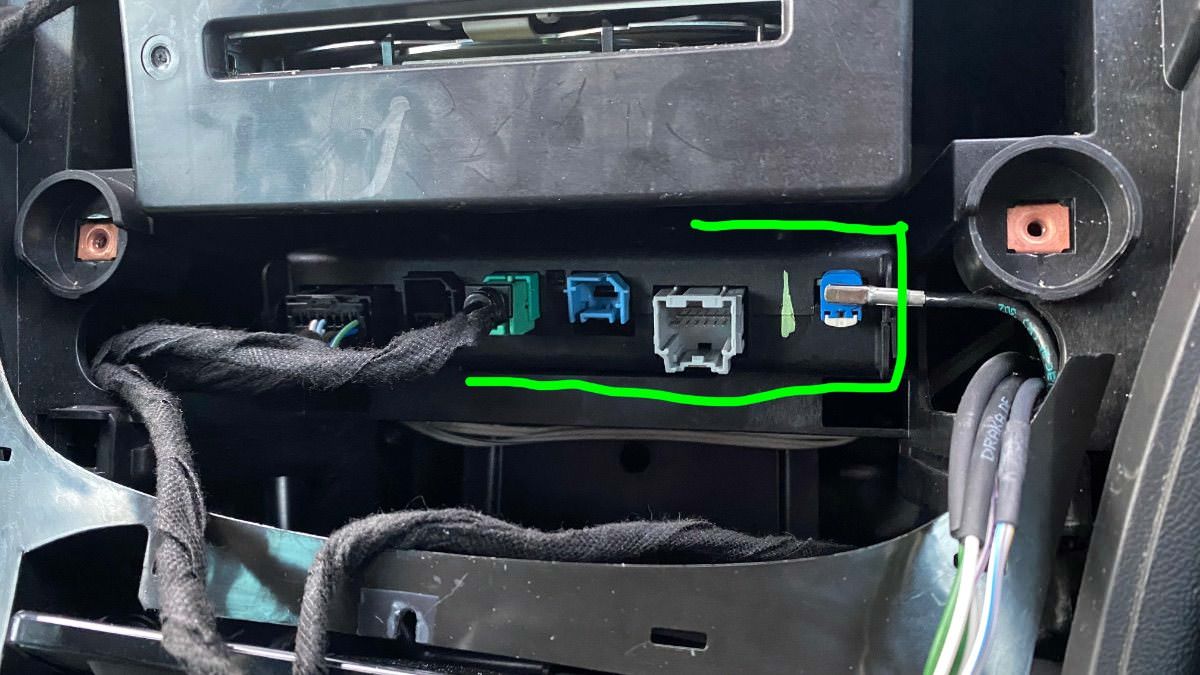
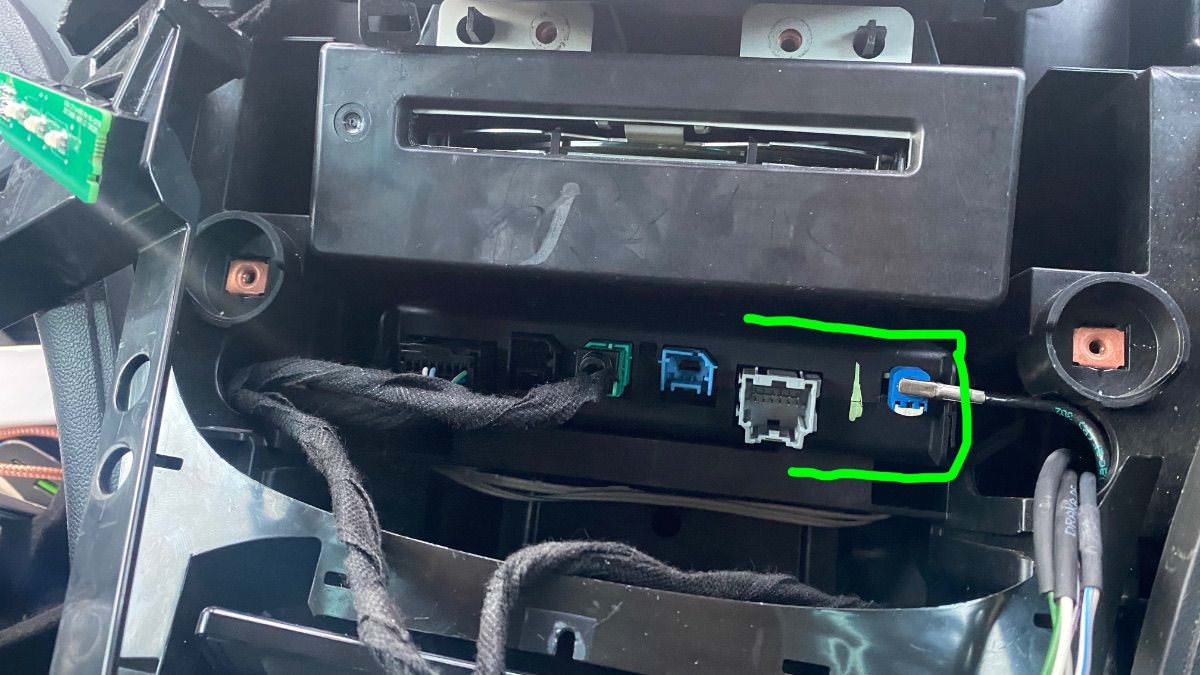
To get Apple Carplay to work, you will also need to replace your vehicle's double USB port with a single USB port.

See the photos below.


The items you will need for removing the theft lock from the HMI module:

  1. A copy of GM DPS software, preferably V4.44.

  2. My custom DPS HMI vin change file

  3. A compatible GM diagnostic interface example: VXDIAG Nano, Drew tech mongoose GM2 pro, etc. (All diagnostic interfaces that work with GM's SPS will work with GM's DPS software.


GM DPS V4.44


This file will remove the theft lock from the HMI and radio module DPS VIN Relearn file.

This is for European cars/cars that use the SilverBox Radio module.


For USA cars/cars that use the satellite radio module.


GM HMI 2.5 Activate Video In Motion, SAT-NAV In Motion, Track-Pad, Rear Camera And Climate Control Using GM DPS 

Check out this article, which demonstrates how to gain wireless Apple CarPlay and wireless Android Auto for GM vehicles that use the HMI 2.5 module.


The HMI module location and USB module you will need for Apple CarPlay.
IMG_4524.jpg

IMG_4525.jpg

IMG_4526.jpg

IMG_4533.jpg


User Feedback

Recommended Comments

Troy Grand Master

Troy

Administrator

GM Car Hacking Expert

14 minutes ago, Carfixr1977 said:

2016 Chevy Impala Radio Part# 22924536 Fujitsu Ten Limited.

The vin should be in the 8 pin soic. 

Troy Grand Master

Troy

Administrator

GM Car Hacking Expert

17 minutes ago, Carfixr1977 said:

2016 Chevy Impala Radio Part# 22924536 Fujitsu Ten Limited.

Is there a 48 pin tsop chip it that radio? 

Carfixr1977 Rising Star

Carfixr1977

Member

The OKI chip has  50 pins, the one next to it has 44 pins.

Read the soic with 24C, 93C etc,  the ones that connected all read zeros.

GM Fujitsu Radio.jpg

GM Fujitsu Radio1.jpg

Read.jpg

Arbe_gtc Rookie

+Arbe_gtc

+Contributor

GM Car Hacking Expert

  • Contributor

Hi!


I have a insignia B diesel digital cluster (configured to my astra K 1.6T), and the OPC menú not apperars... Used RPO SSC and model designator 0ZX00 Any idea? only change the theme to OPC Unlimited.

IMG_20220602_210553.thumb.jpg.2107018efc48df2ee8c13ee2a6edf168.jpg

And, after the change, in my BCM appear
s the DTC B3926: Wrong environment identifier received from instrument cluster, and in the IPC B3902, Wrong received immobilizer identifier.

Someone tell me i need change the PIN of the IPC to my car pin.... ¿Any idea? I have the original VIN from the IPC. and reading the 95160 from the board read 00 00 00 00.....
 

antek Collaborator

+antek

+Contributor
  • Contributor

You need to perform Immobilizer Re-Learn using SPS2. Remove Keys and add keys.

Arbe_gtc Rookie

+Arbe_gtc

+Contributor

GM Car Hacking Expert

  • Contributor
On 6/4/2022 at 7:49 PM, antek said:

You need to perform Immobilizer Re-Learn using SPS2. Remove Keys and add keys.

Thanks! i need change the PIN of the cluster? or, its no necesary?

and, solved the OPC menú.IMG_20220608_182939.thumb.jpg.45ca0f206dd3aa1f0ca0359964b32abf.jpg.

add this in  <ModificationItem IDREF="DID00a1">:


	  <Parameter ParamDefaultValue="01">
        <ParameterName>P_NG_PERFORMANCE_APPLICATION_ENABLE</ParameterName>
        <StartByte>13</StartByte>
        <StartBit>0</StartBit>
        <BitLength>1</BitLength>
        <ConfData useConfData="false" />
        <ServiceSection IsServiceAccessAllowed="false">
          <Interpretation Text="False" Value="00" />
          <Interpretation Text="True" Value="01" />
        </ServiceSection>
      </Parameter>


antek Collaborator

+antek

+Contributor
  • Contributor

When did my cluster I did both the PIN and the VIN.


I am not sure if the re-learn will take with different PIN. You can try.


Thanks

IARLLC Rising Star

+IARLLC

+Contributor
  • Contributor

I hope this fits in with the current subject. I tried to replace a Park Assist Module on a friend's 2017 GMC with a used one. SPS does not give the option of an update (to change the vin). It looks like it auto-learns the BCM's vin when installed new but not installed used. GDS sees it, sees the old vin and all. I just got DPS up and running. I hope that DPS can make it work.

Troy Grand Master

Troy

Administrator

GM Car Hacking Expert

1 hour ago, IARLLC said:

I hope this fits in with the current subject. I tried to replace a Park Assist Module on a friend's 2017 GMC with a used one. SPS does not give the option of an update (to change the vin). It looks like it auto-learns the BCM's vin when installed new but not installed used. GDS sees it, sees the old vin and all. I just got DPS up and running. I hope that DPS can make it work.

DPS on its own won't be able to change the VIN in the module, you will need dps vin change files.

Are you able to get the calibration files for that module?

IARLLC Rising Star

+IARLLC

+Contributor
  • Contributor
1 minute ago, Troy said:

DPS on its own won't be able to change the VIN in the module, you will need dps vin change files.

Are you able to get the calibration files for that module?

Thanks SO MUCH for responding. I've used SPS a lot for updates on PCM, TCM, ABS, PSCM, HMI, etc, etc, even changing VIN on BCM, Radio, HMI, IPC on newer custom swap applications but I could not see how to do anything with the Park Aid Module.

IARLLC Rising Star

+IARLLC

+Contributor
  • Contributor

Here is what GDS2 could tell me about it.

Park Aid Module.jpeg

IARLLC Rising Star

+IARLLC

+Contributor
  • Contributor
3 hours ago, Troy said:

It supports XML so if you can get the xml files for the module from SPS, you can use it to change the VIN in that module.

Thank you. I will see what I can do.

dmyo Enthusiast

+dmyo

+Purchaser
On 6/17/2022 at 2:11 AM, IARLLC said:

Thanks SO MUCH for responding. I've used SPS a lot for updates on PCM, TCM, ABS, PSCM, HMI, etc, etc, even changing VIN on BCM, Radio, HMI, IPC on newer custom swap applications but I could not see how to do anything with the Park Aid Module.

Conflicting information about sps , some say you cant change vin and other say you can. It seems each talk about different GM ecus

IARLLC Rising Star

+IARLLC

+Contributor
  • Contributor

Back in 2015 GM was still more accommodating and were willing to switch the exterior light control from Canada to the US in their database based on a phone call. That made it really easy with SPS to just update the BCMs to the non-DRL US external light control on a few GMC Yukon Denalis that were exported here via Canada. Then in 2017 (when GM refused to do it again) using SPS I personally changed the VINs on the BCM, Radio, and Instrument panels (in that order) of a fleet of 2017 Yukon Denalis as they were exported via Canada and the uh,,,, owner hated DRLs. I found no way to change the VIN in the Park Assist system so they went without until now. Hopefully with DPS I will finally have them beeping while backing up.


GM got more strict about what they would allow via SPS. I remember having to run them through as "replacement" rather than just update. A few of them were made after April of 2017 and there were no more updates for the radio so I ended up taking the BCMs back to original VIN. To get the SPS system to allow me to take the BCMs back to the original VIN even though they already had the most recent update I changed one of the RPO options...then switched it back. I don't know if it is even still possible to just put in a different vin during the process but I have hundreds of pictures of the process I went through back in 2017. I was so nervous during this to a brand new fleet of such expensive rigs, hard to sleep for a while. Back then you just paid $55 plus tax for 2 days of unlimmited programming. Now you get 2 years of programming on one VIN for $40 if I remember right.


I hope that crazy, stupid project helps somebody else. I wish that I had DPS back then or GM would have been more cooperative but....I did what the owner's management asked me to do.


Troy Grand Master

Troy

Administrator

GM Car Hacking Expert

4 hours ago, dmyo said:

Conflicting information about sps , some say you cant change vin and other say you can. It seems each talk about different GM ecus


With some modules, if you use sps to remove the module from the original car, you can then program those modules to other cars using sps and the used modules will learn new vin and pin. 

Arbe_gtc Rookie

+Arbe_gtc

+Contributor

GM Car Hacking Expert

  • Contributor

Hi!

somebody knows what "DID," byte, bit and length is needed to enable the red light on sport mode, the auto stop message.? like in this video?


Thanks

pupu14 Community Regular

+pupu14

+Contributor

GM Car Hacking Expert

  • Contributor

Hi, Troy!

I wanted to follow your guide and try to replace battery meter gauge with boost gauge on an 2016 Insignia A (2.0d) with large 8.0 IPC.
I think I understand all the work that needs to be done, I have all the files and DPS too. But, somehow, DPS won't even start a config process, it terminates with an error. Maybe you could give me some insight? It seems that some files may be missing..
 

Quote

Initializing Configuration Session - v4.46.6000
- XEC Library Parsing Unsuccessful
- SAX Error: unterminated start tag 'ConfigData'


Troy Grand Master

Troy

Administrator

GM Car Hacking Expert

1 hour ago, pupu14 said:

Hi, Troy!

I wanted to follow your guide and try to replace battery meter gauge with boost gauge on an 2016 Insignia A (2.0d) with large 8.0 IPC.
I think I understand all the work that needs to be done, I have all the files and DPS too. But, somehow, DPS won't even start a config process, it terminates with an error. Maybe you could give me some insight? It seems that some files may be missing..


looks like a diagnostic interface issue. 

dmyo Enthusiast

+dmyo

+Purchaser
On 5/26/2021 at 12:19 AM, Kade said:

In the first video it shows how to get your xml files, use it to add or remove RPO in the BuildRecord.xml.

Where is the video showing how to extract xml files?

Nicholas Trambitas Apprentice

+Nicholas Trambitas

+Purchaser

Yes I would like to see this as well. I want to modify my BCM config as well 

Troy Grand Master

Troy

Administrator

GM Car Hacking Expert

On 11/3/2022 at 11:28 AM, dmyo said:

Where is the video showing how to extract xml files?


5 hours ago, Nicholas Trambitas said:

Yes I would like to see this as well. I want to modify my BCM config as well 


That video was deleted due to selfish members who take the free information and knowledge, they then use it to profit and don't give nothing back. Here is one of them Selfish mr fixing. He came to this website when he needed help with his IPC, I spent my time helping him, when it was time for him to help another member with a simple issue, he wouldn't help that member.

I won't be placing that video and info back in the public viewing.

If you need that Video and info you can purchase it here from this link.


LS-Juan Apprentice

+LS-Juan

+Contributor
  • Contributor

this is a great tutorial. thank you Troy for this!

Bahiarca Rising Star

+Bahiarca

+Purchaser

Hello, what file do I need for this module?

IMG-20230427-WA0011.jpg

Troy Grand Master

Troy

Administrator

GM Car Hacking Expert

51 minutes ago, Bahiarca said:

Hello, what file do I need for this module?


Hi, for theft lock removal you need this file for European vehicles. 


Arbe_gtc Rookie

+Arbe_gtc

+Contributor

GM Car Hacking Expert

  • Contributor
On 6/8/2022 at 6:40 PM, Arbe_gtc said:

Thanks! i need change the PIN of the cluster? or, its no necesary?

and, solved the OPC menú.IMG_20220608_182939.thumb.jpg.45ca0f206dd3aa1f0ca0359964b32abf.jpg.

add this in  <ModificationItem IDREF="DID00a1">:


	  <Parameter ParamDefaultValue="01">
        <ParameterName>P_NG_PERFORMANCE_APPLICATION_ENABLE</ParameterName>
        <StartByte>13</StartByte>
        <StartBit>0</StartBit>
        <BitLength>1</BitLength>
        <ConfData useConfData="false" />
        <ServiceSection IsServiceAccessAllowed="false">
          <Interpretation Text="False" Value="00" />
          <Interpretation Text="True" Value="01" />
        </ServiceSection>
      </Parameter>


Guys, someone have archieved enable the boost pressure in UHS Info3?


And in the info3, GM has removed the OPC, VXR Logos... by this...

image.png.106771b8808a60cbae13b188019fd88f.png


photo_2023-07-05_11-37-59.jpg.f93d65d5d68487b6ae552e124fe19db2.jpg


Join the conversation

You can post now and register later. If you have an account, sign in now to post with your account.

Guest
Add a comment...

All Articles

Popular Members

  1. hassan77h
    +hassan77h
    27
  2. Troy
    Troy
    22
  3. uglyoldbastard
    +uglyoldbastard
    13
  4. regloops
    +regloops
    8
  5. GM-Enthusiast
    +GM-Enthusiast
    7

New Members

  1. David Fontenot
    David Fontenot
      Member
    Joined
  2. SSAUTOZ
    SSAUTOZ
      Member
    Joined
  3. valdemarford
    valdemarford
      Member
    Joined
  4. Course faycal khalil
    Troll-Course faycal khalil
      Troll-Troll
    Joined
  5. Troll stevie nick
    Troll-Troll stevie nick
      Troll-Troll
    Joined
  6. Troll Parkerchevy
    Troll-Troll Parkerchevy
      Troll-Troll
    Joined
  7. Hayk Vardanyan
    Hayk Vardanyan
      Member
    Joined
  8. tunedbycasco
    tunedbycasco
      Member
    Joined
  9. freehugs
    freehugs
      Member
    Joined
  10. ceberon
    ceberon
      Member
    Joined

CameraLoops™
Powered by Art
All Trademarks appearing on this website are the property of their respective owners.

Account

Navigation

Configure browser push notifications

Chrome (Android)
  1. Tap the lock icon next to the address bar.
  2. Tap Permissions → Notifications.
  3. Adjust your preference.
Chrome (Desktop)
  1. Click the padlock icon in the address bar.
  2. Select Site settings.
  3. Find Notifications and adjust your preference.