Skip to content
View in the app

A better way to browse. Learn more.

www.CameraLoops.ru

A full-screen app on your home screen with push notifications, badges and more.

To install this app on iOS and iPadOS
  1. Tap the Share icon in Safari
  2. Scroll the menu and tap Add to Home Screen.
  3. Tap Add in the top-right corner.
To install this app on Android
  1. Tap the 3-dot menu (⋮) in the top-right corner of the browser.
  2. Tap Add to Home screen or Install app.
  3. Confirm by tapping Install.

HMI theft lock, How to remove GM HMI theft lock with GM DPS, Plus more.

Welcome, one and all.

Feel free to ask any questions in the comments section for help.

Here, you will find information and files for upgrading your HMI v2 to the HMI v2.5 or replacing your HMI module with a used part.
Upgrading from HMI v2.0 to HMI v2.5 will enable Apple CarPlay, Android Auto, better SAT-NAV maps, video playback, and faster touch reaction from your touch screen.

Most of GM's electronic module car parts are security-locked to a specific car via the car's VIN number.

To install used car parts and have them functioning, you must first program your vehicle's VIN into the module.

When upgrading from the HMI v2.0 to the HMI v2.5, you must also upgrade the radio module. You can bypass the radio module upgrade by updating the firmware to v2.5 specs. (if you update the radio module firmware, you do not need to replace it)

The radio module upgrade firmware can be found below.

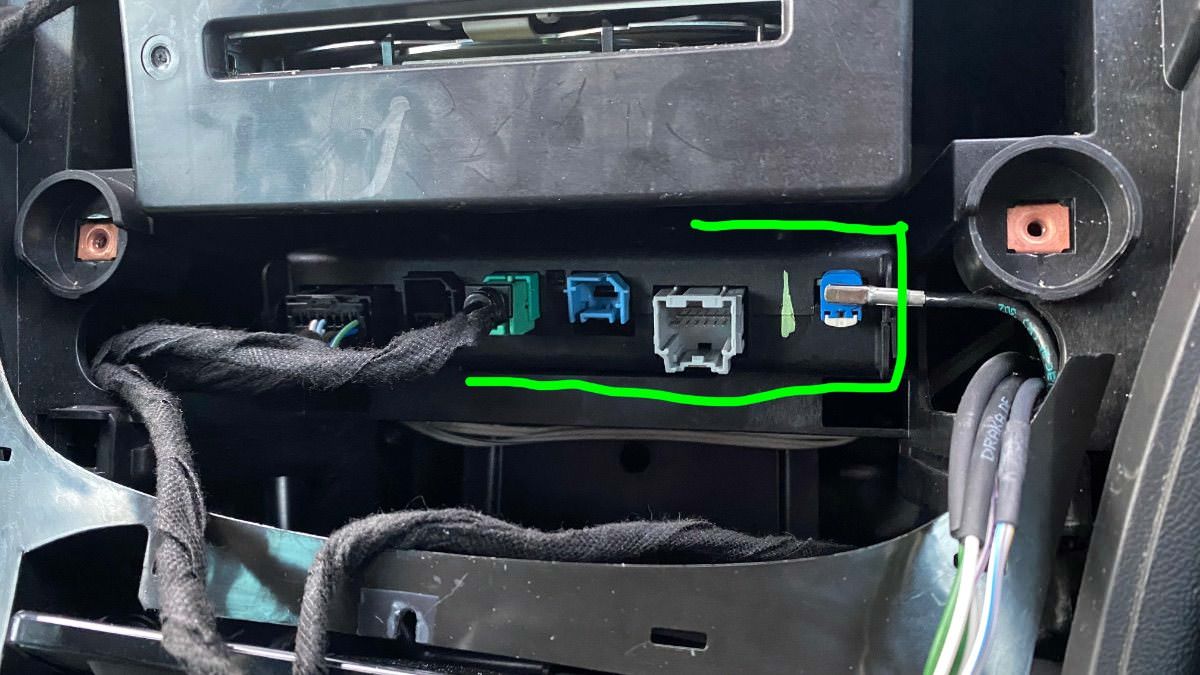
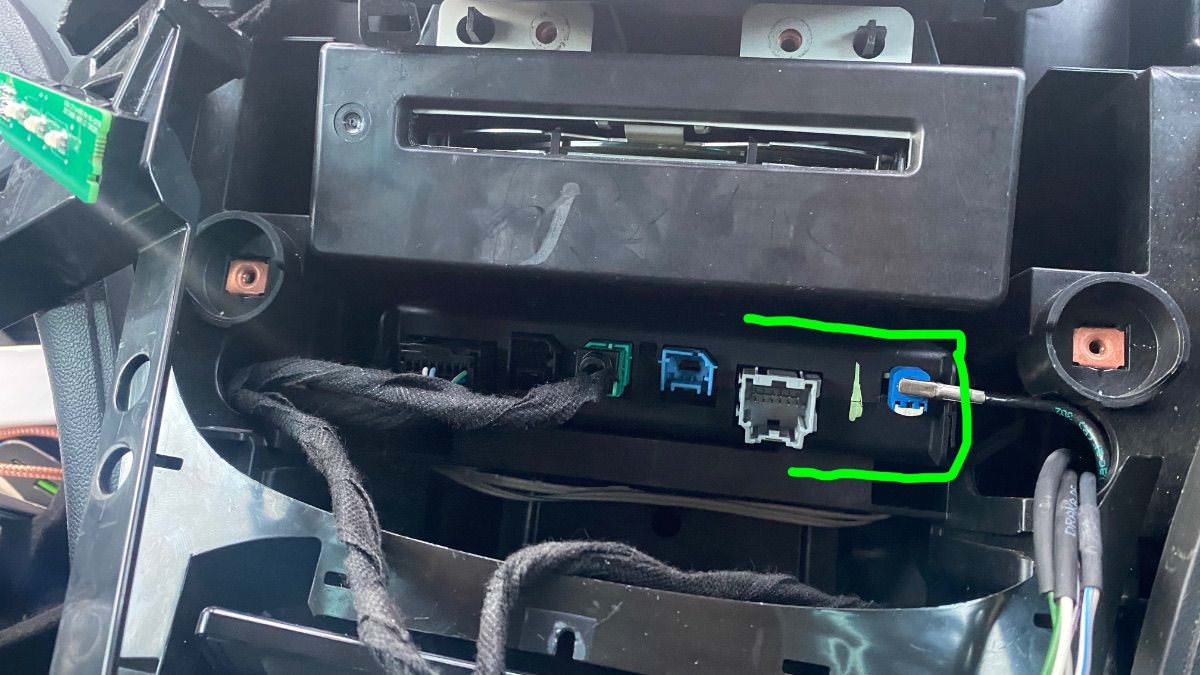
To get Apple Carplay to work, you will also need to replace your vehicle's double USB port with a single USB port.

See the photos below.


The items you will need for removing the theft lock from the HMI module:

  1. A copy of GM DPS software, preferably V4.44.

  2. My custom DPS HMI vin change file

  3. A compatible GM diagnostic interface example: VXDIAG Nano, Drew tech mongoose GM2 pro, etc. (All diagnostic interfaces that work with GM's SPS will work with GM's DPS software.


GM DPS V4.44


This file will remove the theft lock from the HMI and radio module DPS VIN Relearn file.

This is for European cars/cars that use the SilverBox Radio module.


For USA cars/cars that use the satellite radio module.


GM HMI 2.5 Activate Video In Motion, SAT-NAV In Motion, Track-Pad, Rear Camera And Climate Control Using GM DPS 

Check out this article, which demonstrates how to gain wireless Apple CarPlay and wireless Android Auto for GM vehicles that use the HMI 2.5 module.


The HMI module location and USB module you will need for Apple CarPlay.
IMG_4524.jpg

IMG_4525.jpg

IMG_4526.jpg

IMG_4533.jpg


User Feedback

Recommended Comments

Arbe_gtc Rookie

+Arbe_gtc

+Contributor

GM Car Hacking Expert

  • Contributor

Easy, from STOCK to OPC Unlimited.

Insignia A 8inch IPC

photo_2021-11-26_00-21-45.jpg

photo_2021-11-26_11-49-03.jpg

nostra Top Member

+nostra

+Purchaser

Hello Troy does the ECU address id is the same for European and American car ? If not how i can find for American car? thank you

Troy Grand Master

Troy

Administrator

GM Car Hacking Expert

5 minutes ago, nostra said:

Hello Troy does the ECU address id is the same for European and American car ? If not how i can find for American car? thank you

Yes they are the same. You can also use gds2 “module identification “ to find out the id for the modules. 

nostra Top Member

+nostra

+Purchaser

OK thank you


Troy Grand Master

Troy

Administrator

GM Car Hacking Expert

Changing vin only affects module security theft protection. It shouldn’t affects other things. 

Ernestas Community Regular

+Ernestas

+Contributor

GM Car Hacking Expert

  • Contributor
On 11/26/2021 at 10:50 AM, Arbe_gtc said:

Easy, from STOCK to OPC Unlimited.

Insignia A 8inch IPC

photo_2021-11-26_00-21-45.jpg

photo_2021-11-26_11-49-03.jpg


20220127_183340.jpg

Troy Grand Master

Troy

Administrator

GM Car Hacking Expert

2 hours ago, Ernestas said:


20220127_183340.jpg

Looks nice.

Does all the insignia IPC features shows up on that IPC, is it a strait fit? 

Arbe_gtc Rookie

+Arbe_gtc

+Contributor

GM Car Hacking Expert

  • Contributor
19 hours ago, Ernestas said:


20220127_183340.jpg

have you the xmlfile of this instrument? can you share it?

Ernestas Community Regular

+Ernestas

+Contributor

GM Car Hacking Expert

  • Contributor
19 hours ago, Troy said:

Looks nice.

Does all the insignia IPC features shows up on that IPC, is it a strait fit? 

Everything works as it should. After Vin change. Of course xml had to have few lines added to make it right hand drive as it had them missing other than that plug and play. The actual fitting is bit more complicated all come back to you on that 😄

Ernestas Community Regular

+Ernestas

+Contributor

GM Car Hacking Expert

  • Contributor
Just now, Ernestas said:

Everything works as it should. After Vin change. Of course xml had to have few lines added to make it right hand drive as it had them missing other than that plug and play. The actual fitting is bit more complicated all come back to you on that 😄

Next step to get that fitted. (I know it needs top plastic to be replaced but I paid 20£for that so..)

16433904620074728595434800655376.jpg

crakavelli Enthusiast

+crakavelli

+Contributor
  • Contributor
19 minutes ago, Ernestas said:

Everything works as it should. After Vin change. Of course xml had to have few lines added to make it right hand drive as it had them missing other than that plug and play. The actual fitting is bit more complicated all come back to you on that 😄

I installed this IPC stateside in a Cadillac ATS, a lot of cutting was involved but worth it. Also did the HUD conversion since it had the HUD port on the back, wiring is very easy once you find the connectors.

Ernestas Community Regular

+Ernestas

+Contributor

GM Car Hacking Expert

  • Contributor

Do you have hud wiring diagram?

15 minutes ago, crakavelli said:

I installed this IPC stateside in a Cadillac ATS, a lot of cutting was involved but worth it. Also did the HUD conversion since it had the HUD port on the back, wiring is very easy once you find the connectors.

Do you have hud wiring diagram?

Adam Krasuski Apprentice

+Adam Krasuski

+Purchaser

Hello. I want retrofit Opel Insignia  My14 from  HMI 2,0 to HMI 2,5. HMI 2,5  is from Opel Mokka PN 84156702. I was try to change VIN  number in HMI via  gm DPS  and   vin CHANGE.zip  file from Troy. The  programing was Successfull but i still have  Thief Protection and  old VIN in HMI. I add program Log from programing. Do you have any sugestion what I doing  wrong?Do you know  wher is  stored Vin number  in HMI ? ( D70F... , Gl512... , MCIMX...) THX.


Ernestas Community Regular

+Ernestas

+Contributor

GM Car Hacking Expert

  • Contributor

You have to get new relearn zip as old one only works for 2.0 hmi.

dmyo Enthusiast

+dmyo

+Purchaser
On 2/17/2022 at 9:48 PM, Adam Krasuski said:

Hello. I want retrofit Opel Insignia  My14 from  HMI 2,0 to HMI 2,5. HMI 2,5  is from Opel Mokka PN 84156702. I was try to change VIN  number in HMI via  gm DPS  and   vin CHANGE.zip  file from Troy. The  programing was Successfull but i still have  Thief Protection and  old VIN in HMI. I add program Log from programing. Do you have any sugestion what I doing  wrong?Do you know  wher is  stored Vin number  in HMI ? ( D70F... , Gl512... , MCIMX...) THX.

I got the same with GMC sierra 2015

Troy Grand Master

Troy

Administrator

GM Car Hacking Expert

1 hour ago, dmyo said:

I got the same with GMC sierra 2015


Activating vin relearn in the HMI using that file is sometimes temperamental.

I don't know why.

The HMI is a picky module, which relies on the BCM module for various commands before it carries out a request.

Try setting DPS to repeat the common 5 times.

Try turning off car, open car door, close car door then wait 3 minutes.


You can also use this file to relearn both the HMI2, HMI2.5 and radio module without that issue.


For USA cars 


For European cars 


Mohammadazmi9antar Rising Star

+Mohammadazmi9antar

+Purchaser

Thank you so much for this my friend. I have a 2015 Cadillac srx I replaced the HMI module because ththe screen went black. Now it's working but it says theft locked so do I use the vin relearn file only to relearn it right? Dealer can't do anything so do I know need to dps connector to be able to connect the module and relearning the vin? I have a satalite device but i only replaced the hmi. What do I have to do? Mine looks like this 

20220329_213233.jpg

20220329_213321.jpg

Troy Grand Master

Troy

Administrator

GM Car Hacking Expert

16 hours ago, Mohammadazmi9antar said:

Thank you so much for this my friend. I have a 2015 Cadillac srx I replaced the HMI module because ththe screen went black. Now it's working but it says theft locked so do I use the vin relearn file only to relearn it right? Dealer can't do anything so do I know need to dps connector to be able to connect the module and relearning the vin? I have a satalite device but i only replaced the hmi. What do I have to do? Mine looks like this 

20220329_213233.jpg

20220329_213321.jpg

Hi, if you have the satellite radio module and you want to remove the theft lock from the HMI module, you will need to use this file below.


Troy Grand Master

Troy

Administrator

GM Car Hacking Expert

17 minutes ago, AlienGius said:

Hi, I need to replace an Opel Mokka HMI 2.5, do I have to have access to SPS to carry out this procedure? I have installed DPS. In case could you provide me with the .xml file?

Hi, you can use this file to unlock your used HMI module. The DPS file will remove the theft lock from the HMI and radio module.

You don't need SPS access for the removal of the theft lock.


Mohammadazmi9antar Rising Star

+Mohammadazmi9antar

+Purchaser

My friend thank youfor replying. So if i dont need sps to remove theft lock and just use your file, then what does sps allow me to do? I thought it gives me access to all modules programming?

On gm website sps is $40 for one vin. I'm I not understanding something right 

Carfixr1977 Rising Star

Carfixr1977

Member

Hi Troy,

Do you have Vin Edit software for this radio?

Thanks

2016 Chevy Impala Radio.jpg

Troy Grand Master

Troy

Administrator

GM Car Hacking Expert

5 hours ago, Carfixr1977 said:

Hi Troy,

Do you have Vin Edit software for this radio?

Thanks

2016 Chevy Impala Radio.jpg

Hi, no I don't.


Carfixr1977 Rising Star

Carfixr1977

Member

Hi Troy,


Do you know if the Soic 8 is the eeprom or is the Vin on the micro. Thanks


Soic.jpg

Micro.jpg

Troy Grand Master

Troy

Administrator

GM Car Hacking Expert

5 hours ago, Carfixr1977 said:

Hi Troy,


Do you know if the Soic 8 is the eeprom or is the Vin on the micro. Thanks


Soic.jpg

Micro.jpg


Which specs module is that circuit board from?

Carfixr1977 Rising Star

Carfixr1977

Member

2016 Chevy Impala Radio Part# 22924536 Fujitsu Ten Limited.

Join the conversation

You can post now and register later. If you have an account, sign in now to post with your account.

Guest
Add a comment...

All Articles

Popular Members

  1. hassan77h
    +hassan77h
    27
  2. Troy
    Troy
    22
  3. uglyoldbastard
    +uglyoldbastard
    13
  4. regloops
    +regloops
    8
  5. GM-Enthusiast
    +GM-Enthusiast
    7

New Members

  1. David Fontenot
    David Fontenot
      Member
    Joined
  2. SSAUTOZ
    SSAUTOZ
      Member
    Joined
  3. valdemarford
    valdemarford
      Member
    Joined
  4. Course faycal khalil
    Troll-Course faycal khalil
      Troll-Troll
    Joined
  5. Troll stevie nick
    Troll-Troll stevie nick
      Troll-Troll
    Joined
  6. Troll Parkerchevy
    Troll-Troll Parkerchevy
      Troll-Troll
    Joined
  7. Hayk Vardanyan
    Hayk Vardanyan
      Member
    Joined
  8. tunedbycasco
    tunedbycasco
      Member
    Joined
  9. freehugs
    freehugs
      Member
    Joined
  10. ceberon
    ceberon
      Member
    Joined

CameraLoops™
Powered by Art
All Trademarks appearing on this website are the property of their respective owners.

Account

Navigation

Configure browser push notifications

Chrome (Android)
  1. Tap the lock icon next to the address bar.
  2. Tap Permissions → Notifications.
  3. Adjust your preference.
Chrome (Desktop)
  1. Click the padlock icon in the address bar.
  2. Select Site settings.
  3. Find Notifications and adjust your preference.