Skip to content
Install the CameraLoops App

Browse CameraLoops via the app. Learn more.

www.CameraLoops.ru

Use the CameraLoops full-screen app on your home screen with push notifications, badges and more.

To install the CameraLoops app on iOS and iPadOS
  1. Tap the Share icon in Safari
  2. Scroll the menu and tap Add to Home Screen.
  3. Tap Add in the top-right corner.
To install the CameraLoops app on Android
  1. Tap the 3-dot menu (⋮) in the top-right corner of the browser.
  2. Tap Add to Home screen or Install app.
  3. Confirm by tapping Install.

Type4 Odometer setup, change mileage in GM BCM modules, change mileage in IPC, Speedo

$200 -5%

$190

2 Screenshots

DPS Type4 file can be used to change the mileage in GM's BCM modules and the IPC/Speedo.

This file does not work on GM Global-B vehicles or all GM Global-A vehicles. 

The IPC and BCM must be original and compatible and have the same VIN.
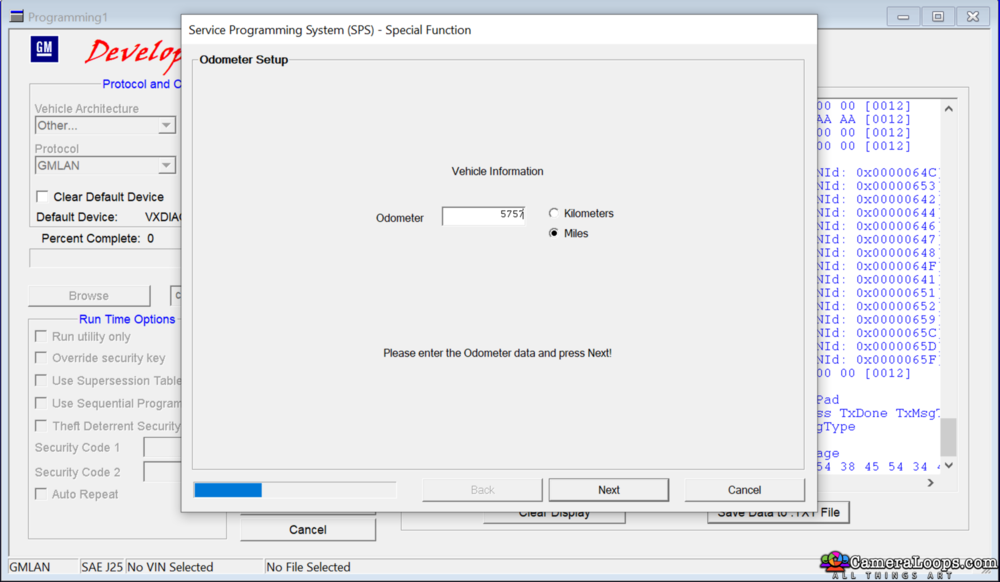
Screenshot2022-02-08at11_36_36pm.png.8c9fa41c9070b9b51bd559d9e4ff6fec.png


Play The Video.


This file works with cars that use the traditional-looking BCM module in the photo below.
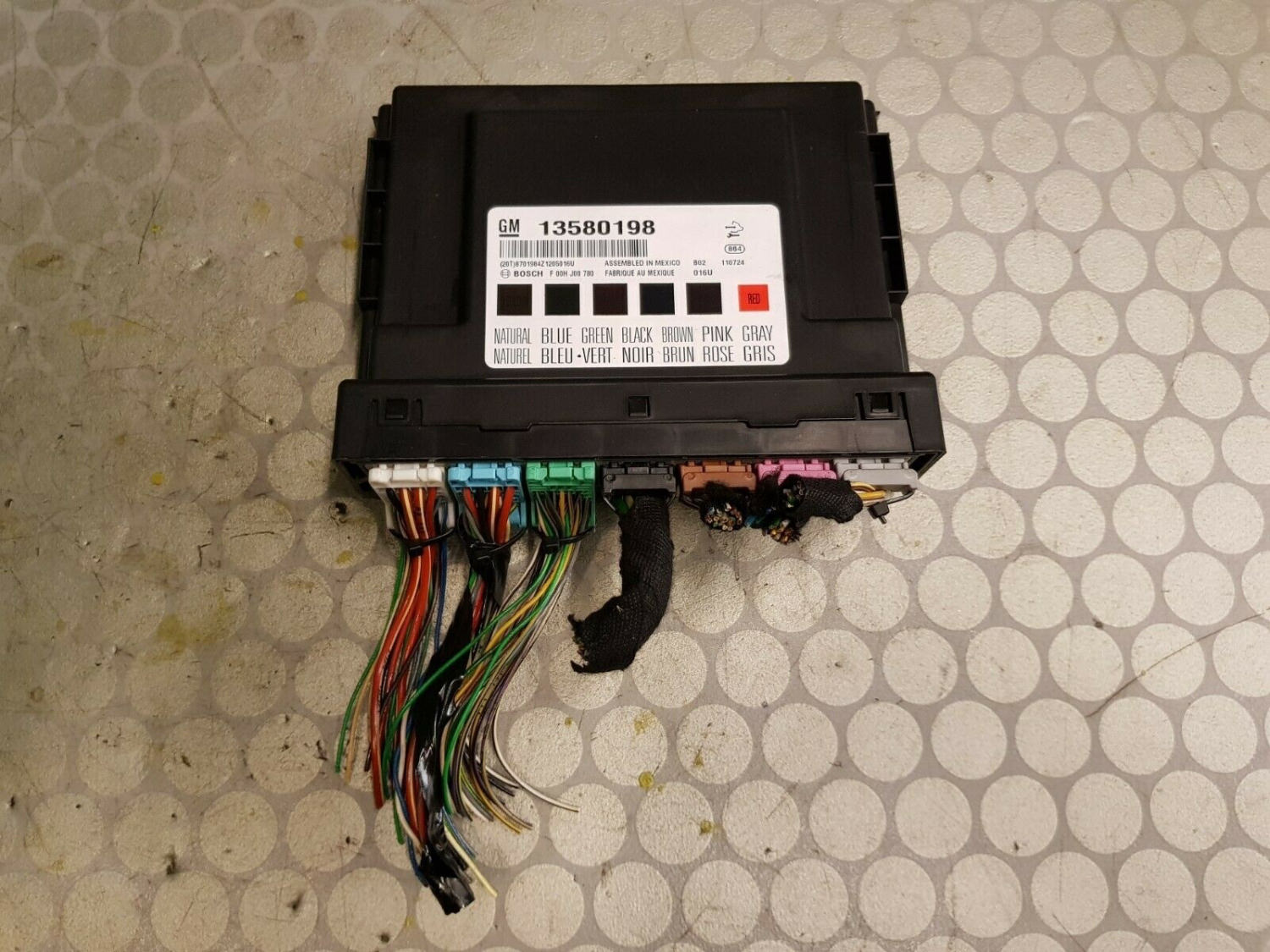
image.jpeg


Use this file to display the Type4 tab option on DPS.


User Feedback

Recommended Comments

Smash Top Member

Smash

Member

13 minutes ago, Troy said:

Have you tried it on the global-a insignia? 

I tried it at home without car, other applications were running and it gives an error. Or everything works only when connected in car? Insignia A

Troy Grand Master

Is always best to run the file in an actual vehicle and not on a bench setup. 

Smash Top Member

Smash

Member

9 minutes ago, Troy said:

Is always best to run the file in an actual vehicle and not on a bench setup. 

Ok, I'll check in the car

Modz2014 modz Rising Star

Modz2014 modz

Member

when will you work on Australia GM vehicle

warriorpluto Rising Star

+warriorpluto

+Purchaser

This worked great on an Malibu I did some work on but on my personal 2008 GMC Yukon Denali it doesn't work. It goes through the programming and then gives an error unable to unlock the ecu. I will upload the logs later when I connect again 

WLRemaps Rising Star

+WLRemaps

+Contributor

  • Contributor

@Troy will this work on a 2012 Antara?


Troy Grand Master

11 minutes ago, WLRemaps said:

@Troy will this work on a 2012 Antara?


I don't know. You will have to buy it and check.

Amplifier Apprentice

+Amplifier

+Contributor

  • Contributor

This issue only when using this Type4App (millage correction)

Astra K 2017

Type4error.jpg

Troy Grand Master

5 minutes ago, Amplifier said:

This issue only when using this Type4App (millage correction)

Astra K 2017

Type4error.jpg


"Vehicle network type is not supported by any installed J2534 Device" The issue is with your diagnostic interface. 


Amplifier Apprentice

+Amplifier

+Contributor

  • Contributor

DPS 4.48 or 4.51 the same problem...

Installed newer version for MDI

Both interfaces reads ECU Info with no problems...


But when I press NEXT button in Type4 the program crush...

DPSread.jpg

Type4crush.jpg

Troy Grand Master

The file works fine on Astra K using genuine GM MDI2, drew tech Mongoose pro GM and vxdiag nano GM.

DPS tells you the issue. It states Vehicle network type is not supported by any installed J2534 Device, which means DPS is not seeing a compatible J2534 device in your PC which supports DPS Type4 functions.

The issue is not DPS nor the type4 file. The issue is your interface.

Troy Grand Master

Get a VXdiag nano GM GDS2 diagnostic interface and try it. That interface you have is not compatible with DPS Type4

Troy Grand Master

Is your MDI interface genuine or a china clone?

Amplifier Apprentice

+Amplifier

+Contributor

  • Contributor

When I have try to run from Windows 10 - runs with no error.

But the problem is in while process - it does not give me any window to enter new value for millage.

"Next" - "Turn ignition off then on"  - "Next" - "Finish". Thats all.

Is the real problem in fast Interface coonection, which required for Global B platform?

I use the chinese MDI1, and Chipsoft Mid.

Troy Grand Master

Get a VXdiag nano GM GDS2 diagnostic interface and try it. That device works fine with DPS Type4.

Amplifier Apprentice

+Amplifier

+Contributor

  • Contributor

Just tested for Equinox 2011.

Now I can enter new value, but error depends.


Type4err.jpg

Amplifier Apprentice

+Amplifier

+Contributor

  • Contributor
44 minutes ago, Amplifier said:

Just tested for Equinox 2011.

Now I can enter new value, but error depends.


Type4err.jpg


Sorry. Just checked that all is fine. Yes, error comes, but millage in fact has been changed few times.

I had different VINs in IPC and BCM, and I have not seen the mileage.

I made the same VINs and everything is OK.

Astrafan Collaborator

ªAstrafan

ªMemberª

Hello community,

type 4 files don't work for me, dps shows it, I can select them, it starts but then dps crashes. I use an original MDI 1.


Troy Grand Master

On 7/28/2023 at 12:15 PM, Astrafan said:

Hello community,

type 4 files don't work for me, dps shows it, I can select them, it starts but then dps crashes. I use an original MDI 1.


I use Windows 10 64bit without any issues with the Type4 DLL files.

You could try installing a clean Windows 10 OS.


Type4 Dll files.


rusty2009 Enthusiast

+rusty2009

+Contributor

  • Contributor
On 7/28/2023 at 12:15 PM, Astrafan said:

Hello community,

type 4 files don't work for me, dps shows it, I can select them, it starts but then dps crashes. I use an original MDI 1.


I've been facing the same issue DPS would just close or freeze up.

I've spent the last week mucking around making all different VMware's up with all different OS's and different DPS versions.

Today I've finally got them working.

Windows 10 x64 and DPS 4.52 then used the .dll files kindly provided by Troy.

rusty2009 Enthusiast

+rusty2009

+Contributor

  • Contributor
On 7/29/2023 at 3:37 PM, rusty2009 said:

I've been facing the same issue DPS would just close or freeze up.

I've spent the last week mucking around making all different VMware's up with all different OS's and different DPS versions.

Today I've finally got them working.

Windows 10 x64 and DPS 4.52 then used the .dll files kindly provided by Troy.

Just to update further investigation has releveled the 2 .dll files Troy shared have resolved the the issue on my PC. but if you then use SPS they are overwritten and these seem to causing the issue with DPS crashing on type4.

Scannerval Rising Star

Scannerval

Member

funciona en chevrolet onix 2022???

TheMechanic Rising Star

TheMechanic

Member

Looking to do a 2021 Suburban with a Duramax. North American. Will this work? I have heard that the 2021 specifically has issues.

Troy Grand Master

4 minutes ago, TheMechanic said:

Looking to do a 2021 Suburban with a Duramax. North American. Will this work? I have heard that the 2021 specifically has issues.


The file does not work on all GM vehicles. You would have to buy it and then try it.

TheMechanic Rising Star

TheMechanic

Member

I guess that answers my question.

Join the conversation

You can post now and register later. If you have an account, sign in now to post with your account.

Guest
Add a comment...

Other files from Troy


CameraLoops™
Powered by Art
All Trademarks appearing on this website are the property of their respective owners.

Account

Navigation

Configure browser push notifications

Chrome (Android)
  1. Tap the lock icon next to the address bar.
  2. Tap Permissions → Notifications.
  3. Adjust your preference.
Chrome (Desktop)
  1. Click the padlock icon in the address bar.
  2. Select Site settings.
  3. Find Notifications and adjust your preference.
CameraLoops members who viewed this content
David Fontenot Cleberson Santos Ciprian Mateiuc Thamer Mo miltonautomotive Lyubomir Krastanov Thestonedone chicking fahd DanielGuzman Dallas Texas Stanleyyy Siarhei Beliashchuk Teklock marcos alpino alexandre zph666 mohammed Qays jawad alaa_bastaki Arbe_gtc Camelot