Skip to content
Install the CameraLoops App

Browse CameraLoops via the app. Learn more.

www.CameraLoops.ru

Use the CameraLoops full-screen app on your home screen with push notifications, badges and more.

To install the CameraLoops app on iOS and iPadOS
  1. Tap the Share icon in Safari
  2. Scroll the menu and tap Add to Home Screen.
  3. Tap Add in the top-right corner.
To install the CameraLoops app on Android
  1. Tap the 3-dot menu (⋮) in the top-right corner of the browser.
  2. Tap Add to Home screen or Install app.
  3. Confirm by tapping Install.

Type4 Odometer setup, change mileage in GM BCM modules, change mileage in IPC, Speedo

$200 -5%

$190

2 Screenshots

DPS Type4 file can be used to change the mileage in GM's BCM modules and the IPC/Speedo.

This file does not work on GM Global-B vehicles or all GM Global-A vehicles. 

The IPC and BCM must be original and compatible and have the same VIN.
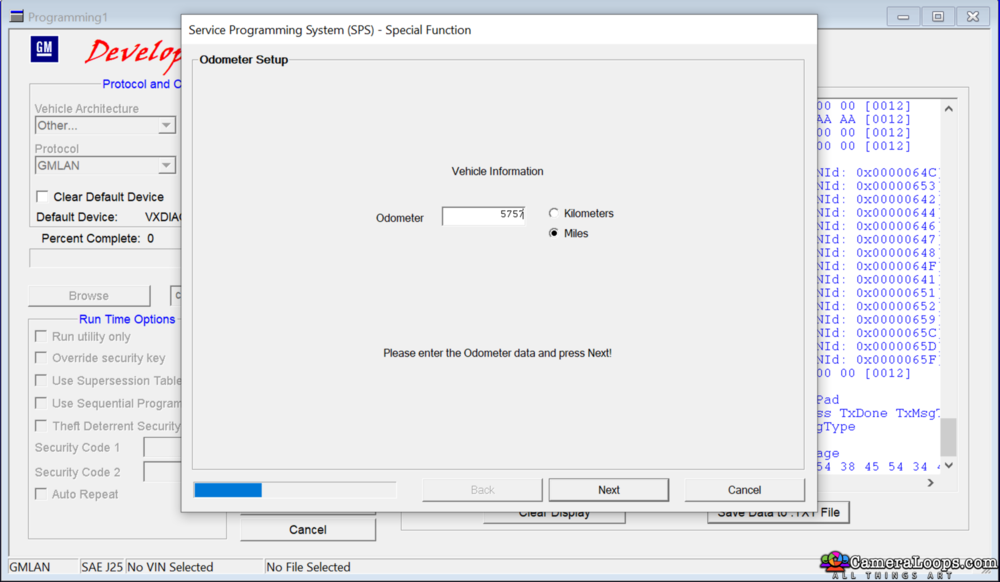
Screenshot2022-02-08at11_36_36pm.png.8c9fa41c9070b9b51bd559d9e4ff6fec.png


Play The Video.


This file works with cars that use the traditional-looking BCM module in the photo below.
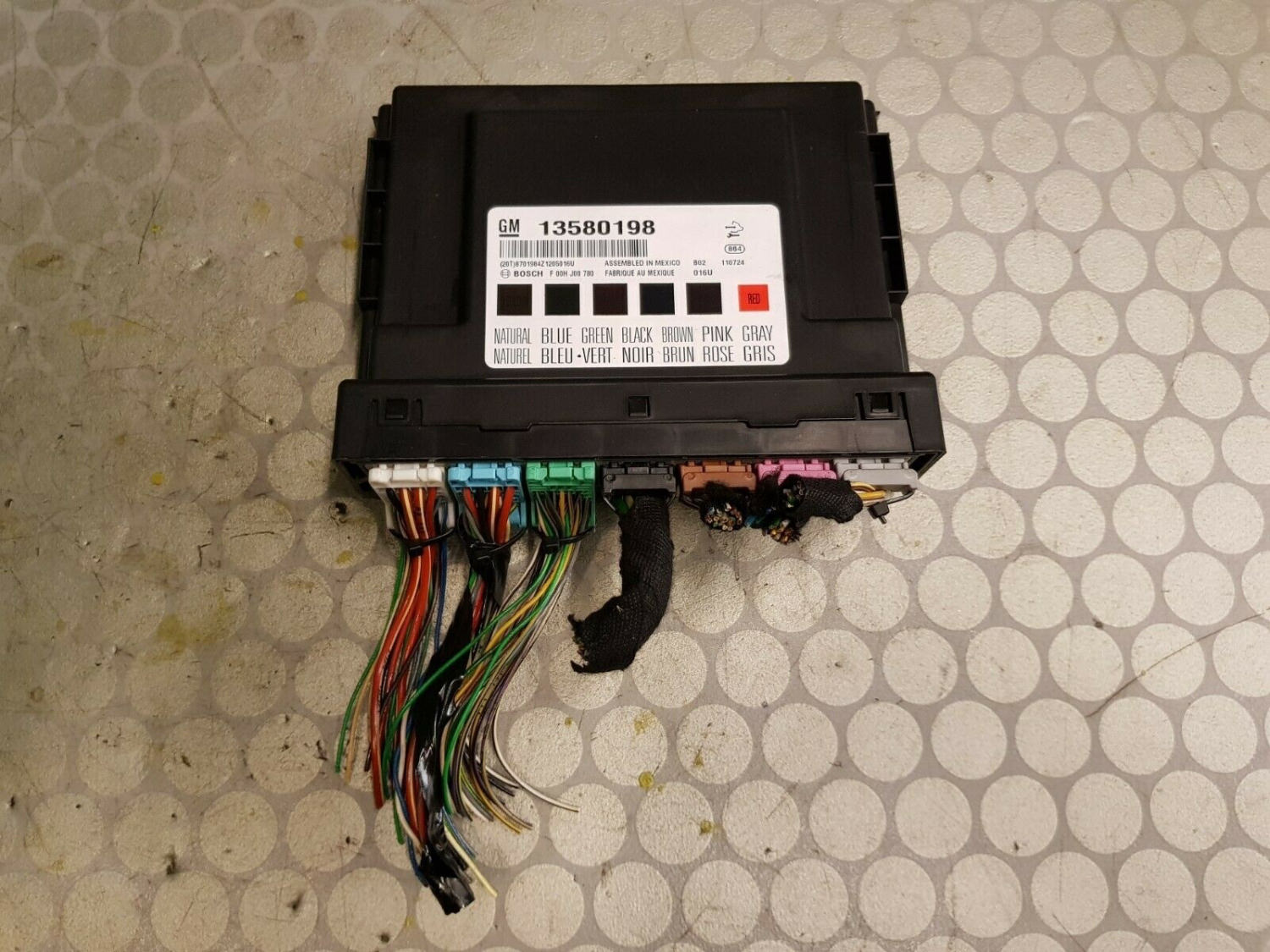
image.jpeg


Use this file to display the Type4 tab option on DPS.


User Feedback

Recommended Comments

Opel_driver Apprentice

+Opel_driver

+Contributor

  • Contributor

It works great, thanks

med458 Enthusiast

+med458

+Contributor

  • Contributor

Hi this looks great will it work for north america cars?  Thank you.

Troy Grand Master

3 hours ago, med458 said:

Hi this looks great will it work for north america cars?  Thank you.

Hi, yes it works on North American, EU and Middle East GM cars.

mohamad Apprentice

+mohamad

+Contributor

  • Contributor

hi i want ask about type 4 application i can not see on dps software , can you help me ihave v 4 4.46.6000

Troy Grand Master

1 hour ago, mohamad said:

hi i want ask about type 4 application i can not see on dps software , can you help me ihave v 4 4.46.6000


In the DPS pdf user guide manual, under Type4 it states this "Most DPS users will never see this button displayed because there are some unique dependencies." 

I don't know what those dependencies are. It seems the type4 option displaying depends on PC OS or machine specs.

Try installing DPS on a different machine.

WELLINGTON CAETANO Enthusiast

+WELLINGTON CAETANO

+Contributor

  • Contributor

hello , this file makes the vehicles of Brazil ?
vehicles year 2022 that came out with a new bcm.

Troy Grand Master

On 2/27/2022 at 6:18 PM, WELLINGTON CAETANO said:

hello , this file makes the vehicles of Brazil ?
vehicles year 2022 that came out with a new bcm.

Hi, this file will work on GM global A Brazil cars.

nostra Top Member

+nostra

+Purchaser

Thank you for your excelent work Troy and for your sharing.

Troy Grand Master

11 hours ago, nostra said:

Thank you for your excelent work Troy and for your sharing.

Hi, thanks, and thank you for your support.

mytunes Rising Star

+mytunes

+Purchaser

Thanks again Troy, will work on NA trucks 2014-2022?


Amazing work as usual

Axel Bro Rising Star

+Axel Bro

+Purchaser

What it takes to have this file working? Is there any tutorial for installation?   Thanks


Troy Grand Master

On 4/10/2022 at 4:25 AM, mytunes said:

Thanks again Troy, will work on NA trucks 2014-2022?


Amazing work as usual


Not sure about 2022 vehicles, 


2 minutes ago, Axel Bro said:

What it takes to have this file working? Is there any tutorial for installation?   Thanks


That file is a type4 app for dps.

You need DPS and you need to have GM SPS Techline connect application fully install and working for the type 4 files to function in DPS.


Jules Patch Rising Star

ªJules Patch

ªMemberª

you think it would work on 2021 silverados?

Lyubomir Krastanov Rookie

+Lyubomir Krastanov

+Contributor

  • Contributor

Work with small bug or may be my setup is have issue. When write mileage always write 1 mile less. And even write mileage show me error at end. Anyway in general work. As well get some of info in what cases Type4 button is missing or is greyed out. Will be interesting to learn how to build packages for personal purposes because is many more learn function. 

Troy Grand Master

On 5/3/2022 at 9:07 AM, Jules Patch said:

you think it would work on 2021 silverados?


I don't know for sure.


14 hours ago, Lyubomir Krastanov said:

Work with small bug or may be my setup is have issue. When write mileage always write 1 mile less. And even write mileage show me error at end. Anyway in general work. As well get some of info in what cases Type4 button is missing or is greyed out. Will be interesting to learn how to build packages for personal purposes because is many more learn function. 


Yes it always write mileage 1 mile less, just add 1 mile to the amount you need and it will program the correct mileage amount.

No errors here when using the the type 4 option. My machine is MacBook Pro 2019 running window 10 in parallels virtual machine.

Lyubomir Krastanov Rookie

+Lyubomir Krastanov

+Contributor

  • Contributor

@Troy may be make conflict with any software installed on my tablet. Even error is work. Will be interesting to share when you decide, how to make Type4 apps. I have rough idea, but have no time to test. About missing Type4 button found some reason why. One is at least once need to have starter SPS session to create SPS folder with libraries and other dll's. Not see greyed button, but should be any of these missing may be. As example - cut your SPS folder from User folder and move temp to desktop and open DPS - Type4 button will gone, when put folder back will come and will be active.


Regards

Troy Grand Master

13 hours ago, Lyubomir Krastanov said:

@Troy may be make conflict with any software installed on my tablet. Even error is work. Will be interesting to share when you decide, how to make Type4 apps. I have rough idea, but have no time to test. About missing Type4 button found some reason why. One is at least once need to have starter SPS session to create SPS folder with libraries and other dll's. Not see greyed button, but should be any of these missing may be. As example - cut your SPS folder from User folder and move temp to desktop and open DPS - Type4 button will gone, when put folder back will come and will be active.


Regards


Thanks for that tip. I rounded it down to the files DPS needs to display the Type4 option.


Lyubomir Krastanov Rookie

+Lyubomir Krastanov

+Contributor

  • Contributor

I just discover where require that folder, but not dig deeper what is required files from it 🙂 for me is easy, just to login once to SPS, or keep copy of whole folder if install to someone else. So because most people never use SPS and they no have folder, they should create these folders manually 🙂 or just zip these files in SPS/ nativelibs/ and when they unzip to paste whole folder in User directory. Or make these dll's in exe and when been executed  to create necessary folders in correct location. Is many options

strtrans Rising Star

+strtrans

+Purchaser

Hi Everyone

I'm trying to use this on a 2020 Silverado, and I get the error that the BCM cannot be unlocked. Does that mean it will not work on this truck or am I doing something wrong?

Thanks

strtrans Rising Star

+strtrans

+Purchaser

Hi Troy

It is global A. I don't think the Silverado went to global B till 2022.

Thanks

Flex_user Collaborator

+Flex_user

+Contributor

  • Contributor

This is a MUST have,  after doing a BCM or IPC swap. Worked great. Thanks 

Camaro2022 Rising Star

+Camaro2022

+Purchaser

Works for corvette 2015

0C7C089A-4A12-4BC8-A33A-185F5EFC6B74.jpeg46B22A3C-45B0-4752-92B2-9F86EC17ED72.jpeg


Smash Top Member

Smash

Member

Has anyone had a similar problem? the other apps work correctly.

1677679648255..jpg

Troy Grand Master

1 minute ago, Smash said:

Has anyone had a similar problem? the other apps work correctly.

1677679648255..jpg

Have you tried it on the global-a insignia? 

Join the conversation

You can post now and register later. If you have an account, sign in now to post with your account.

Guest
Add a comment...

Other files from Troy


CameraLoops™
Powered by Art
All Trademarks appearing on this website are the property of their respective owners.

Account

Navigation

Configure browser push notifications

Chrome (Android)
  1. Tap the lock icon next to the address bar.
  2. Tap Permissions → Notifications.
  3. Adjust your preference.
Chrome (Desktop)
  1. Click the padlock icon in the address bar.
  2. Select Site settings.
  3. Find Notifications and adjust your preference.
CameraLoops members who viewed this content
David Fontenot Cleberson Santos Ciprian Mateiuc Thamer Mo miltonautomotive Lyubomir Krastanov Thestonedone chicking fahd DanielGuzman Dallas Texas Stanleyyy Siarhei Beliashchuk Teklock marcos alpino alexandre zph666 mohammed Qays jawad alaa_bastaki Arbe_gtc Camelot