Skip to content
Install the CameraLoops App

Browse CameraLoops via the app. Learn more.

www.CameraLoops.ru

Use the CameraLoops full-screen app on your home screen with push notifications, badges and more.

To install the CameraLoops app on iOS and iPadOS
  1. Tap the Share icon in Safari
  2. Scroll the menu and tap Add to Home Screen.
  3. Tap Add in the top-right corner.
To install the CameraLoops app on Android
  1. Tap the 3-dot menu (⋮) in the top-right corner of the browser.
  2. Tap Add to Home screen or Install app.
  3. Confirm by tapping Install.

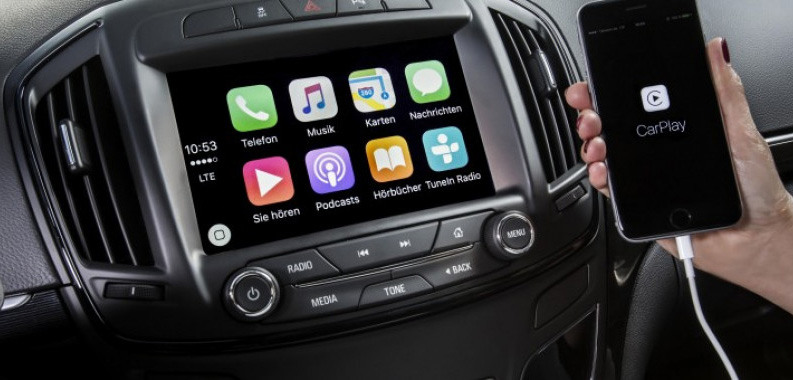
HMI 2.5 Firmware 84131943. Adds Apple CarPlay and Android Auto (For North American HMI 2.5 module)

1 Screenshot

Opel-IntelliLink-For-Insignia-720x340-1140x38000.jpg

Important Note:

This HMI 2.5 module firmware is only compatible with GM vehicles in the North American market. It is not compatible with the HMI 2.5 module in GM vehicles in the European market.

The Firmware file for the European market GM vehicles HMI 2.5 module can be found at this Web-Link.

Mega link for HMI 2.5 Firmware file 84131943.

You can use this firmware file to update the HMI 2.5 module via a USB stick, which will add the Apple CarPlay and Android Auto features.

This file does not remove the theft lock from the HMI module.

Click here for the HMI 2.0 and HMI 2.5 theft-lock removal DPS file for North America Satellite radio.

Click here for the HMI 2.0 and HMI 2.5 theft-lock removal DPS file for the Europe SilverBox radio.


After completing the HMI 2.5 firmware update, you will see "calibrate Device" showing on the screen. You can use one of the three options below to remove the "calibrate Device" notification and have the HMI module functioning again.

  1. You will need to use the GM SPS service with a VIN number from a car that has the HMI 2.5 and all the necessary features activated to program your HMI module.

  2. Program the HMI with a DPS archive made for the HMI 2.5

  3. Use these files to program the HMI after a firmware update to Activate video in motion, RVS guide-lines and RVS always on for GM vehicles.

How to install the Firmware:

1. Extract the contents of the file onto a reputable USB stick.

2. Insert the USB stick into the vehicle's USB port.

3. Follow the onscreen instructions.


Check out this article, which demonstrates how to gain wireless Apple CarPlay and wireless Android Auto for GM vehicles that use the HMI 2.5 module.

User Feedback

Recommended Comments

choi Rising Star

+choi

+Purchaser

When I put the file in the USB and connected it to it, it said, "Invalid update file.
The update file below is not valid: 84156702.mnf" and does not proceed with the update.

Can you please let me know what the problem is

choi Rising Star

+choi

+Purchaser

The vehicle is a 2016 Impala, and the VIN is 1G1155SA7GU134038.
This is NG 2.5 HMI IO5 84028491.

C-Lo Apprentice

+C-Lo

+Contributor

  • Contributor

This firmware update comes from a Cadillac XTS hybrid; it's not a generic firmware update. I figured it out after I flashed my 2016 Chevy Silverado LT (Non-Bose); see the photos.

PXL_20251201_050300504.jpgPXL_20251201_053458413.MP.jpgPXL_20251205_050812864.jpgPXL_20251205_050816599.jpgPXL_20251205_050820167.jpgPXL_20251205_050826105.jpg

C-Lo Apprentice

+C-Lo

+Contributor

  • Contributor
On 10/22/2025 at 3:56 AM, choi said:

When I put the file in the USB and connected it to it, it said, "Invalid update file.
The update file below is not valid: 84156702.mnf" and does not proceed with the update.

Can you please let me know what the problem is

How did you extract the files in the USB?

All these files need to be in the root of the USB 

image.png

Troy Grand Master

8 minutes ago, Carlos Cuevas said:

This firmware update comes from a Cadillac XTS hybrid; it's not a generic firmware update. I figured it out after I flashed my 2016 Chevy Silverado LT (Non-Bose); see the photos.

PXL_20251201_050300504.jpgPXL_20251201_053458413.MP.jpgPXL_20251205_050812864.jpgPXL_20251205_050816599.jpgPXL_20251205_050820167.jpgPXL_20251205_050826105.jpg

Did you program the Cadillac XTS hybrid calibration file to the HMI after the firmware update?

C-Lo Apprentice

+C-Lo

+Contributor

  • Contributor
32 minutes ago, Troy said:

Did you program the Cadillac XTS hybrid calibration file to the HMI after the firmware update?

No, I wouldn't even know how to get calibration files or how to flash it. I am happy it flashed, but the message keeps coming up when I shut off and turn the truck.

Troy Grand Master

43 minutes ago, C-Lo said:

No, I wouldn't even know how to get calibration files or how to flash it. I am happy it flashed, but the message keeps coming up when I shut off and turn the truck.

After a firmware update, you must program the HMI again via SPS or DPS.

GM-Enthusiast Mentor

+GM-Enthusiast

+Contributor

  • Contributor

program your hmi by sps, save calibration file, remove calibration 4,5,6,and 9, replace calibration from 2018 impala by 4, 5, 6, and 9 calibration, convert to dpconvert to dps file and write.

84080584.bin 23458593.bin 23458627.bin 23458601.bin


Car Hacking Services I Provide For General Motors Vehicles.

  • GM Remote Diagnosing and Troubleshooting
  • All GM Modules Programming
  • GM ECM/TCM Tuning
  • Auto Mechanic Workshop
C-Lo Apprentice

+C-Lo

+Contributor

  • Contributor
On 12/4/2025 at 11:22 PM, GM-Enthusiast said:

program your hmi by sps, save calibration file, remove calibration 4,5,6,and 9, replace calibration from 2018 impala by 4, 5, 6, and 9 calibration, convert to dpconvert to dps file and write.

84080584.bin 23458593.bin 23458627.bin 23458601.bin

Sorry for asking, but I'm fairly new and still figuring out everything. Is there a tutorial on how to save the calibration files?

GM-Enthusiast Mentor

+GM-Enthusiast

+Contributor

  • Contributor

Local Disk C.
Users
Select name of user
sps
spsCache
spsCacheInternal
save file , check date if have mix calibration on the folder


Car Hacking Services I Provide For General Motors Vehicles.

  • GM Remote Diagnosing and Troubleshooting
  • All GM Modules Programming
  • GM ECM/TCM Tuning
  • Auto Mechanic Workshop
C-Lo Apprentice

+C-Lo

+Contributor

  • Contributor
On 12/14/2025 at 11:46 PM, GM-Enthusiast said:

Local Disk C.
Users
Select name of user
sps
spsCache
spsCacheInternal
save file , check date if have mix calibration on the folder

thanks for the info. is there a specific software i need to edit the calibration files

Alain Apprentice

Alain

Member

Hi , does that file work on chevy equinox 2018 and is the hmi number have to be absolutely 84131943 ? thank you

theogpt Rising Star

theogpt

Member

After completing the HMI 2.5 firmware update, you will see "calibrate Device" showing on the screen. You can use one of the three options below to remove the "calibrate Device" notification and have the HMI module functioning again.

1- You will need to use the GM SPS service with a VIN number from a car that has the HMI 2.5 and all the necessary features activated to program your HMI module.

I have SPS2 to program the HMI 2.5 but I am just confused in this step. "VIN Number from a car that has the HMI 2.5" does this mean the VIN number from the car that the used HMI 2.5 came from or the car that we just installed to? In my case I just did a HMI 2.5 upgrade, installed the module and will purchase the VIN change files from here soon. Then I want to use these files to activate the options but not sure what VIN to use on SPS2 to program the car as the last step.

Join the conversation

You can post now and register later. If you have an account, sign in now to post with your account.

Guest
Add a comment...

Other files from Troy


CameraLoops™
Powered by Art
All Trademarks appearing on this website are the property of their respective owners.

Account

Navigation

Configure browser push notifications

Chrome (Android)
  1. Tap the lock icon next to the address bar.
  2. Tap Permissions → Notifications.
  3. Adjust your preference.
Chrome (Desktop)
  1. Click the padlock icon in the address bar.
  2. Select Site settings.
  3. Find Notifications and adjust your preference.
CameraLoops members who viewed this content
Pedro Pica BaldPunk FunWithHMI Miragui RubenTX mohammed Qays jawad bajad acff Axioma Raed_raed thxx bekooly Alpha Mitchell Trotter spadesbrian Wojtek tejiera Alain Matthew Alt Mirza Mujakovic