











Important Note:
This HMI 2.5 module firmware is only compatible with GM vehicles in the China, Macau, Hongkong, Taiwan, Japan, Korea, Singapur, market. It is not compatible with the HMI 2.5 module in GM vehicles in the European or North American market.
The Firmware file for the European market GM vehicles HMI 2.5 module can be found at this Web-Link.
The Firmware file for the North American market GM vehicles HMI 2.5 module can be found at this Web-Link.
Mega link for HMI 2.5 Firmware file 84156700.mnf/84156708.smd FOR IO5 (No integrated NAVIGATION)
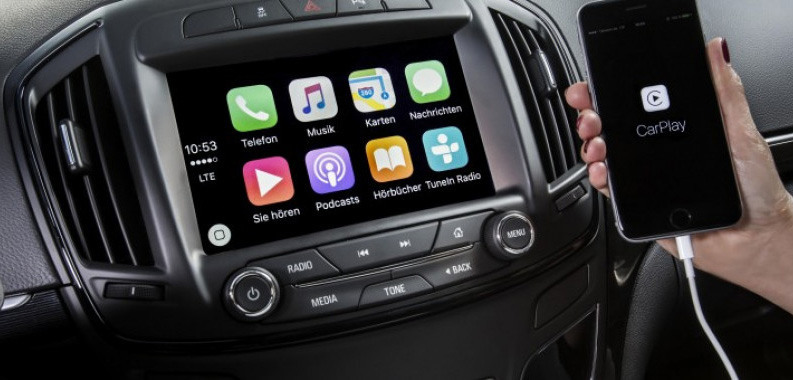
You can use this firmware file to update the HMI 2.5 module via a USB stick, which will add the Apple CarPlay and Android Auto features.
This file does not remove the theft lock from the HMI module.
After completing the HMI 2.5 firmware update, you will see "calibrate Device" showing on the screen. You can use one of the next options below to remove the "calibrate Device" notification and have the HMI module functioning again.
You will need to use the GM SPS service with a VIN number from a car that has the HMI 2.5 and all the necessary features activated to program your HMI module.
How to install the Firmware:
1. Extract the contents of the file onto a reputable USB stick.
2. Insert the USB stick into the vehicle's USB port.
3. Follow the onscreen instructions.
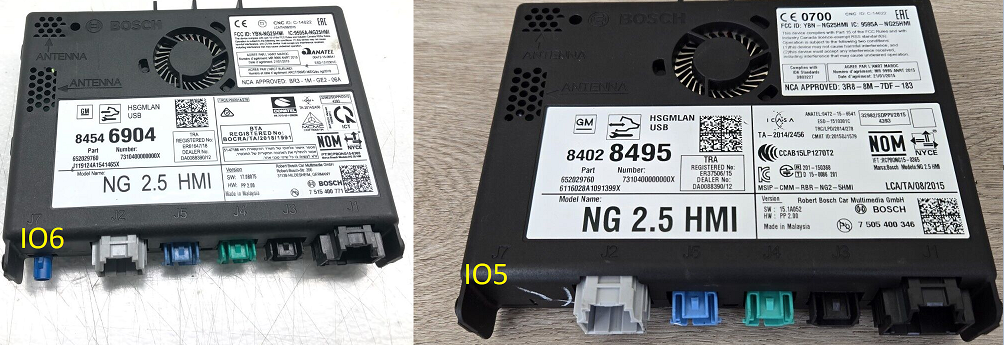
Differences between IO5 and IO6:
The blue GPS antenna plug in the module
IO5: Without blue plug (No integrated NAV)
IO6: With Blue plug (Integrated Nav)
-
 10
10
-
 1
1
-
 3
3





















Recommended Comments
Join the conversation
You can post now and register later. If you have an account, sign in now to post with your account.