Skip to content
Install the CameraLoops App

Browse CameraLoops via the app. Learn more.

www.CameraLoops.ru

Use the CameraLoops full-screen app on your home screen with push notifications, badges and more.

To install the CameraLoops app on iOS and iPadOS
  1. Tap the Share icon in Safari
  2. Scroll the menu and tap Add to Home Screen.
  3. Tap Add in the top-right corner.
To install the CameraLoops app on Android
  1. Tap the 3-dot menu (⋮) in the top-right corner of the browser.
  2. Tap Add to Home screen or Install app.
  3. Confirm by tapping Install.

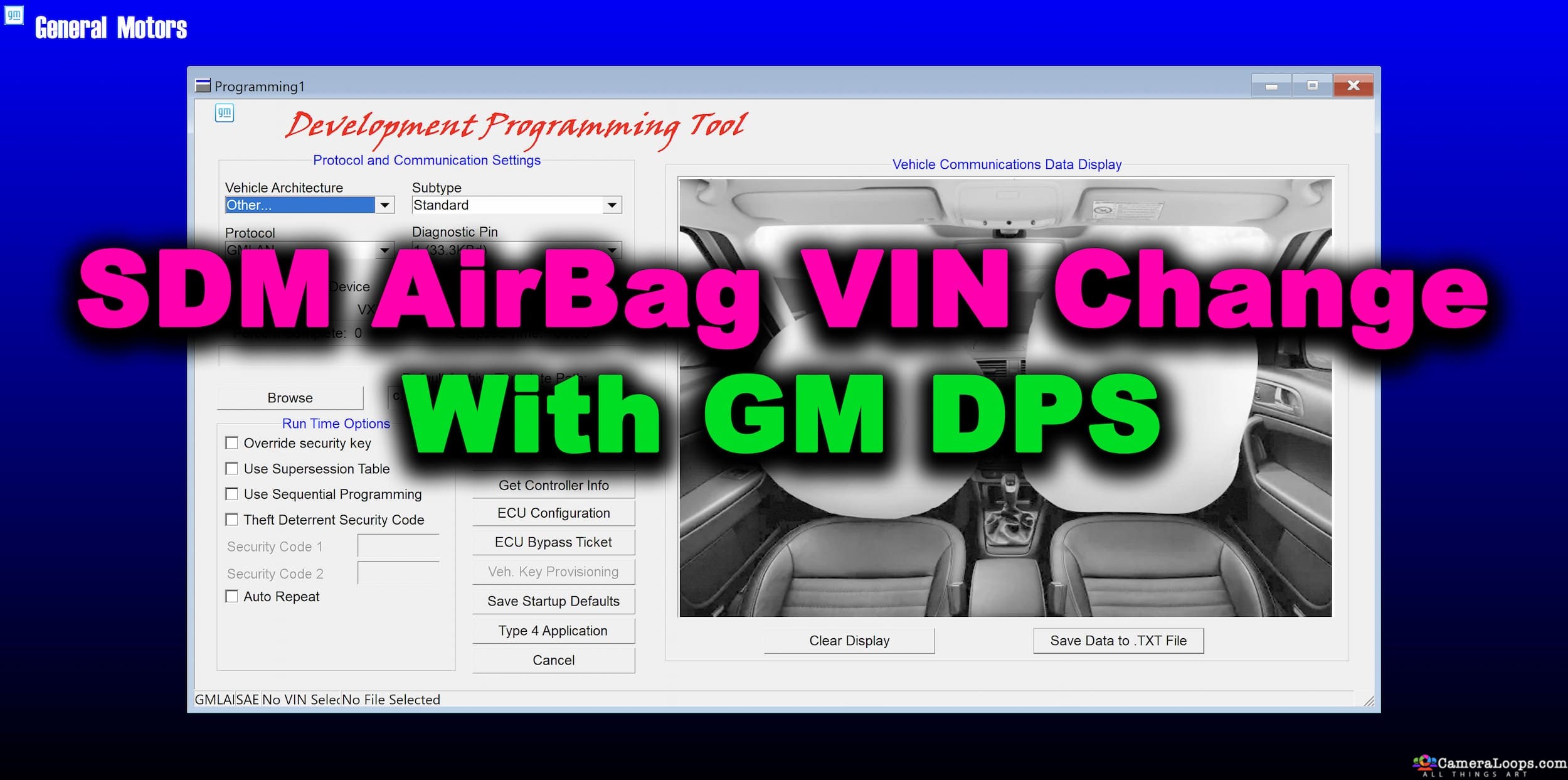
SDM AirBag VIN Change 2 Bytes seed

$100

1 Screenshot

You can use this DPS file to change the VIN in GM Global-A cars SDM AirBag module that uses the 2-byte seed.

For Insignia-A and Buick Regal 2-byte seed SDM.

Note: Some SDM installed in GM vehicles do not allow VIN change, particularly in the Chevrolet Malibu, Impala 2015.


Play the video to see the process.

https://cameraloops.ru/uploads/videos/sdm_vin_change.mp4


How to identify GM 2 and 5 byte seed.jpg

User Feedback

Recommended Comments

loadandgo Rising Star

+loadandgo

+Purchaser

tried this on Commodorre VE and wouldnt work. 

Troy Grand Master

29 minutes ago, loadandgo said:

tried this on Commodorre VE and wouldnt work. 


As stated on the file listing before you bought it, "Note: Some SDM installed in GM vehicles do not allow VIN change"

loadandgo Rising Star

+loadandgo

+Purchaser

i wasnt asking for a refund mate. just letting people know not to try it for the specific vehicle as it wouldnt work.

Troy Grand Master

The problem is with that type of SDM. From the logs, it did not allow the VIN change process to run. The only way to know more is by getting the calibration files from GM and then inspecting the calibration files to see the coding process. The SDM is the only module that the VIN and PIN change file will work between models except for the Chevrolet Malibu. On the Malibu, the VIN change process will run to the end, but the VIN will not change due to GM blocking VIN change command in the Malibu SDM firmware. The same file you bought will work 100% on Insignia, Buick, other Chevy, GMC etc.  Without having the calibration files for your SDM I won't be able to figure out the issue.

Tyler Kummer Rising Star

+Tyler Kummer

+Purchaser

Not working on 2013 Buick Lacrosse.


Troy Grand Master

37 minutes ago, Tyler Kummer said:

Not working on 2013 Buick Lacrosse.


The file is sending the correct commands to the SDM. However, the SDM response with this code 7F 3B 22 which means this SDM firmware doesn't allow VIN change. Not all GM SDM VINs can be changed, especially in Malibu and others. This same file will work on other GM 2-Byte seed SDM, but not all of them.

Lister Llanes Enthusiast

+Lister Llanes

+Contributor

  • Contributor

Not working in a 2016 CHEVY CRUZE.

VIN CHANGED, but option configuration on. 

image.png

Troy Grand Master

I don't fully understand. Did you change both the VIN and PIN in the SDM? 

Lister Llanes Enthusiast

+Lister Llanes

+Contributor

  • Contributor
2 minutes ago, Troy said:

I don't fully understand. Did you change both the VIN and PIN in the SDM? 

VIN only so far. PIN has to be changed also?

Troy Grand Master

Yes, without a PIN change, you cannot program the keys with SPS.


More info here.

.

Lister Llanes Enthusiast

+Lister Llanes

+Contributor

  • Contributor

I have got good news for you, my friend.

I just did the VIN programming, as you shown, and I did the PIN in the BCM through Techline (did not need to get the pin). It went thru, SDM is working and SRS light is off.
Thanks Troy.

Autosys Rising Star

+Autosys

+Contributor

  • Contributor

Hello,

Work file Camaro 2014y. Need replacement secondhand no crach code modul, but need change VIN. Modul 13592407

Join the conversation

You can post now and register later. If you have an account, sign in now to post with your account.

Guest
Add a comment...

Other files from Troy


CameraLoops™
Powered by Art
All Trademarks appearing on this website are the property of their respective owners.

Account

Navigation

Configure browser push notifications

Chrome (Android)
  1. Tap the lock icon next to the address bar.
  2. Tap Permissions → Notifications.
  3. Adjust your preference.
Chrome (Desktop)
  1. Click the padlock icon in the address bar.
  2. Select Site settings.
  3. Find Notifications and adjust your preference.
CameraLoops members who viewed this content
Josh_King Kovalskiy Volodymyr Ratushko tobiasp Jarektf jesus teran ali raaed Autosys Pasha Hero Tran Opelinsignia1985 Anzar pupu14 Alusine Koroma forkauto JonniRepo Adriancho jeffery pique SnugMyg SlavaSH