Skip to content
Install the CameraLoops App

Browse CameraLoops via the app. Learn more.

www.CameraLoops.ru

Use the CameraLoops full-screen app on your home screen with push notifications, badges and more.


To install the CameraLoops app on iOS and iPadOS
  1. Tap the Share icon in Safari
  2. Scroll the menu and tap Add to Home Screen.
  3. Tap Add in the top-right corner.
To install the CameraLoops app on Android
  1. Tap the 3-dot menu (⋮) in the top-right corner of the browser.
  2. Tap Add to Home screen or Install app.
  3. Confirm by tapping Install.

Onix chevrolet global B

Featured Replies

  • Contributor

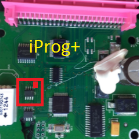
HELLO BEAUTIFUL PEOPLE OF THIS FORUM .. I HAVE A QUESTION IF I GET A NEW VIRGIN MOTOR MODULE LIKE THE ONE IN THE PHOTO WITHOUT PROGRAMMING, WILL I BE ABLE TO READ IT WITH DPS TO OBTAIN THE VIRGIN FILE

WhatsApp Image 2026-04-18 at 7.37.42 AM.jpeg

  • Replies 2
  • Views 183
  • Created
  • Last Reply

Top Posters In This Topic

Most Popular Posts

  • Not with DPS.. You may write a custom DPS "script" to read a part of the Eeprom from a module.. But to take a full dump and later flash it to other module - not a task DPS was designed for.

Posted Images

  • GM Car Hacking Expert
  • Contributor

Not with DPS..

You may write a custom DPS "script" to read a part of the Eeprom from a module..

But to take a full dump and later flash it to other module - not a task DPS was designed for.

  • Author
  • Contributor

WELL IF SOMEONE HAS AN IDEA OF HOW TO MANAGE TO MAKE A COMPUTER USED AT GLOBAL B WORK... HERE I AM TO LISTEN AND LEARN OR IF SOMEONE WANTS ME TO TRY SOMETHING, LET ME KNOW.

Join the conversation

You can post now and register later. If you have an account, sign in now to post with your account.

Guest
Reply to this topic...

Popular Members

  1. hassan77h
    +hassan77h
    27
  2. Troy
    Troy
    24
  3. uglyoldbastard
    +uglyoldbastard
    13
  4. regloops
    +regloops
    10
  5. GM-Enthusiast
    +GM-Enthusiast
    7

CameraLoops™
Powered by Art
All Trademarks appearing on this website are the property of their respective owners.

Account

Navigation

Configure browser push notifications

Chrome (Android)
  1. Tap the lock icon next to the address bar.
  2. Tap Permissions → Notifications.
  3. Adjust your preference.
Chrome (Desktop)
  1. Click the padlock icon in the address bar.
  2. Select Site settings.
  3. Find Notifications and adjust your preference.
CameraLoops members who viewed this content
Shifty tan tan Cleberson Santos vext__ Flash wieslaw drobniak simaservis mcOreos jesus teran satn Check Engine Opelinsignia1985 chenghuGZS Christos Tsirdanis Pavel thxx JBL_1989 Rusnet1 paul mike nev3r