Skip to content
Install the CameraLoops App

Browse CameraLoops via the app. Learn more.

www.CameraLoops.ru

Use the CameraLoops full-screen app on your home screen with push notifications, badges and more.

To install the CameraLoops app on iOS and iPadOS
  1. Tap the Share icon in Safari
  2. Scroll the menu and tap Add to Home Screen.
  3. Tap Add in the top-right corner.
To install the CameraLoops app on Android
  1. Tap the 3-dot menu (⋮) in the top-right corner of the browser.
  2. Tap Add to Home screen or Install app.
  3. Confirm by tapping Install.

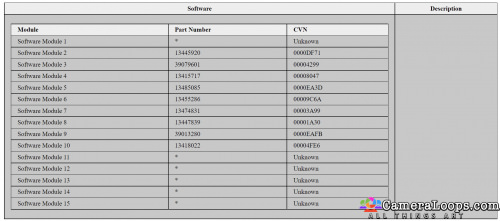
2014 Astra J A20DTH LBS SPS ECM Calibration Files
1 Screenshot

Standard files from SPS to correct the DPF temp sensor issue.. latest available files as of 25/12/22

User Feedback

Recommended Comments

WLRemaps Rising Star

+WLRemaps

+Contributor

  • Contributor

Can I ask what folder you went into to grab the downloaded calibration file when doing the sps?

pistnbroke Community Regular

+pistnbroke

+Contributor

  • Contributor
1 hour ago, WLRemaps said:

Can I ask what folder you went into to grab the downloaded calibration file when doing the sps?

It was the first time I'd used SPS so found it easiest to have all the possible destination folders open at the same time and watch to see where they appeared... it was the spsDebug folder they showed in but only just before they started to program so be ready to pull the interface if you dont actually want to go that far..  (the files did stay there though after programming)   hope that makes sense and helps a bit..

Join the conversation

You can post now and register later. If you have an account, sign in now to post with your account.

Guest
Add a comment...

Other files from pistnbroke


CameraLoops™
Powered by Art
All Trademarks appearing on this website are the property of their respective owners.

Account

Navigation

Configure browser push notifications

Chrome (Android)
  1. Tap the lock icon next to the address bar.
  2. Tap Permissions → Notifications.
  3. Adjust your preference.
Chrome (Desktop)
  1. Click the padlock icon in the address bar.
  2. Select Site settings.
  3. Find Notifications and adjust your preference.
CameraLoops members who viewed this content
Brock Johnson Fazlullo Ubaydullayev hassan77h pupu14 Ediagforcars E-Ing-X20XEV ABOMAZEN Szeffo freon GM-Enthusiast Dukie exc11 pistnbroke uinbytes DaniilOvchinnikov Maciej Swiderski SCAMMER Ahmedhussen