Skip to content
Install the CameraLoops App

Browse CameraLoops via the app. Learn more.

www.CameraLoops.ru

Use the CameraLoops full-screen app on your home screen with push notifications, badges and more.

To install the CameraLoops app on iOS and iPadOS
  1. Tap the Share icon in Safari
  2. Scroll the menu and tap Add to Home Screen.
  3. Tap Add in the top-right corner.
To install the CameraLoops app on Android
  1. Tap the 3-dot menu (⋮) in the top-right corner of the browser.
  2. Tap Add to Home screen or Install app.
  3. Confirm by tapping Install.

GM Vehicle Modules Documentation

GM HMI 2.5 theft lock removal, unlock

Here you will find information and files for upgrading your HMI v2 to the HMI v2.5 or replacing your HMI module with a used part.
Upgrading from HMI v2.0 to HMI v2.5 will enable you to have Apple CarPlay, Android Auto, better SAT-NAV maps, play videos and faster touch reaction from the your touch screen.

The majority for GM's electronic modules car parts are security locked to a specific car via the car's VIN number.

In order to install a used car parts and have it functioning you first need to program your car's vin number to the module.

When upgrading from the HMI v2.0 to the HMI v2.5 you also need to upgrade the radio module. You can bypass the radio module upgrade by updating the radio module firmware to v2.5 specs, (if you update the radio module firmware you no not need to replace it)

The radio module upgrade firmware can be found below.

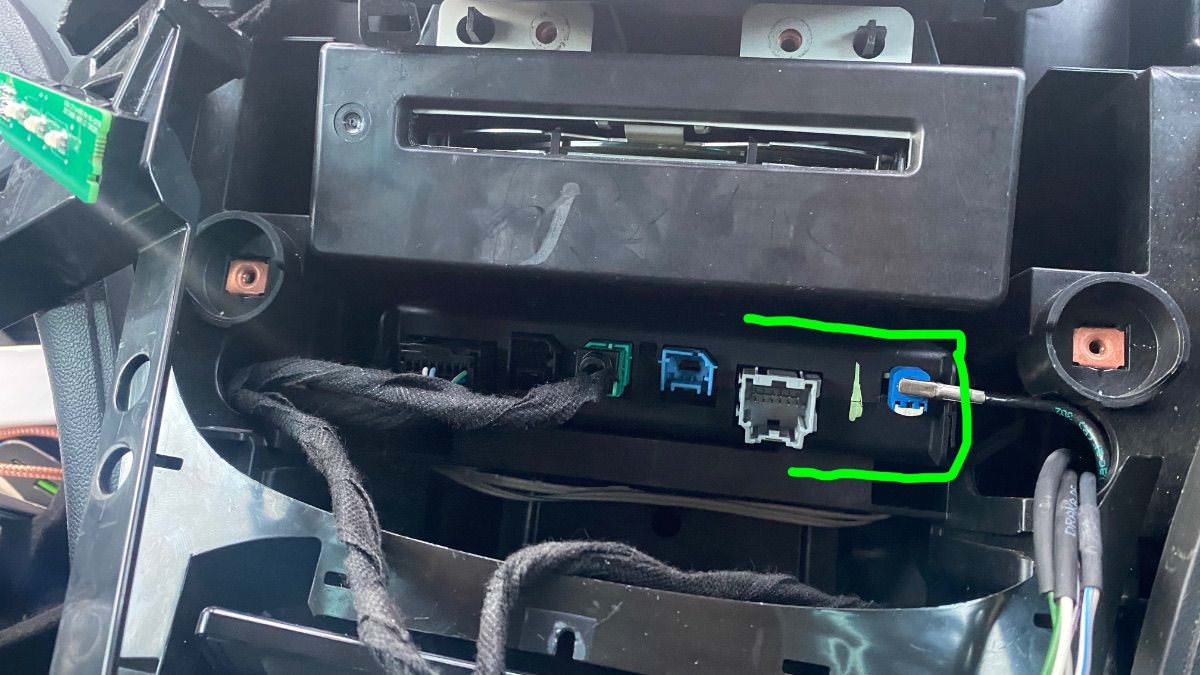
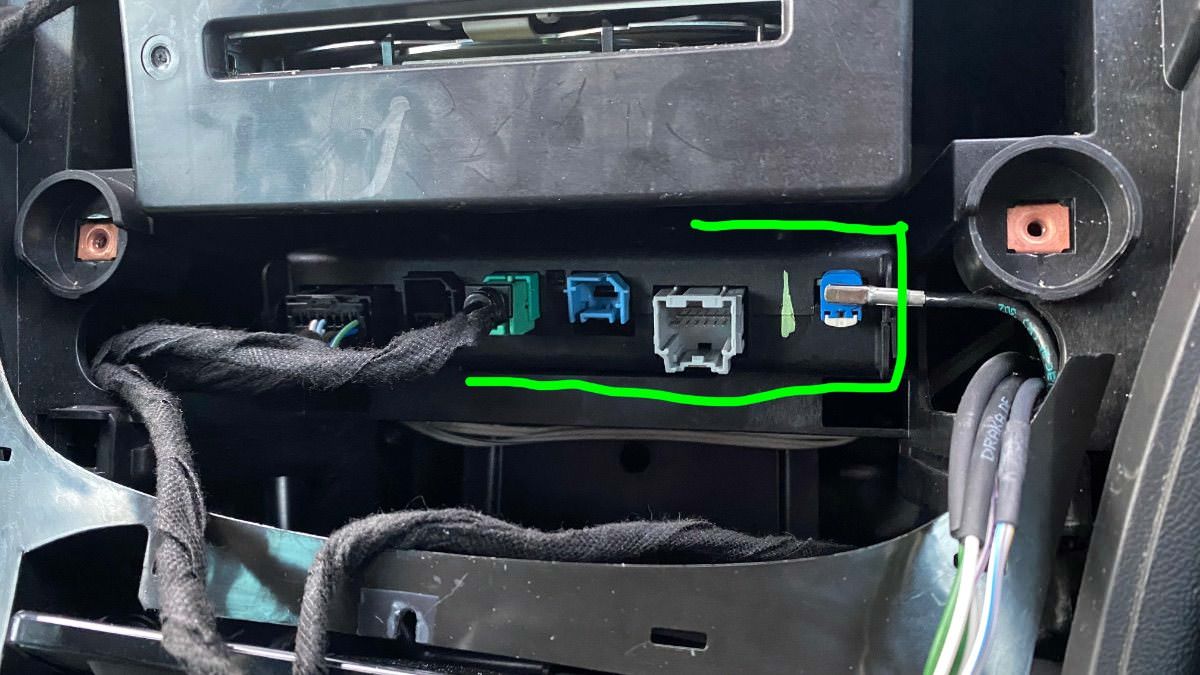
You will also need to replace your cars double USB port to the single USB port in order to get the apple CarPlay working.

See below photos.


The items you will need for removing the theft lock from the HMI module:

  1. A copy of GM DPS software, preferably V4.44.
  2. My custom DPS HMI vin change file
  3. A compatible GM diagnostic interface example: VXDIAG Nano, Drew tech mongoose GM2 pro etc, (all diagnostic interface that works with GM's SPS will work with GM's DPS software.


GM DPS V4.44


One file that will remove the theft lock from both the HMI and radio module, DPS VIN Relearn file.

For European cars/cars that uses the SilverBox Radio module.


For USA cars/cars that uses the satellite radio module.


The HMI module location and the USB module you will need for Apple CarPlay.

IMG_4525.jpgIMG_4524.jpg


IMG_4526.jpgIMG_4533.jpg


Troy

By Troy

User Feedback

Recommended Comments

ZmanCamaro Top Member

+ZmanCamaro

+Purchaser

In Troy's video he first selects a different Cal file then programs that to with just a bunch of letters then its changed, but my setup is the Radio & BCM have the original VIN it's the HMI that needs it correct?


Sorry this is a bit confusing....


Thank you for any help..


Christopher

codebuilder Community Regular

+codebuilder

+Contributor

GM Car Hacking Expert

  • Contributor

Ohhhh...  remove the (1) from the name of the file.  The filename *must* stay what it was when you downloaded it.  You can actually see in the zip file the .tbl file, the name of the zip must match that exactly.

ZmanCamaro Top Member

+ZmanCamaro

+Purchaser

Ok NOW i'm stupid, you need to unzip the downloaded file first....Inside is the Radio-VIN_Relearn_USA_TattooTroy.zip" So then try it again? So how or when do I get to use the original VIN? I don't get it yet...


Thanks

Christopher

codebuilder Community Regular

+codebuilder

+Contributor

GM Car Hacking Expert

  • Contributor
10 minutes ago, ZmanCamaro said:

Ok NOW i'm stupid, you need to unzip the downloaded file first....Inside is the Radio-VIN_Relearn_USA_TattooTroy.zip" So then try it again? So how or when do I get to use the original VIN? I don't get it yet...


Thanks

Christopher

ohhh, it's a zip in a zip lol.  Yep, run that one, that makes more sense now.


ZmanCamaro Top Member

+ZmanCamaro

+Purchaser

Now I found a file that does not make sense to me? Since my Radio and Sirius XM are the original with current Vin, I only just need to do the HMI but don't understand HMI ECU address is 8F?


Set Diagnostic pin to 1 but 1 is for the Radio/Sirus Sat mod.

The HMI ECU address is: 8F (How 


Thanks

Christopher

ZmanCamaro Top Member

+ZmanCamaro

+Purchaser
Just now, codebuilder said:

ohhh, it's a zip in a zip lol.  Yep, run that one, that makes more sense now.


But still confused.... I think I only need to do the HMI since the others are factory? So how do I just do the HMI and get current Vin in it? I am having issues with GM GDS2 as it needs internet and I am using that laptop on Airplane mode and won't work no Lic? Oh boy...


Christopher

codebuilder Community Regular

+codebuilder

+Contributor

GM Car Hacking Expert

  • Contributor
2 minutes ago, ZmanCamaro said:

Now I found a file that does not make sense to me? Since my Radio and Sirius XM are the original with current Vin, I only just need to do the HMI but don't understand HMI ECU address is 8F?


Set Diagnostic pin to 1 but 1 is for the Radio/Sirus Sat mod.

The HMI ECU address is: 8F (How 


Thanks

Christopher

I saw that in the video too, try 6 & 14 and see what it does.  I've never used that one personally  We will get it either way ;).

ZmanCamaro Top Member

+ZmanCamaro

+Purchaser
Just now, codebuilder said:

I saw that in the video too, try 6 & 14 and see what it does.  I've never used that one personally  We will get it either way ;).

But I don't want to change the Sat or Radio Vin only the used HMI? Right? 


Thanks

Christopher

codebuilder Community Regular

+codebuilder

+Contributor

GM Car Hacking Expert

  • Contributor
1 minute ago, ZmanCamaro said:

But I don't want to change the Sat or Radio Vin only the used HMI? Right? 


Thanks

Christopher

It won't hurt it, it'll just rewrite the VIN in those modules again.  You probably won't even notice it happen.

ZmanCamaro Top Member

+ZmanCamaro

+Purchaser
1 minute ago, codebuilder said:

It won't hurt it, it'll just rewrite the VIN in those modules again.  You probably won't even notice it happen.

WOW cool, but i'm still lost on how to get my correct Vin into the HMI? His instructions are a bit confusing when just replacing the HMI or maybe it's me?? 


Thank you again!

Christopher

codebuilder Community Regular

+codebuilder

+Contributor

GM Car Hacking Expert

  • Contributor
1 minute ago, ZmanCamaro said:

WOW cool, but i'm still lost on how to get my correct Vin into the HMI? His instructions are a bit confusing when just replacing the HMI or maybe it's me?? 


Thank you again!

Christopher

I *think* his DPS package just relearns all of them in one shot.  I could be wrong.

ZmanCamaro Top Member

+ZmanCamaro

+Purchaser
3 minutes ago, codebuilder said:

I *think* his DPS package just relearns all of them in one shot.  I could be wrong.

I guess that would good if you are replaced both the radio and HMI and the Sat unit?


I don't want to take any of your time tonight if tomorrow is better ?

Lyubomir Krastanov Rookie

+Lyubomir Krastanov

+Contributor

GM Car Hacking Expert

  • Contributor

As I say, use 6/14 and populate your VIN. If you cannot handle it let me know and will help remotely via anydesk

ZmanCamaro Top Member

+ZmanCamaro

+Purchaser
1 minute ago, Lyubomir Krastanov said:

As I say, use 6/14 and populate your VIN. If you cannot handle it let me know and will help remotely via anydesk

I now think I get it. Thank you for the offer my friend!


Christopher

ZmanCamaro Top Member

+ZmanCamaro

+Purchaser

Well no joy just now, I did run Troy file but never got the blue progression or the pop up Programming successful. So I was on Protocal GMLAN Device is the VXDIAG and it asked and the Subtype was Standard and Diag Pin 6 & 14, did it a second time and got this from the log.


Then I tried a second Vin setup for my Vin and it ran and gave me the popup  Programming successful. waited a few and removed the XVDiag and pressed the start button to turn off waited and pressed and get Theif Locked so did not work? I have that log file also and attached..


So I am lost, hope something I can try again..


Many Thanks!

Christopher

Troy ProgramLog 10-18-2023.Txt ProgramLog different program.Txt

Lyubomir Krastanov Rookie

+Lyubomir Krastanov

+Contributor

GM Car Hacking Expert

  • Contributor

For protocol leave other sub to standard and just be sure u use 6/14, load vin relearn and execute programming. If fail…u have to sent message to Troy and him may will assist you.


Good luck!

ZmanCamaro Top Member

+ZmanCamaro

+Purchaser

I did that, what I would say is it started but seams it just stops, with Troy I am not entering a VIN I just loaded his file in DSP and program and it never had the blue progression bar that I see in videos so I am not doing something right. I just did that above, but I will need to find his video as I think he has a few extra steps?


Thanks

Christopher

ZmanCamaro Top Member

+ZmanCamaro

+Purchaser

OK NOW JOY!!!! I was not choosing Pin 1, did that and it finished and saw NO VIN, so I knew I was getting close,,Then it was done and I have my display and audio so back...


So the only FEATURE I would pay for is to connect my Curb Camera thru the 8" Display, but I think a special cable and programming??


Any suggestions that I could do to keep cost low?


Thank You ALL, codebuilder too!!!!!


Christopher

codebuilder Community Regular

+codebuilder

+Contributor

GM Car Hacking Expert

  • Contributor
1 hour ago, ZmanCamaro said:

Well no joy just now, I did run Troy file but never got the blue progression or the pop up Programming successful. So I was on Protocal GMLAN Device is the VXDIAG and it asked and the Subtype was Standard and Diag Pin 6 & 14, did it a second time and got this from the log.


Then I tried a second Vin setup for my Vin and it ran and gave me the popup  Programming successful. waited a few and removed the XVDiag and pressed the start button to turn off waited and pressed and get Theif Locked so did not work? I have that log file also and attached..


So I am lost, hope something I can try again..


Many Thanks!

Christopher

Troy ProgramLog 10-18-2023.Txt 6.99 kB · 1 download ProgramLog different program.Txt 16.21 kB · 1 download

Yeah, it looks like it’s only trying to do the radio.  Did you receive the link I sent in messages?  That one will work.  

Kaleb Rising Star

Kaleb

Member
On 10/8/2023 at 10:06 PM, codebuilder said:

You're close 🙂


You need:


- An MDI tool (VX Diag or true GM MDI - which is expensive)

- DPS 4.46 is good

- Replacing the HMI:

  - The model doesn't need to be exact but if you have GPS, look for one with a GPS antenna and be sure it's an HMI 2.5.  Lot's of 2.0's online....

  - Calibrations for your HMI (I can get them for you if you send me your VIN) unless it came out of a Camaro with the same features (backup cam, etc)

  - Troy's HMI 2.0/2.5 Module VIN Number Relearn

- If you're still replacing the radio.... (but your old sounds fine?)

  - Calibrations for your radio unless it came out of a Camaro (can also get these for you if I have your VIN)

  - Troy's Radio relearn


So say you swap out the radio and HMI.  You plug the new stuff in, it'll say theft locked.  You'll use Troy's relearn's to get both unlocked.  But if the HMI came out of a Buick (and yes, some have the same part #'s), it'll boot up showing Buick and the icon style of buick.  That's where the calibrations come in.  It tells it that it's a Chevy, has backup cam, etc.


Hello, I get an HMI2.5 for a Cadillac ATS 2015, but shows the Theft Lock when installed besides this was from a Chevy vehicle, is there a way to get both VIN and Cal files for this Unit?


VIN: 1G6A91RX6F0133857

Troy Grand Master

Troy

Administrator

GM Car Hacking Expert

On 7/25/2024 at 12:57 AM, Kaleb said:

Hello, I get an HMI2.5 for a Cadillac ATS 2015, but shows the Theft Lock when installed besides this was from a Chevy vehicle, is there a way to get both VIN and Cal files for this Unit?


VIN: 1G6A91RX6F0133857


Hi, you can use the file in the link below to remove the theft lock from the HMI2.5. If the vehicle originally came with an HMI 2.5 module, you then use the vehicle’s VIN to program the HMI module via GM sps service. That should have it functioning again. 


BLKATSG Collaborator

+BLKATSG

+Contributor

GM Car Hacking Expert

  • Contributor
On 7/24/2024 at 7:57 PM, Kaleb said:

Hello, I get an HMI2.5 for a Cadillac ATS 2015, but shows the Theft Lock when installed besides this was from a Chevy vehicle, is there a way to get both VIN and Cal files for this Unit?


VIN: 1G6A91RX6F0133857

I did this to our 2015 ATS also.  I ended up switching to a 2016 cluster also to allow the steering wheel controls to function correctly with carplay

Redsupra Rising Star

+Redsupra

+Contributor
  • Contributor

I am getting a "ERROR OCCURRED FERGANA PROGRAMMING"


Any ideas? using 4.48 dps


trying to just vin wipe the radio. not the hmi.

ProgramLog.Txt

BLKATSG Collaborator

+BLKATSG

+Contributor

GM Car Hacking Expert

  • Contributor

Are you on pin 1?

Join the conversation

You can post now and register later. If you have an account, sign in now to post with your account.

Guest
Add a comment...

CameraLoops™
Powered by Art
All Trademarks appearing on this website are the property of their respective owners.

Account

Navigation

Configure browser push notifications

Chrome (Android)
  1. Tap the lock icon next to the address bar.
  2. Tap Permissions → Notifications.
  3. Adjust your preference.
Chrome (Desktop)
  1. Click the padlock icon in the address bar.
  2. Select Site settings.
  3. Find Notifications and adjust your preference.