Skip to content
Install the CameraLoops App

Browse CameraLoops via the app. Learn more.

www.CameraLoops.ru

Use the CameraLoops full-screen app on your home screen with push notifications, badges and more.

To install the CameraLoops app on iOS and iPadOS
  1. Tap the Share icon in Safari
  2. Scroll the menu and tap Add to Home Screen.
  3. Tap Add in the top-right corner.
To install the CameraLoops app on Android
  1. Tap the 3-dot menu (⋮) in the top-right corner of the browser.
  2. Tap Add to Home screen or Install app.
  3. Confirm by tapping Install.

GM Vehicle Modules Documentation

GM HMI 2.5 theft lock removal, unlock

Here you will find information and files for upgrading your HMI v2 to the HMI v2.5 or replacing your HMI module with a used part.
Upgrading from HMI v2.0 to HMI v2.5 will enable you to have Apple CarPlay, Android Auto, better SAT-NAV maps, play videos and faster touch reaction from the your touch screen.

The majority for GM's electronic modules car parts are security locked to a specific car via the car's VIN number.

In order to install a used car parts and have it functioning you first need to program your car's vin number to the module.

When upgrading from the HMI v2.0 to the HMI v2.5 you also need to upgrade the radio module. You can bypass the radio module upgrade by updating the radio module firmware to v2.5 specs, (if you update the radio module firmware you no not need to replace it)

The radio module upgrade firmware can be found below.

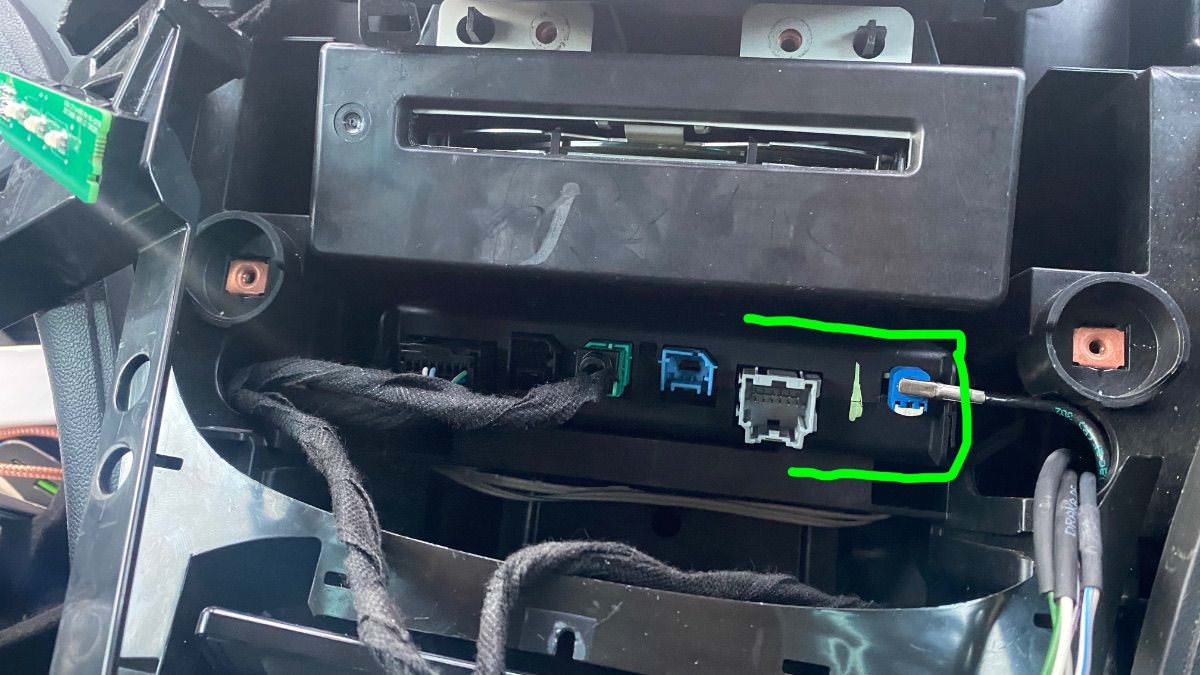
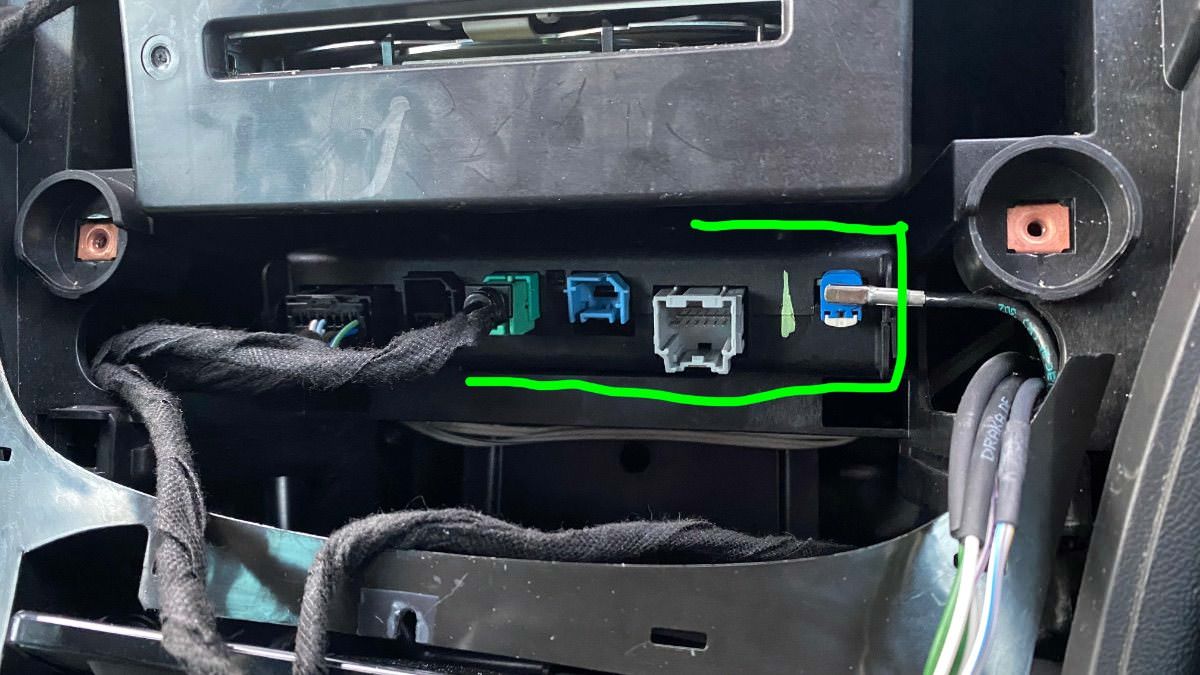
You will also need to replace your cars double USB port to the single USB port in order to get the apple CarPlay working.

See below photos.


The items you will need for removing the theft lock from the HMI module:

  1. A copy of GM DPS software, preferably V4.44.
  2. My custom DPS HMI vin change file
  3. A compatible GM diagnostic interface example: VXDIAG Nano, Drew tech mongoose GM2 pro etc, (all diagnostic interface that works with GM's SPS will work with GM's DPS software.


GM DPS V4.44


One file that will remove the theft lock from both the HMI and radio module, DPS VIN Relearn file.

For European cars/cars that uses the SilverBox Radio module.


For USA cars/cars that uses the satellite radio module.


The HMI module location and the USB module you will need for Apple CarPlay.

IMG_4525.jpgIMG_4524.jpg


IMG_4526.jpgIMG_4533.jpg


Troy

By Troy

User Feedback

Recommended Comments

TransAuto Rising Star

+TransAuto

+Purchaser

Thanks Troy much appreciated 

ZmanCamaro Top Member

+ZmanCamaro

+Purchaser

Hi Troy,  I have a 2017 2LT Camaro Convertible and the HMI unit part went out making the 8” radio black and just got a new 8” radio and same issue, so if I get a used HMI with the same model 8409-6817 as my HMI and then I would need to get your “GM USA Satellite Radio And HMI 2.5, HMI 2.0 Module VIN Number Relearn DPS File” and then I can download the DPS 4.46 and how does all of this connect to the HMI ? A USB- Mini-B or a special cable?

Sorry I am new to all of this and thank you for help people like us..


Christopher

codebuilder Community Regular

+codebuilder

+Contributor

GM Car Hacking Expert

  • Contributor
21 minutes ago, ZmanCamaro said:

Hi Troy,  I have a 2017 2LT Camaro Convertible and the HMI unit part went out making the 8” radio black and just got a new 8” radio and same issue, so if I get a used HMI with the same model 8409-6817 as my HMI and then I would need to get your “GM USA Satellite Radio And HMI 2.5, HMI 2.0 Module VIN Number Relearn DPS File” and then I can download the DPS 4.46 and how does all of this connect to the HMI ? A USB- Mini-B or a special cable?

Sorry I am new to all of this and thank you for help people like us..


Christopher

You're close 🙂


You need:


- An MDI tool (VX Diag or true GM MDI - which is expensive)

- DPS 4.46 is good

- Replacing the HMI:

  - The model doesn't need to be exact but if you have GPS, look for one with a GPS antenna and be sure it's an HMI 2.5.  Lot's of 2.0's online....

  - Calibrations for your HMI (I can get them for you if you send me your VIN) unless it came out of a Camaro with the same features (backup cam, etc)

  - Troy's HMI 2.0/2.5 Module VIN Number Relearn

- If you're still replacing the radio.... (but your old sounds fine?)

  - Calibrations for your radio unless it came out of a Camaro (can also get these for you if I have your VIN)

  - Troy's Radio relearn


So say you swap out the radio and HMI.  You plug the new stuff in, it'll say theft locked.  You'll use Troy's relearn's to get both unlocked.  But if the HMI came out of a Buick (and yes, some have the same part #'s), it'll boot up showing Buick and the icon style of buick.  That's where the calibrations come in.  It tells it that it's a Chevy, has backup cam, etc.


codebuilder Community Regular

+codebuilder

+Contributor

GM Car Hacking Expert

  • Contributor
45 minutes ago, ZmanCamaro said:

Hi Troy,  I have a 2017 2LT Camaro Convertible and the HMI unit part went out making the 8” radio black and just got a new 8” radio and same issue, so if I get a used HMI with the same model 8409-6817 as my HMI and then I would need to get your “GM USA Satellite Radio And HMI 2.5, HMI 2.0 Module VIN Number Relearn DPS File” and then I can download the DPS 4.46 and how does all of this connect to the HMI ? A USB- Mini-B or a special cable?

Sorry I am new to all of this and thank you for help people like us..


Christopher

Sorry, I re-read and wanted to clarify something.  Did you replace the radio unit, or the display screen?  Those are definitely separate.  If you replaced the display, it's possible the radio unit is actually failed and not the HMI.  The HMI you can usually hear the fan kick in when you open the door.  Or if you find where it is, you might be able to hear the fan spin up when you open the door or wake it.  Ideally, if you had GDS2 or similar, you could try to query the radio and see if it responds, and do the same with the HMI and see if it responds.  If one doesn't, that's likely the one that's failed.  I had just went through this for someone recently and it was the radio unit.  In either case, what I wrote above would apply.  

GM-Enthusiast Mentor

+GM-Enthusiast

+Contributor

GM Car Hacking Expert

  • Contributor

quick and easy,, just buy and do theft lock removal by dps,its only one software and does it all at a time, if all ok after theft lock removal,all ok, to retain original setting,, can do online or calibration by dps,, show vin (to obtain radio and hmi calibration,, 


Car Hacking Services I Provide For General Motors Vehicles.

  • GM Remote Diagnosing and Troubleshooting
  • All GM Modules Programming
  • GM ECM/TCM Tuning
  • Auto Mechanic Workshop
codebuilder Community Regular

+codebuilder

+Contributor

GM Car Hacking Expert

  • Contributor
24 minutes ago, LLCasaol said:

quick and easy,, just buy and do theft lock removal by dps,its only one software and does it all at a time, if all ok after theft lock removal,all ok, to retain original setting,, can do online or calibration by dps,, show vin (to obtain radio and hmi calibration,, 

Your response is a bit confusing but I feel I've covered it.  I provided a few more steps and details so he understands what's needed.  I'm also unsure if he replaced the actual radio unit or just the display which makes a big difference.  

ZmanCamaro Top Member

+ZmanCamaro

+Purchaser

Hi thank you for the replies!! Ok I have the original 8" radio unit that is in the car and I just got a new unused 8" radio unit and a few days ago installed the new radio and same no screen or power on/off or volume working. So I now think it's the HMI and last night ordered a used from eBay with the same model so from what I am understanding all I will need to do is replace the old HMI with the used HMI from ebay and put back the 8" original radio and connect the Neg battery and start the Camaro, and I hope the screen will come on and then maybe will see enter a code or the Anti theft message and then purchase "Troy's HMI 2.0/2.5 Module VIN Number Relearn" program and then get access to DPS 4.46? Also I will get the "VXDIAG VCX Nano GDS2 and Tech2Win Diagnostic Tool Compatible for GM/OPEL with Global Diagnostic Programming System GDS & GDS2" so I can use the HMI 2.0/2.5 correct?


P.S i used a better OBD2 reader and saw codes B1325-03 IPC/ U2098-002 MOST Comm Enable circuit, B1325-03 Radio Control Module power Circuit Low Voltage, U0028-00 MOST Bus, U15E1-00 LIN But 14 Lost Communication with Device 1. 


So I if understand what everyone wrote I should if the used HMI works just will need to enter a wrong VIn and it will relearn from the BCM and all good? 


Thank everyone!

Christopher 


P.S I think I want this for my GM Camaro "VXDIAG VCX Nano Compatible for GM/OPEL with GDS2 and Tech2WIN System Diagnostic Tool" ??

Thanks

ZmanCamaro Top Member

+ZmanCamaro

+Purchaser

P.S I think I want this for my GM Camaro "VXDIAG VCX Nano Compatible for GM/OPEL with GDS2 and Tech2WIN System Diagnostic Tool"  or get for a few more $$ the "VXDIAG VCX Nano GDS2 and Tech2Win Diagnostic Programming System for GM/Opel WiFi Version"??


Not sure if these softwares work USB only or WiFi and is it worth the $10 more??


Oh forgot, I read this "You will also need to replace your vehicle's double USB port with a single USB port to get the Apple CarPlay working. See the below photos."


If I use the same part GM # as what I have will I still need to replace the Double USB to a Single, I already have Apple CarPlay/Android Auto came with the Camaro?


Thanks again!!

Christopher


codebuilder Community Regular

+codebuilder

+Contributor

GM Car Hacking Expert

  • Contributor
2 hours ago, ZmanCamaro said:

Hi thank you for the replies!! Ok I have the original 8" radio unit that is in the car and I just got a new unused 8" radio unit and a few days ago installed the new radio and same no screen or power on/off or volume working. So I now think it's the HMI and last night ordered a used from eBay with the same model so from what I am understanding all I will need to do is replace the old HMI with the used HMI from ebay and put back the 8" original radio and connect the Neg battery and start the Camaro, and I hope the screen will come on and then maybe will see enter a code or the Anti theft message and then purchase "Troy's HMI 2.0/2.5 Module VIN Number Relearn" program and then get access to DPS 4.46? Also I will get the "VXDIAG VCX Nano GDS2 and Tech2Win Diagnostic Tool Compatible for GM/OPEL with Global Diagnostic Programming System GDS & GDS2" so I can use the HMI 2.0/2.5 correct?


P.S i used a better OBD2 reader and saw codes B1325-03 IPC/ U2098-002 MOST Comm Enable circuit, B1325-03 Radio Control Module power Circuit Low Voltage, U0028-00 MOST Bus, U15E1-00 LIN But 14 Lost Communication with Device 1. 


So I if understand what everyone wrote I should if the used HMI works just will need to enter a wrong VIn and it will relearn from the BCM and all good? 


Thank everyone!

Christopher 


P.S The VXDiag is exactly what you want.  You can either get the Wi-Fi or not.  I have both versions but I like the Wi-Fi one as I do a lot in my garage and it actually works really well!  I can either run it on my local network or Wi-Fi connect my laptop to it (it allows both).  But the wired is totally fine too. 


the HMI will come with the wrong vin already in it.  You’ll need that relearn using Troy’s script.  It’s really easy 🙂 
 

Here’s my worry though….   The codes you’ve shown in your reply, and I believe the MOST device #1 is the radio.  I can’t remember exactly but I believe the radio is the master on the MOST bus.  I’m actually starting to lean even more that your radio is gone and not your HMI.  I just replaced one about two months ago in a truck.  Do you get any door chimes?  I can’t remember the signs we had but those codes really push me to believe your radio module failed and not the HMI.  The good news is, the radio usually isn’t as expensive but!  Get one 2016 and up as there is a hardware difference and you may run into issues with Siri, etc.  


For the HMI, if the calibrations are off I can help you get that sorted out.  The same part # doesn’t mean it came out of a Camaro (unless the ad on eBay stated that haha).  They do use many of the same part numbers in other vehicles.  
 

If you already had CarPlay, you don’t need to replace the usb.  That’s only if you’re upgrading like a 2014-15 Sierra that didn’t have it.  

ZmanCamaro Top Member

+ZmanCamaro

+Purchaser

Thank you codebuilder, I too was thinking it was the radio, so last week I found a new 2016 radio online and plugged it in a few days ago and attached the Neg battery battery lead and started the car and the new radio was black same as the original radio, so I then was thinking it's the HMI


So I was reading that if I hooked up any HMI and saw something on the radio screen, but I choose to get a used 1 on eBay and it's from a "2017 BUICK ENVISION" with NAV as I have NAV, so my thinking is to replace the original HMI with the eBay 1 and the original radio and see if I see the radio comes on? 


So what currenty happends is I start the Camaro the radio stays black and I do hear the AM/FM once I choose radio/Sirus XM, and normal sounds, turn signals, and can control with the steering wheel controls, but the HUD don't see the posted road speed limit and the radio after a few minuets I will hear a click in the audio and then about 7 minuets later the radio stops and I can't change the volume or change the channels as everything is locked up. Even when I press the Onstar nothing, and when I shut off the car for say 30min to a few hours and start the car it's got sound. But I just read that the HMI fan may not be working and the HMI maybe over heats and shuts off the audio? Something I will need to check. But even if the fan is not working which it may not there are still other codes to deal with, I really don't want to take it to the GM dealer $2K can't do that...


Thank you again for your help and time!

Christopher   

ZmanCamaro Top Member

+ZmanCamaro

+Purchaser

I have read that many have taken there Camaros to the Gm dealer and with there OBD2 reader can see what the issue is? So maybe when it get in a few days the "VXDIAG VCX Nano GDS2 and Tech2Win Diagnostic Programming System for GM/Opel WiFi version" maybe the included software will provide more info than the other OBD2 reader, or maybe there is better software I can get from this site to help?


Thanks again

Christopher

codebuilder Community Regular

+codebuilder

+Contributor

GM Car Hacking Expert

  • Contributor
1 hour ago, ZmanCamaro said:

I have read that many have taken there Camaros to the Gm dealer and with there OBD2 reader can see what the issue is? So maybe when it get in a few days the "VXDIAG VCX Nano GDS2 and Tech2Win Diagnostic Programming System for GM/Opel WiFi version" maybe the included software will provide more info than the other OBD2 reader, or maybe there is better software I can get from this site to help?


Thanks again

Christopher

Wow, that is interesting!  It could be the HMI then or possibly even the LVDS (blue cable).  We will know once you plug that HMI in haha.  If you can hear the radio, the unit is working so that’s good.  
 

and yeah, once you get GDS2 with the VXDiag, you can actually go to the individual module (HMI, Radio, etc) and see if it will even communicate at all.  And of course check codes for that module as needed.  You can also send test screens.  

GM-Enthusiast Mentor

+GM-Enthusiast

+Contributor

GM Car Hacking Expert

  • Contributor
11 hours ago, ZmanCamaro said:

Hi thank you for the replies!! Ok I have the original 8" radio unit that is in the car and I just got a new unused 8" radio unit and a few days ago installed the new radio and same no screen or power on/off or volume working. So I now think it's the HMI and last night ordered a used from eBay with the same model so from what I am understanding all I will need to do is replace the old HMI with the used HMI from ebay and put back the 8" original radio and connect the Neg battery and start the Camaro, and I hope the screen will come on and then maybe will see enter a code or the Anti theft message and then purchase "Troy's HMI 2.0/2.5 Module VIN Number Relearn" program and then get access to DPS 4.46? Also I will get the "VXDIAG VCX Nano GDS2 and Tech2Win Diagnostic Tool Compatible for GM/OPEL with Global Diagnostic Programming System GDS & GDS2" so I can use the HMI 2.0/2.5 correct?


P.S i used a better OBD2 reader and saw codes B1325-03 IPC/ U2098-002 MOST Comm Enable circuit, B1325-03 Radio Control Module power Circuit Low Voltage, U0028-00 MOST Bus, U15E1-00 LIN But 14 Lost Communication with Device 1. 


So I if understand what everyone wrote I should if the used HMI works just will need to enter a wrong VIn and it will relearn from the BCM and all good? 


Thank everyone!

Christopher 


P.S I think I want this for my GM Camaro "VXDIAG VCX Nano Compatible for GM/OPEL with GDS2 and Tech2WIN System Diagnostic Tool" ??

Thanks

need to fix power , ground, wake-up serial data(communication enable),, this automatically clear most bus dtc,, if no issue on most bus,, MOST-Media Oriented System Transport.


Car Hacking Services I Provide For General Motors Vehicles.

  • GM Remote Diagnosing and Troubleshooting
  • All GM Modules Programming
  • GM ECM/TCM Tuning
  • Auto Mechanic Workshop
ZmanCamaro Top Member

+ZmanCamaro

+Purchaser

So not sure how to fix power? Maybe a blown fuse, I don't know which fuse would be for the the MOST? I already did pulled the radio fuse on back and a few others, so maybe there is a HMI fuse?

Maybe this is just a blown fuse in either fuse boxes causing this as I had a dead battery and replaced it myself and when this all started...


Christopher

codebuilder Community Regular

+codebuilder

+Contributor

GM Car Hacking Expert

  • Contributor
1 hour ago, ZmanCamaro said:

So not sure how to fix power? Maybe a blown fuse, I don't know which fuse would be for the the MOST? I already did pulled the radio fuse on back and a few others, so maybe there is a HMI fuse?

Maybe this is just a blown fuse in either fuse boxes causing this as I had a dead battery and replaced it myself and when this all started...


Christopher

There's no fuse for the MOST bus, it's basically a ring that connects the Radio unit, HMI, CD Player (if any), and the cluster.  When it breaks, you usually lose the animations in your cluster, all music, etc.  

ZmanCamaro Top Member

+ZmanCamaro

+Purchaser
42 minutes ago, codebuilder said:

There's no fuse for the MOST bus, it's basically a ring that connects the Radio unit, HMI, CD Player (if any), and the cluster.  When it breaks, you usually lose the animations in your cluster, all music, etc.  

Ok a round ring? Sorry not sure what you mean there? Since the HMI is working for say 7-10 min but the Radio is black and so is the new one then i'm thinking it's not the radio but like you said ring or maybe a fuse for the radio has been removed and looked not blown. I would think there is a fuse for the HMI? Don't know but will research. 

By cluster do you mean the Digital display dash speed ect...? Or you mean the radio cluster and yes those can't see but the illumination all is on the radio/doors ect...


Wow they make it hard to repair yourself, but I am determined to keep going. But winter is coming so don't want to work in 20 degree temps if I can help it.. Going to check the HMI fan..


Thank you very much for the help and any more help my friend!!!


Christopher


Just pressed the start button and hear music but NO HMI fan. I do recall hearing that fan sometime ago, but now nothing.....If it has a fuse and if blown how can it output a digital signal to my GM650 that's is working as I hear the radio..?

codebuilder Community Regular

+codebuilder

+Contributor

GM Car Hacking Expert

  • Contributor
4 hours ago, ZmanCamaro said:

Ok a round ring? Sorry not sure what you mean there? Since the HMI is working for say 7-10 min but the Radio is black and so is the new one then i'm thinking it's not the radio but like you said ring or maybe a fuse for the radio has been removed and looked not blown. I would think there is a fuse for the HMI? Don't know but will research. 

By cluster do you mean the Digital display dash speed ect...? Or you mean the radio cluster and yes those can't see but the illumination all is on the radio/doors ect...


Wow they make it hard to repair yourself, but I am determined to keep going. But winter is coming so don't want to work in 20 degree temps if I can help it.. Going to check the HMI fan..


Thank you very much for the help and any more help my friend!!!


Christopher


Just pressed the start button and hear music but NO HMI fan. I do recall hearing that fan sometime ago, but now nothing.....If it has a fuse and if blown how can it output a digital signal to my GM650 that's is working as I hear the radio..?

I was writing from my phone earlier :).  IPC is the instrument panel cluster (your dash as you guessed) It's a ring-network basically.  So, the radio has wires going from the Radio to the HMI, then wires from the HMI to the IPC, then the IPC back to the radio (rough example).  There is no fuse for the MOST bus, if a fuse was blown, I'd expect you to have nothing at all.  If it's working for like 7-10 minutes, the MOST bus is probably fine.  


On my truck, when I open the door I can usually hear the fan kick in on the HMI.  Those codes you put earlier might just be noise (for example, you've unplugged the radio so it set those codes).  It's actually sounding more and more like your HMI now.  When do you get it?


Also, once you get that VX Diag with GDS2, it's WAY easier to diagnose this 🙂 but I am leaning more the HMI now.  

ZmanCamaro Top Member

+ZmanCamaro

+Purchaser

Thanks, I agree. I am going to check each fuse in the engine compartment just to rule that out. I get that GDS2 on Wed, I found something called "GDS2 Special 6 in 1" not fully sure but it's a Win program that helps with diagnosis with the GDS2? I also found "GM GDS2 BY FANTOMEL" not fully sure what does?


But I also found "GDS2" as I don't think this program comes with that tool? I think that's the GM diag program and hope it's more powerful than the $200 OBD2 reader I found those errors. 


Yeah I do recal when I open the door a fan coming on under the glove box but did not really know or think about it...LOL until now!  


I think end of the week I will get that used HMI so trying to do more testing. I was a bit surprised that there may not be a fuse for the HMI for what those cost but I looked online and saw many fuses and found a Nav fuse and it looked good, but soon I will test each fuse in the engine compartment, but from the trunk much harder as I custom built a dual 12" DV subs, working with JL this was the first of it's kind that they know of for the 2017 Camaro convertible as they had the shortest 12" dual Voice Coil on the market.


But if it is a the HMI fuse (if it had 1) then would not work at all and no sounds? Unless there as fuse for something that's having low voltage and then causing what's going on? Too bad there's not much on the GM/Bosch HMI, I read that the GM dealer has pinouts so they can test the pinouts, but I have the 2017 service manual but did not that.


Thank you!!

Christopher  

Lyubomir Krastanov Rookie

+Lyubomir Krastanov

+Contributor

GM Car Hacking Expert

  • Contributor

Pinouts is covered in SI, EndViews. Without diagnostic equipment I really not understand why you try to fix unknown issue. 

ZmanCamaro Top Member

+ZmanCamaro

+Purchaser
19 hours ago, Lyubomir Krastanov said:

Pinouts is covered in SI, EndViews. Without diagnostic equipment I really not understand why you try to fix unknown issue. 

Well i'm thinking if I had the pin outs I could use a DVM and see if there are 5v or 12v coming to leaving? I am not sure what you mean covered in SI EndViews? Not what or where this info is? Thank you for your help.


Got that "VXDIAG VCX Nano GDS2 and Tech2Win Diagnostic Programming System for GM/Opel WiFi version" unit and it does come with a USB thumb drive, but not much info on how to use, but maybe YouTube? I did check all of the fuses in the engine compartment and they are all good, did not check the relays, but for me it's a process of elimination then leaves the issue?


Any suggestion on a how to use guide or videos?


Thank everyone for there help!

Christopher 

codebuilder Community Regular

+codebuilder

+Contributor

GM Car Hacking Expert

  • Contributor
2 hours ago, ZmanCamaro said:

Well i'm thinking if I had the pin outs I could use a DVM and see if there are 5v or 12v coming to leaving? I am not sure what you mean covered in SI EndViews? Not what or where this info is? Thank you for your help.


Got that "VXDIAG VCX Nano GDS2 and Tech2Win Diagnostic Programming System for GM/Opel WiFi version" unit and it does come with a USB thumb drive, but not much info on how to use, but maybe YouTube? I did check all of the fuses in the engine compartment and they are all good, did not check the relays, but for me it's a process of elimination then leaves the issue?


Any suggestion on a how to use guide or videos?


Thank everyone for there help!

Christopher 

My first recommendation, get GDS2 working.  The VXDiag can be a bit of a PITA.  Forget relays and fuses....  there's usually one or two fuses at most for that system and relays, no.  Get GDS2 up, see if the radio or the HMI responds.  Go from there.  The fact that you have the system working for like 7-10 minutes, it's not a fuse.  If the fuse blew, it would be off.

ZmanCamaro Top Member

+ZmanCamaro

+Purchaser
10 hours ago, codebuilder said:

My first recommendation, get GDS2 working.  The VXDiag can be a bit of a PITA.  Forget relays and fuses....  there's usually one or two fuses at most for that system and relays, no.  Get GDS2 up, see if the radio or the HMI responds.  Go from there.  The fact that you have the system working for like 7-10 minutes, it's not a fuse.  If the fuse blew, it would be off.

Makes perfect sense, get GDS2. I did try my OBD2 unit (not the VXDiax) and it could not talk to the HMI, so maybe that's the issue and the fan does not run and maybe with that it over heats and stuts off the Audio until car off for a bit then works again so when I get the used HMI I will replace it and hope what caused the orginal HMI stop working won't on the new/used HMI?


Thanks

Christopher

ZmanCamaro Top Member

+ZmanCamaro

+Purchaser

Ok some good news, I think!! I removed the new Radio unit since it did not work and while the battery was disconnect unpluged the new radio and replaced with my original radio unit and removed the original HMI, and installed the eBay HMI and reconnected the battery and when I got in the drivers side I saw the radio display backlit was on and then I tried to start the car and like normal it just clicks then tried a second time and started and the radio screen says Thief Locked in red. Also on the cars speed display dash says Audio Off, and I can't turn on or hear any audio. What's odd is the eBay HMI fan was not on either and all of this could be the "Thief Locked" mode?


So now  Codebuilder per your notes:

- Calibrations for your HMI (I can get them for you if you send me your VIN) unless it came out of a Camaro with the same features (backup cam, etc) ( It did not as it came out of A Buick car? the seller said)

  - Troy's HMI 2.0/2.5 Module VIN Number Relearn

- If you're still replacing the radio.... (but your old sounds fine?) I think so, the orginal radio is fine and is reinstalled.

  - Calibrations for your radio unless it came out of a Camaro (can also get these for you if I have your VIN)

  - Troy's Radio relearn


So with all of your help i'm getting closer ti getting this back to 100%, so what's the next steps please Codebuilder??


My Vin 1G1FD3DS2H0145539


Thanks again

Christopher

IMG_4969.jpg

ZmanCamaro Top Member

+ZmanCamaro

+Purchaser

Well I played around with GDS2 and it works and maybe I hope not a bad thing is I went looking around and generated a few reports and on some of the Modules it asked you does your car have.... I did the best I could and hope it does not save the selections if I choose wrong??

But went to DTC Radio and it showed MOST Bus and the radio came on and I was able to get the screen in the Buick screens and could change the time and go to phone, but I did not have the Nav GPS cable plugged so it looks to be a good progress.


Just now need to purchase what programs I need to get this back to 100% and ready Codebuilder to get what I need ASAP please..


Thank you so very much!!

Christopher

ZmanCamaro Top Member

+ZmanCamaro

+Purchaser

Hi Codebuilder, saw your message but can't send message. I do have DPS 4.48, so what else I will need a config file and then I buy HMI 2.0/2.5 Module VIN Number Relearn program is that all?


Super thank you Codebuilder!!

Christopher

Join the conversation

You can post now and register later. If you have an account, sign in now to post with your account.

Guest
Add a comment...

CameraLoops™
Powered by Art
All Trademarks appearing on this website are the property of their respective owners.

Account

Navigation

Configure browser push notifications

Chrome (Android)
  1. Tap the lock icon next to the address bar.
  2. Tap Permissions → Notifications.
  3. Adjust your preference.
Chrome (Desktop)
  1. Click the padlock icon in the address bar.
  2. Select Site settings.
  3. Find Notifications and adjust your preference.