Skip to content
Install the CameraLoops App

Browse CameraLoops via the app. Learn more.

www.CameraLoops.ru

Use the CameraLoops full-screen app on your home screen with push notifications, badges and more.

To install the CameraLoops app on iOS and iPadOS
  1. Tap the Share icon in Safari
  2. Scroll the menu and tap Add to Home Screen.
  3. Tap Add in the top-right corner.
To install the CameraLoops app on Android
  1. Tap the 3-dot menu (⋮) in the top-right corner of the browser.
  2. Tap Add to Home screen or Install app.
  3. Confirm by tapping Install.

GM Vehicle Modules Documentation

GM HMI 2.5 theft lock removal, unlock

Here you will find information and files for upgrading your HMI v2 to the HMI v2.5 or replacing your HMI module with a used part.
Upgrading from HMI v2.0 to HMI v2.5 will enable you to have Apple CarPlay, Android Auto, better SAT-NAV maps, play videos and faster touch reaction from the your touch screen.

The majority for GM's electronic modules car parts are security locked to a specific car via the car's VIN number.

In order to install a used car parts and have it functioning you first need to program your car's vin number to the module.

When upgrading from the HMI v2.0 to the HMI v2.5 you also need to upgrade the radio module. You can bypass the radio module upgrade by updating the radio module firmware to v2.5 specs, (if you update the radio module firmware you no not need to replace it)

The radio module upgrade firmware can be found below.

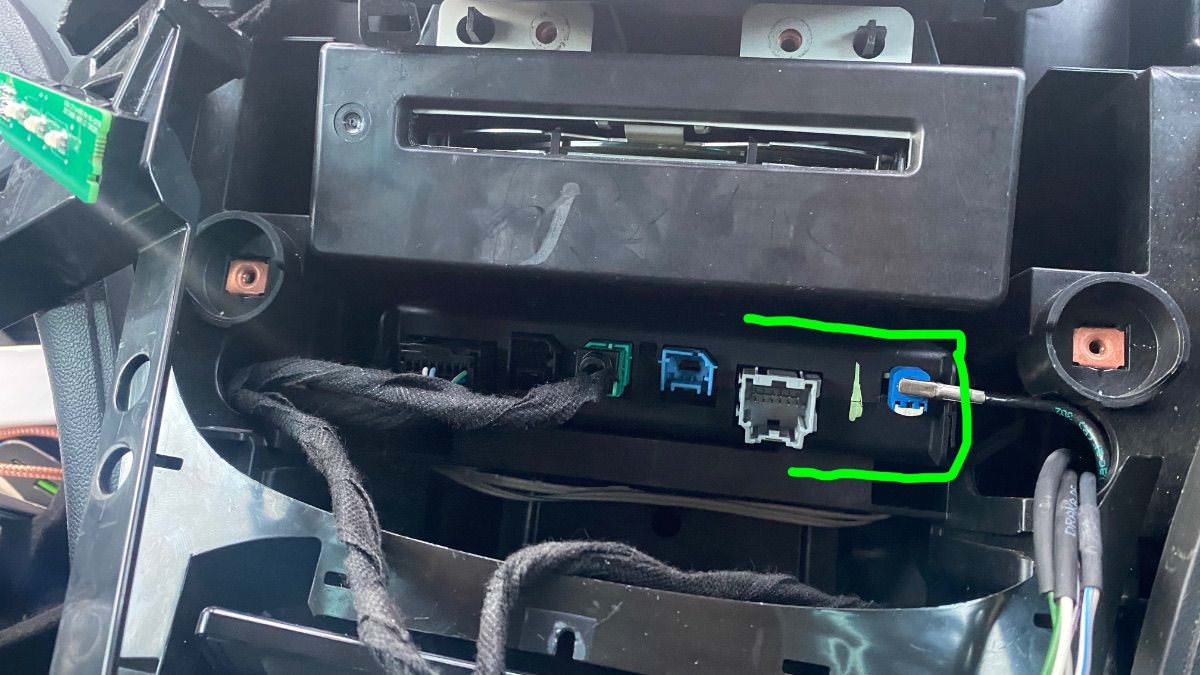
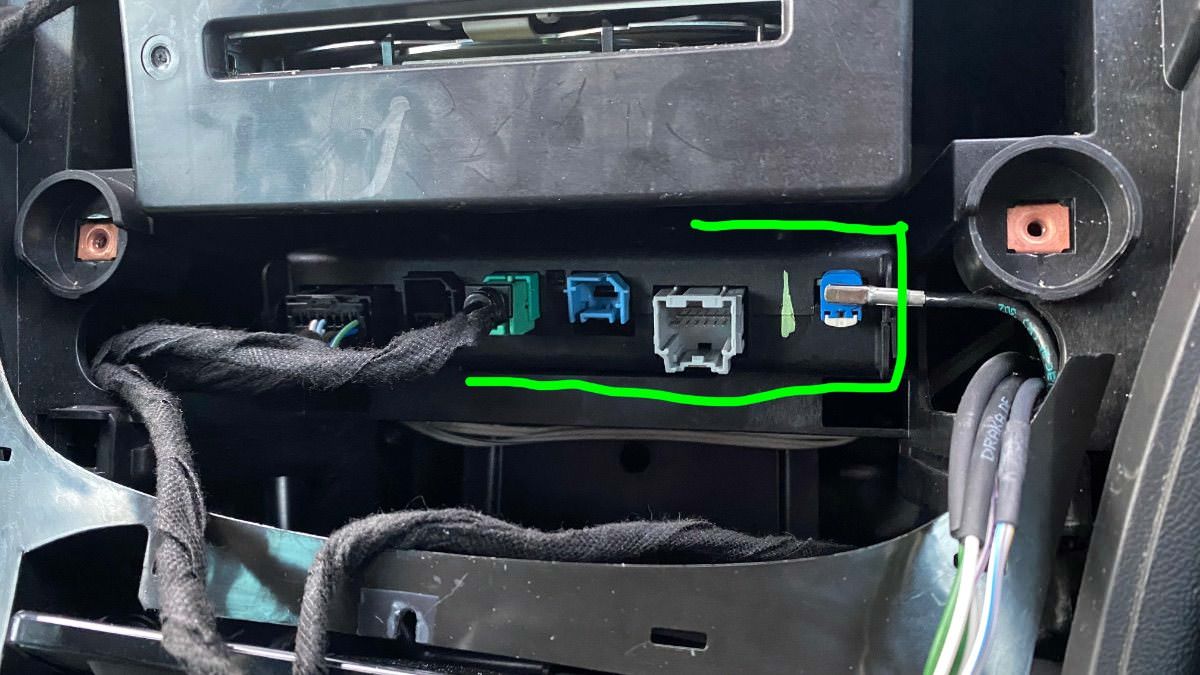
You will also need to replace your cars double USB port to the single USB port in order to get the apple CarPlay working.

See below photos.


The items you will need for removing the theft lock from the HMI module:

  1. A copy of GM DPS software, preferably V4.44.
  2. My custom DPS HMI vin change file
  3. A compatible GM diagnostic interface example: VXDIAG Nano, Drew tech mongoose GM2 pro etc, (all diagnostic interface that works with GM's SPS will work with GM's DPS software.


GM DPS V4.44


One file that will remove the theft lock from both the HMI and radio module, DPS VIN Relearn file.

For European cars/cars that uses the SilverBox Radio module.


For USA cars/cars that uses the satellite radio module.


The HMI module location and the USB module you will need for Apple CarPlay.

IMG_4525.jpgIMG_4524.jpg


IMG_4526.jpgIMG_4533.jpg


Troy

By Troy

User Feedback

Recommended Comments

Lyubomir Krastanov Rookie

+Lyubomir Krastanov

+Contributor

GM Car Hacking Expert

  • Contributor

U have to populate VIN

ZmanCamaro Top Member

+ZmanCamaro

+Purchaser
Just now, codebuilder said:

You have the key on and it's plugged into the OBD2 port?  It didn't receive anything back from the vehicle.

This does not use a key it's push button start, but yes it's in the Acc mode correct?

codebuilder Community Regular

+codebuilder

+Contributor

GM Car Hacking Expert

  • Contributor
Just now, ZmanCamaro said:

This does not use a key it's push button start, but yes it's in the Acc mode correct?

Yeah, maybe try full ignition on (engine off).  I've just tested the file I've made for you, it should look similar to below:


image.png.ece0fca5307ff91b36064aa542a490ad.png

ZmanCamaro Top Member

+ZmanCamaro

+Purchaser
1 minute ago, Lyubomir Krastanov said:

U have to populate VIN

No the HMI was a used and codebuilder is thinking the Vin file you get me could fix this or need Troy HMI Vin program is that what you are thinking?

ZmanCamaro Top Member

+ZmanCamaro

+Purchaser

Thanks for testing that maybe a Lic could be my issue? I am uninstalling and then reinstall and try... 

codebuilder Community Regular

+codebuilder

+Contributor

GM Car Hacking Expert

  • Contributor
11 minutes ago, ZmanCamaro said:

Here's a pic

GM DPS ERROR.jpg

Something is definitely strange.  I purposely unplugged my OBD2 connection and I get further than you.  I don't see that Disable HS-CAN...


image.png.4e6a65ffcd7ec9e4a1ee1a2266d12bce.png


codebuilder Community Regular

+codebuilder

+Contributor

GM Car Hacking Expert

  • Contributor
4 minutes ago, ZmanCamaro said:

Thanks for testing that maybe a Lic could be my issue? I am uninstalling and then reinstall and try... 

Also, maybe try the 4.46 version, I had issues with something on 4.48 before

ZmanCamaro Top Member

+ZmanCamaro

+Purchaser

Yeah I think I know, in your pic the Protocal you set to xvdiag, in my pull down it's not there, but not sure why no vxdiag I even have it running? Sure something i'm doing wrong?

Lyubomir Krastanov Rookie

+Lyubomir Krastanov

+Contributor

GM Car Hacking Expert

  • Contributor

I use 4.52, but if you want drop me PM and will help you remotely

ZmanCamaro Top Member

+ZmanCamaro

+Purchaser

Yeah I on'y have 4.48 now. Also I am not getting the VXdiag like you do, so I am being asked by DPS 4.48 MDI or MDI2 so I should or need to get VXDiag choosen?


But VXDiag works?

codebuilder Community Regular

+codebuilder

+Contributor

GM Car Hacking Expert

  • Contributor
5 minutes ago, ZmanCamaro said:

Yeah I think I know, in your pic the Protocal you set to xvdiag, in my pull down it's not there, but not sure why no vxdiag I even have it running? Sure something i'm doing wrong?

Ohhhhhhhhh, yes, you don't have the VX Diag installed properly.  Make sure you pick Pass-through when installing it.  I have never been able to use "MDI" with my VCX Nano, at least not for a few years.

ZmanCamaro Top Member

+ZmanCamaro

+Purchaser

How do I get VXDiag installed so DPS 4.48 so I can choose it as in codebuilder it's listed? This is the first issue I think?

ZmanCamaro Top Member

+ZmanCamaro

+Purchaser
Just now, codebuilder said:

Ohhhhhhhhh, yes, you don't have the VX Diag installed properly.  Make sure you pick Pass-through when installing it.  I have never been able to use "MDI" with my VCX Nano, at least not for a few years.

Will reinstall now...

ZmanCamaro Top Member

+ZmanCamaro

+Purchaser
1 minute ago, ZmanCamaro said:

Will reinstall now...

I picked GM one DOH.....

ZmanCamaro Top Member

+ZmanCamaro

+Purchaser

Well that did not work by just  reinstalling and then picking Pass Thru... Now uninstalled and reboot and try again...


ZmanCamaro Top Member

+ZmanCamaro

+Purchaser

WE HAVE some JOY!!!! it's working....

codebuilder Community Regular

+codebuilder

+Contributor

GM Car Hacking Expert

  • Contributor
3 minutes ago, ZmanCamaro said:

WE HAVE some JOY!!!! it's working....

Yeah, the VCX install options can be a bit confusing 🙂

ZmanCamaro Top Member

+ZmanCamaro

+Purchaser

Well it's programmed fully but still have Theft Locked. So I will purchased the Troys GM HMI and maybe I will get it in a few hours as Troy shows away...

ZmanCamaro Top Member

+ZmanCamaro

+Purchaser

Ok thank you codebuilder and Lyubomir Krastanoy!!  So I will need this program, just want to confirm?  Troy's  "GM USA Satellite Radio And HMI 2.5, HMI 2.0 Module VIN Number Relearn DPS File" I don't think I need Video in motion?


Thank you again, I'm getting so close with all your help...


Christopher

codebuilder Community Regular

+codebuilder

+Contributor

GM Car Hacking Expert

  • Contributor
11 minutes ago, ZmanCamaro said:

Ok thank you codebuilder and Lyubomir Krastanoy!!  So I will need this program, just want to confirm?  Troy's  "GM USA Satellite Radio And HMI 2.5, HMI 2.0 Module VIN Number Relearn DPS File" I don't think I need Video in motion?


Thank you again, I'm getting so close with all your help...


Christopher

That's correct, that's the only file you need.  The calibrations I gave you, I actually put video in motion, typing allowed, etc in for you.

ZmanCamaro Top Member

+ZmanCamaro

+Purchaser

Wow thank you! does this codebuilder upgrade let me watch videos while driving...LOL


Thank you so much ok going to purchase that program, I think it's a Cal file and I do the same as your file method? As when I was in DSP I clicked and looks like I can add a VIn and maybe not save without a Cal file and this is what's $100? 


Thank everyone again for the help!!

Christopher


codebuilder Community Regular

+codebuilder

+Contributor

GM Car Hacking Expert

  • Contributor
11 minutes ago, ZmanCamaro said:

Wow thank you! does this codebuilder upgrade let me watch videos while driving...LOL


Thank you so much ok going to purchase that program, I think it's a Cal file and I do the same as your file method? As when I was in DSP I clicked and looks like I can add a VIn and maybe not save without a Cal file and this is what's $100? 


Thank everyone again for the help!!

Christopher


lol it does, just don't get a distracted driving ticket 😛


I haven't used Troy's (I have my own applications) but I watched the video and it looks like it's made as a DPS archive as well.  He has a comment there too, you get the file right away even though Troy isn't around right now.

ZmanCamaro Top Member

+ZmanCamaro

+Purchaser

Just got the download, that was fast now going to do it with the video...


I will post back in a few...

ZmanCamaro Top Member

+ZmanCamaro

+Purchaser

Not sure what I did wrong I choose 1 (33.3KBd) and opened it as I downloaded from a Mac and copied it to a thumb drive and now opened DSP Select Cal that file and get could not unzip file? 


No Joy yet... Any suggestions? I will re-down load it 

IMG_5002.jpg

ZmanCamaro Top Member

+ZmanCamaro

+Purchaser

Here's the load retry log file... Does this help?


Thanks again

Christopher

HMI Vin ProgramLog.Txt

Join the conversation

You can post now and register later. If you have an account, sign in now to post with your account.

Guest
Add a comment...

CameraLoops™
Powered by Art
All Trademarks appearing on this website are the property of their respective owners.

Account

Navigation

Configure browser push notifications

Chrome (Android)
  1. Tap the lock icon next to the address bar.
  2. Tap Permissions → Notifications.
  3. Adjust your preference.
Chrome (Desktop)
  1. Click the padlock icon in the address bar.
  2. Select Site settings.
  3. Find Notifications and adjust your preference.