Skip to content
Install the CameraLoops App

Browse CameraLoops via the app. Learn more.

www.CameraLoops.ru

Use the CameraLoops full-screen app on your home screen with push notifications, badges and more.

To install the CameraLoops app on iOS and iPadOS
  1. Tap the Share icon in Safari
  2. Scroll the menu and tap Add to Home Screen.
  3. Tap Add in the top-right corner.
To install the CameraLoops app on Android
  1. Tap the 3-dot menu (⋮) in the top-right corner of the browser.
  2. Tap Add to Home screen or Install app.
  3. Confirm by tapping Install.

GM Vehicle Modules Documentation

GM HMI 2.5 theft lock removal, unlock

Here you will find information and files for upgrading your HMI v2 to the HMI v2.5 or replacing your HMI module with a used part.
Upgrading from HMI v2.0 to HMI v2.5 will enable you to have Apple CarPlay, Android Auto, better SAT-NAV maps, play videos and faster touch reaction from the your touch screen.

The majority for GM's electronic modules car parts are security locked to a specific car via the car's VIN number.

In order to install a used car parts and have it functioning you first need to program your car's vin number to the module.

When upgrading from the HMI v2.0 to the HMI v2.5 you also need to upgrade the radio module. You can bypass the radio module upgrade by updating the radio module firmware to v2.5 specs, (if you update the radio module firmware you no not need to replace it)

The radio module upgrade firmware can be found below.

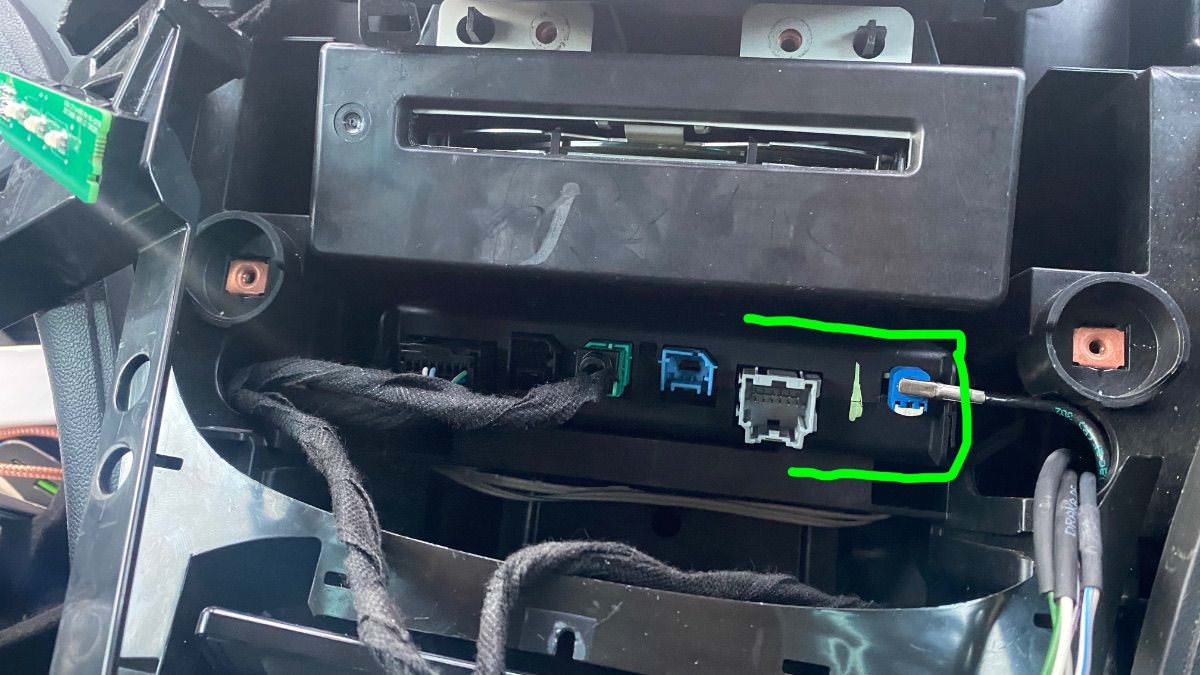
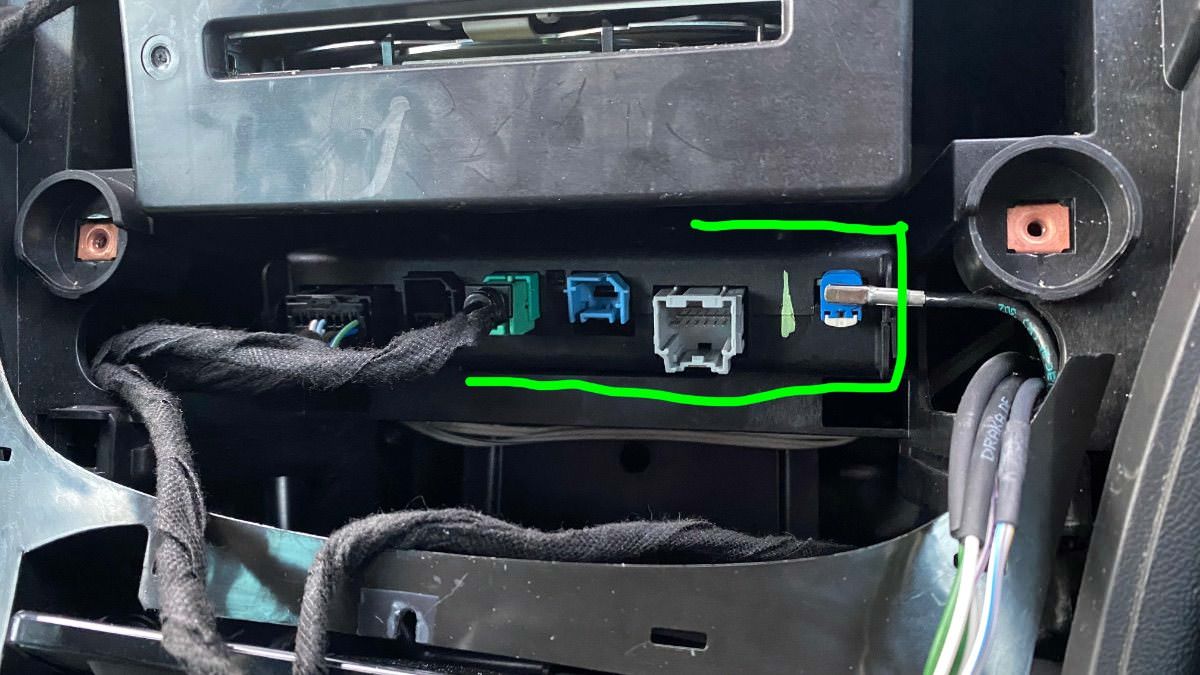
You will also need to replace your cars double USB port to the single USB port in order to get the apple CarPlay working.

See below photos.


The items you will need for removing the theft lock from the HMI module:

  1. A copy of GM DPS software, preferably V4.44.
  2. My custom DPS HMI vin change file
  3. A compatible GM diagnostic interface example: VXDIAG Nano, Drew tech mongoose GM2 pro etc, (all diagnostic interface that works with GM's SPS will work with GM's DPS software.


GM DPS V4.44


One file that will remove the theft lock from both the HMI and radio module, DPS VIN Relearn file.

For European cars/cars that uses the SilverBox Radio module.


For USA cars/cars that uses the satellite radio module.


The HMI module location and the USB module you will need for Apple CarPlay.

IMG_4525.jpgIMG_4524.jpg


IMG_4526.jpgIMG_4533.jpg


Troy

By Troy

User Feedback

Recommended Comments

Redsupra Rising Star

+Redsupra

+Contributor
  • Contributor

I donated the 150$ amount or whatever it is and downloaded the 4.46 dps from here, still same issue. Tried it on my wife's cadillac, same issue that doesnt have any issues, same thing.

Redsupra Rising Star

+Redsupra

+Contributor
  • Contributor
2 minutes ago, BLKATSG said:

Are you on pin 1?

yes pin 1 33.3k

it tries to go much further if i do the 6 and 14 (which i know its for HMI). Actually, it goes all the way on pin 6 andnd 14, just says error during programming at the end which i read to ignore that message.


But doing pin 1 on either 33.3 or 83, no luck. 


Using mongoose, drewtech, JLR


Arbe_gtc Rookie

+Arbe_gtc

+Contributor

GM Car Hacking Expert

  • Contributor

The log you shared is over HS-CAN line (500Kbps)


>> Available subnets:  HS-CAN 


>> Target address 0x0080 not in mapping matrix!


In PIN 1 33,3 must works

Redsupra Rising Star

+Redsupra

+Contributor
  • Contributor

Figured it out yesterday. It was my OBD interface. Didn’t have the DLC pins for that module.

bajad Enthusiast

+bajad

+Contributor
  • Contributor
On 8/1/2024 at 5:42 AM, Redsupra said:

yes pin 1 33.3k

it tries to go much further if i do the 6 and 14 (which i know its for HMI). Actually, it goes all the way on pin 6 andnd 14, just says error during programming at the end which i read to ignore that message.


But doing pin 1 on either 33.3 or 83, no luck. 


Using mongoose, drewtech, JLR


MONGOOSE JLR doesn't work at all on pin 1. You can use Mongoose GM .

Redsupra Rising Star

+Redsupra

+Contributor
  • Contributor
5 hours ago, bajad said:

MONGOOSE JLR doesn't work at all on pin 1. You can use Mongoose GM .

Yea I posted that above

Join the conversation

You can post now and register later. If you have an account, sign in now to post with your account.

Guest
Add a comment...

CameraLoops™
Powered by Art
All Trademarks appearing on this website are the property of their respective owners.

Account

Navigation

Configure browser push notifications

Chrome (Android)
  1. Tap the lock icon next to the address bar.
  2. Tap Permissions → Notifications.
  3. Adjust your preference.
Chrome (Desktop)
  1. Click the padlock icon in the address bar.
  2. Select Site settings.
  3. Find Notifications and adjust your preference.